Christian’s Status Report for 2/21/26

This week I was able to get the first physical 3D print for our stylus housing and start on the next iteration, as well as update our conversion module plan.

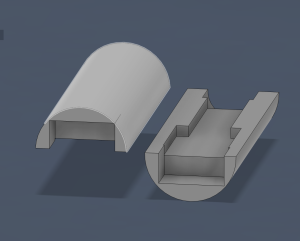
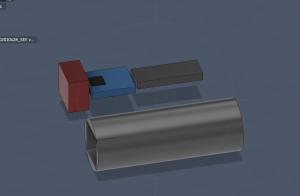
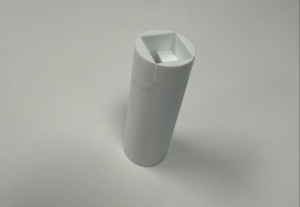
Our current stylus housing is a bit short, but the thickness of it sits comfortably in the hand. Even though we don’t have our MCU yet, I personally have a different MCU model from the same company that has the same dimensions, so I was able to test the fit of the housing with that. Within this next week, in addition to making the stylus longer, I am splitting the body in two to make it easier to insert and remove parts. I will also rearrange the positioning of the parts some to account for our IMU needing to be tested in variable positions to get the most accurate reading in relation to hand motion.

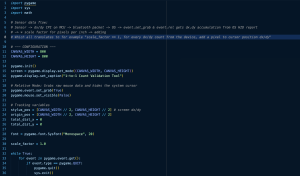
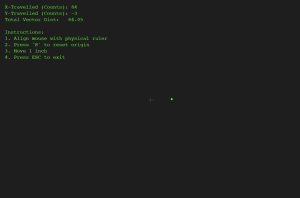
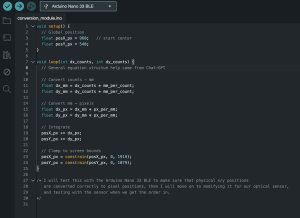
In terms of the conversion module, I came upon a really great Python library called pygame that natively works with the OS to use pixels as its measurement distance and directly grabs dx/dy data from the Bluetooth device buffer before it’s optimized by the OS. This simplifies the work needed to be done for our conversion module, and allows me to focus more on helping make sure our MCU and sensor outputs the optimal CPI for our application so that our users have a smooth drawing experience. I used Gemini to help with making a test program that measures x and y differences of CPI and pixel counts using the pygame library.

Progress is going well, I just need to send in the next iteration of our 3D print this weekend.


Jamari’s Status Report for 2/21/26

This week I was able to find and create a basic software program for tracking standard mouse inputs to performing drawing functions. The code utilizes event handlers that’s synced with the mouse through html. I also created some javascript code for scanning and connecting a bluetooth device. It currently needs testing as we are waiting for our microcontroller to come in can test the BLE connection of the code + sending basic data. I have also been working with Christian as we may consider a different canvasing approach through pygame, which has built-in functions for better processing bluetooth input.

This week I plan to look more into the structure our of bluetooth communcication. I’ve followed some steps for getting the testing environment onto my device. Now we need to work on setting the struct for what data to send using the GATT protocol.

Team Status Report for 2/21/26

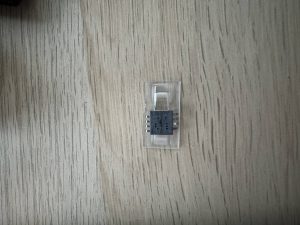
The most significant risk that could jeopardize the success of the project is still the motion sensor since we have still been struggling to find one that would work for our intended purpose. However, this risk has been managed since we were able to find an old mouse lying around and break that apart to take the motion sensor from it. So we will spend time testing that to make sure it works for our intended purpose. If not our only backup so far is to try to get the IMU to effectively track linear motion which has not provided the best results so far since it does not work very well on small movements. Further testing of this will be done just in case.

The only thing that’s changed with our design this week is that instead of building a conversion module from the ground up, we found a Python library called pygame that interfaces with our computer OS to do 1-to-1 CPI-pixel mapping. We will be using this library for the base of our stylus data interfacing after BLE communication. We also may need to change our design depending on which motion sensor we end up choosing. The reason for this is the one we originally wanted is too hard to find and we are still testing the current one we found.  The good thing is all of the motion sensors work relatively the same with slightly different resolutions so the cost for switching is lower resolution but that should not be too much of a problem since we were planning on working on the lowest resolution anyway to start. Overall we can still make it work with mostly any mouse motion sensor we find.

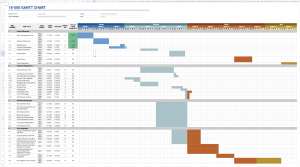
Here is the updated schedule: 18-500 Gantt chart – Gantt Chart

Tsairus’s Status Reports for 2/21/26

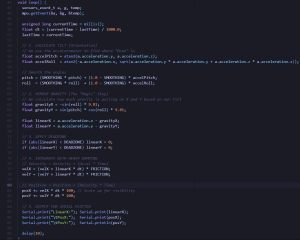
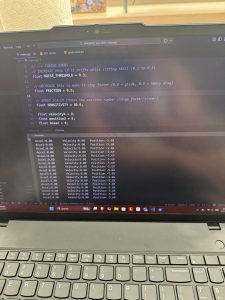
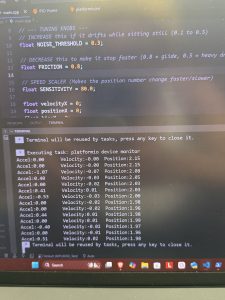
This week I spent more time testing the IMU implementation to see how well the IMU will work in our product. I also tried testing again how well the IMU could detect linear movement and implemented the code in a slightly different way since before I was trying to track the IMU on the surface but then realized the IMU would actually be in the air inside the pen shaft which changes the implementation. The IMU work slightly better when in the air but still does not work the best on small movements. Additional testing and algorithms will need to be done. Here is the main body of the code for that:

My progress did fall behind a little since I was still struggling to find the mouse sensor and I did not want to start the PCB until I knew the exact part we will use. However, Christian did manage to find an old mouse lying around and I was able to spend some time this week breaking it open and unsolder the mouse sensor from it.

My plans for next week is to test this mouse sensor to see how well it is able to track the surface and send that data to the computer. Also some time at the end of next week I should be able to receive a datasheet from the vender in addition to a quote to buy the sensor if it fits our needs and start working on the PCB schematic/layout. So deliverables is to test the mouse sensor and hopefully finalize the motion sensor we want to use.

Jamari’s Status Report for 2/14/26

This week I completed I did more research on the software side of our project. I found documentation online for setting up and rewriting to a canvas with mouse strokes, as well as integrating bluetooth into javascript. This gives us a good idea of how we want to format data (x & y position, z pos or isPressed). We will continue forward with using javascript + html for our software functions & try to see the differences between hosting locally and on a browser. Progress is relatively on point with a few strides needed to formally define the software architecture for our design presentation.

This week I plan to complete the software architecture and look at the interface between MCU controller and reaching the computer with saved code examples for later use.

Team Status Report for 2/14/26

The most significant risks is obtaining a sensor that can effectively track motion across a surface. We are still thinking of using an optical mouse sensor for our pen to track the surface but we have been having a hard time finding vendors that sell them. Our team is currently talking to a vendor that sells them and we are waiting for a response from them to receive a datasheet to see if what they have will work for us. These risks are being managed by looking into multiple different types of motion sensors to see which ones are available and would work best for our product. One contingency plan we have currently is to try an use the IMU we have in order to track motion across the surface but we will have to sacrifice some accuracy if we decide to go with this plan. We have also found some other motion sensors through vendors like Amazon and Tindie but they are a little bigger than ideal and after reading datasheets we would have to test them first to see if they are worth using in our product.

At the moment, we do not have any changes to our design but if we are unable to obtain our original motion sensor then we could possibly have some design changes in the future.

We slightly updated our schedule to push PCB stuff back by a couple of days: 18-500 Gantt chart – Gantt Chart


Week-Specific Items

A was written by T’sairus Beasley, B was written by Christian Cherry, and C was written by Jamari Toussaint.

Part A (Health, Safety, Welfare):  For welfare, the project is designed to be an easily accessible and essential digital tool that breaks down the current economic barriers that restrict digital literacy and prevent people from having access to convenient technology. Since we were able to engineer a device that works on any surface at a very low-cost (<$50) compared to other expensive options out there, we are able to support the welfare of under-resourced young professionals and artists by providing affordable access to an industry-standard digital tool that will help them in their day to day life. Furthermore, for safety we ensure that the physical design of our product prioritizes user safety through a fully enclosed, non-toxic 3D-printed case that secures the LiPo battery and other electrical components away from harmful encounters to make the device safe for daily use in many environments. For health, our product will maintain a lightweight structure (~25 grams) and will have the weight balanced throughout the entire pen. This will ensure that users will be comfortable with the product and not have to strain their hands or arms through daily use of our product causing unnecessary health problems

Part B (Social Factors): Just as tablet artist and tablet student notetakers became distinctive within the population of artists and students respectively, our Versatile Stylus has the potential to create another group of people who are marked by using our product with their computers rather than a laptop. This can generate a social group of people who dynamically collaborate with each other with larger screens. In addition, it will bring those who cannot afford a tablet into the realm of being able to draw or write digitally. We do recognize the possibility that, since our product is meant to be affordable, this social group may become isolated from those who see having a tablet paired with their stylus as a more premium option or status. On the other side of the coin, given further development time and a wider range of compatibility and features beyond our MVP, our product could replace the specific stylus-tablet dependence of certain tablet products, integrating the tablet and computer social groups with usability that benefits both communities.

Part C (Economic Factors): Considering economic factors, we are looking to design the versatile stylus with robust performance whilst increasing the affordability compared to a usual pen/tablet combo. Our microcontroller and components are relatively available, the only exception being our camera motion sensor. This would require some additional considerations when thinking about moving our product to larger scales. Our communication (bluetooth) is widely used and available for integration with scaffolding available online. Finally, we are looking into using a reusable battery within our design so users will not spend additional costs on upkeep for switching dead batteries. As our stylus is looking to be accessible, we want to include accessible parts for simple use and easy maintenance.

Christian’s Status Report for 2/14/26

This week I completed the first draft iteration of our stylus parts housing, and started on the conversion module for our physical distance to pixel distance software module.

For the stylus housing, I imported a 3D CAD for the MCU we are using and formed a 3D block dimension for the MCU’s board. Since we are still leaning towards using the optical motion sensor rather than relying only on the IMU, I included a block for the PWM optical sensor that accounts for the ~1mm clearance needed for the sensor to work. I also included a block for our rechargeable Li-ion battery. I then formed the first iteration of our stylus housing around the dimensions of these parts.

For the conversion module, I started on the basic math needed to take x-y data from an external controller and convert it to distance on a computer screen with bounding boxes. The actual steps needed to implement this conversion are quite simple, so the real challenge will come from tuning these equations when we test with whichever motion sensor we order.

Progress this week is a bit behind because I needed to get used to using Fusion360 again after about a year. I will ensure I’m caught up by cutting the 3D CAD iteration time in half by potentially using multiple 3D printers at a time if resources allow for it.

In this next week I plan to test the fit of our initial housing iteration with some similarly sized MCU and sensor parts, and I further improve and iterate the design by adding sections for buttons and slots to more firmly hold our parts together. I will also test the current conversion module with an Arduino Nano microcontroller to make sure that the baseline equations work well before we move on to the optical sensor.

Tsairus’s Status Reports for 2/14/26

This week I decided to look into the PCB Schematic and look more into the motion sensor trying to find vendors that sell them. Originally I wanted to have the PCB schematic and layout done but I first need to find a vendor for the motion sensor we want before I can finish doing this. I am currently speaking with a vendor to arrange a part order for a particular motion sensor. So instead of sitting around waiting for that I decided to also test the IMU functionality to see if it would be possible to implement our entire pen’s motion just with the IMU. After testing, the IMU did not work that well at detecting position as we would have hoped so we are thinking of sticking to our original design of using an optical motion sensor. Here is some photos of the IMU temporarily being setup and tested using an STM32 board until we get our XIAO MCU:

:

My progress is a little behind since I was hoping to have the PCB stuff done and ready to order by the end of this week. The actions I plan on taking to catch up is continue talking to the vendor I am hoping to buy from and get the datasheet from them so that way I can start building the schematic and laying everything out by the next status report. By next week, I hope to finally have the motion sensor decided and ready to order. In addition, I am hoping to have the PCB schematic and layout for the motion sensor completed as well.

Jamari’s Status Report for 2/7/26

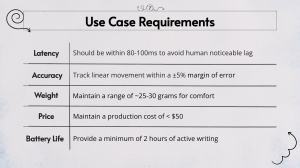
This week I worked to define the use case for our project so we can easily map out our use case requirements. I also contributed to solidifying the technical challenges for the versatile stylus and thinking about what testing methods we can use to ensure our hardware and software are functioning properly. With the next week, I am looking to research and experiment with the canvasing capabilities using JavaScript & HTML, with some rudimentary code to understand how we want to setup our conversion module.


Christian’s Status Report for 2/7/26

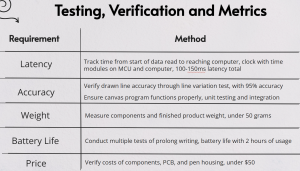
This week I helped specify use case requirements for our project to ensure that our MVP is indeed viable, including tallying up the weight, price, and helping estimate the latency requirements to look towards how usable our product will be. In addition to this, I planned out our semester work schedule in the gantt chart, and recently edited it to account for our shifted work schedule.

Within the next week, I hope to have a rough draft of both the physical position to digital position conversion module and the 3D print housing CAD done. As long as I start on these two things this weekend, I should be on schedule.