Team Status Report for 10/17/26

For the week of October 4th–11th, our team moved Iteration 1 from completed design files into fabrication and early assembly. We finished printing all of the planned robot-arm components and began assembling the base. This allowed us to begin validating the physical fit of the printed pieces rather than relying only on the SolidWorks assembly and simulation results.

We also refined the CAD representations of the motors, bearings, shafts, power components, and other purchased hardware so that the model more closely matches the parts used in the physical build. Updating these measurements reduced the risk of mounting, clearance, and alignment problems during assembly and gives us a more accurate reference if any components need to be revised or reprinted.

The modeling and printing work planned for Iteration 1 is complete. However, the physical assembly is slightly behind our original schedule because the fabrication work took longer than expected and several additional parts have not yet arrived. Our next priority is to finish the base and joint assemblies as the remaining hardware becomes available, then verify the arm’s alignment, clearances, and range of motion.

For next week, our team plans to:

  • Finish assembling the base and continue building the remaining arm sections.
  • Install the motors, bearings, shafts, and power components as the remaining hardware arrives.
  • Verify that the purchased components match the refined CAD models.
  • Test joint fit, alignment, and range of motion during assembly.
  • Update or reprint any components that require dimensional corrections.
  • Continue the ROS2, URDF, and control-system integration for the physical arm.

Week-Specific Considerations

Part A was written by Jonathan Waller. Part B was written by Aaron Tang. Part C was written by Bryan Hong.

Part A: Global Factors — Jonathan Waller

Our 6DOF drawing robot addresses global factors by making physical surface-drawing automation accessible to non-academic, non-technical creators far beyond specialized robotics environments. Traditional six-axis industrial arms require specialized programming knowledge and heavy capital investment, isolating advanced automation tools within large industrial facilities or technical research institutions. In contrast, our system is designed for independent artists, small business owners, and creators anywhere in the world. It features a simple browser-based web interface that allows non-technologically savvy users to upload standard SVG files and execute jobs without needing coding or robotics expertise. Furthermore, by leveraging an open-source ROS2 software stack, 3D-printable structural components, and affordable off-the-shelf hardware, the solution can be deployed, repaired, and operated globally without reliance on specialized regional supply chains or high-cost industrial infrastructure.

Part B: Cultural Factors — Aaron Tang

Cultural concerns can be addressed in the design of our 6DOF drawing robot by providing users the option to select the images, scripts, writings, symbols, or other visuals they would like the robot to recreate without having to resort to an established library of drawings meant to represent a particular culture. Since the web interface of the robot accepts common SVG files, it gives creators the freedom to submit any content that is relevant and meaningful to their culture or community. Additionally, the use of the browser interface for input means that the user does not have to become familiar with specialized robotics instructions and can use the interface in multiple languages.

Moreover, we are aware that drawings can include culturally sensitive images or materials protected by intellectual-property laws. We design our drawing robot as a tool meant for user control rather than a system capable of selecting or interpreting cultural material on its own. Providing clear documentation and allowing user control can facilitate responsible usage of the product while still giving each community the ability to adapt the open and 3D printable design to their own materials, culture, art practices, and legislation.

Part C: Environmental Factors — Bryan Hong

Our 6DOF robot arm does not require complex machining and commercially-inaccessible hardware that is typical of larger robotic systems. Instead, by using 3D-printed parts and relatively-inexpensive hardware, our robot arm generates less material waste during its lifespan. For example, if a component on our system breaks, it can be easily reprinted and refitted, whereas other robotic arm systems would require the purchasing of replacement parts or an entirely new system. Factoring in the energy consumed to machine these replacement parts and/or an entirely new system, it is clear that our robotic arm will result in less natural resource consumption.

Additionally, the robot arm’s ability to reproduce drawings directly onto a surface can help reduce the need for repetitive manual work. Because our system is fully programmable, it allows users to produce multiple designs with a consistent process, potentially reducing errors and wasted materials during repeated drawing tasks.

Although our 6DOF robot arm is not designed specifically for environmental conservation, simple construction and use of accessible components provide opportunities to reduce material waste compared to more complex robotic arm systems. As we develop the system further, factors such as material selection, efficient power management, and proper disposal/recycling of electronic components and 3D-printing waste will be important considerations. These practices can help reduce the robot’s environmental footprint while supporting its long-term usability.

Aaron’s Status Report for 10/17/26

For the week of October 4th–11th, I focused on moving our ITERATION 1 design from completed CAD files into 3D printed parts to assemble. We finished printing all of the designed components for the arm and began assembling the base. Reaching this stage was an important milestone because it allowed us to start checking how the printed pieces fit together outside of the SolidWorks assembly.

Alongside the printing process, I started refining our CAD models for a few purchased components now that we have received the physical measurements, including the motors, bearings, and power system. I updated these models to match the parts we plan to use as closely as possible so that the mounting locations, clearances, shaft dimensions, and enclosure measurements remain accurate during assembly, as we realized the motor enclosure for one of the bases was too tight. This helped reduce the risk that differences between placeholder models and the real components would require larger redesigns later.

All of the modeling and printing work planned for Iteration 1 is now complete with revisions still to be printed. However, the physical assembly is slightly behind our original schedule: we’ve started with the base, but still need to complete the rest of the arm and are waiting for several additional parts to arrive. Once those parts are available, I will need to verify the fit of the motors and bearings, complete the joint assemblies, and correct or reprint any components that do not match the purchased hardware.

I am on schedule with the CAD and printing portions of my Iteration 1 responsibilities, but we will need to make up some time during assembly. The completed model and printed parts give us a solid foundation, and the remaining work is primarily integration and fit verification.

For next week, I plan to:

  • Continue assembling the base and remaining arm sections.
  • Install the motors, bearings, and power components as the remaining hardware arrives.
  • Measure the purchased components and compare them against the refined CAD models.
  • Test joint alignment, clearances, and range of motion during assembly.
  • Update or reprint any parts that require dimensional corrections.
  • Document the completed Iteration 1 assembly and any design changes needed for the next iteration.

Jonathan’s Status Report for 10/17/26

For this week, I dedicated my time toward structuring our ROS2 repository on the Jetson Nano, developing custom kinematic and torque analysis scripts in Python, and helping finalize our hardware parts list for Iteration 1. A major milestone for this week was creating a comprehensive mathematical simulation model of our 6DOF arm to verify that our selected serial bus servos can handle expected joint loads across our workspace (see below).

On the software and simulation side, I expanded our ROS2 environment on the Jetson Nano by installing necessary development utilities, creating our team’s official GitHub repository, and laying out the core software framework for our project. To validate our mechanical design before 3D printing, I wrote a dedicated Python robot class to process our arm’s link lengths, joint limits, and component masses. Using this class, I implemented forward kinematics, Jacobian matrix calculations, and inverse kinematics solvers, sampling various coordinate points across our 3D workspace. By coupling these kinematic transformations with static load physics equations, I confirmed that our calculated joint torques fall comfortably within the operating limits of our smart serial bus servos for Iteration 1 (see below for graph of workspace points tested).

Beyond simulation, I collaborated with the team to finalize our master hardware parts list for Iteration 1 so we can get all necessary servos, bearings, and power components ordered. We also wrapped up the remaining CAD design details for Iteration 1. While finalizing the CAD model took longer than anticipated and pushed the start of 3D printing to this weekend, we now have a solid design ready to manufacture.

I am mostly on track with my individual software and analysis tasks, though as a team we are slightly behind schedule on physical assembly for Iteration 1, so we will need to pick up the pace once parts finish printing and hardware arrives.

For next week, I plan to:

  • Clean up and document the Python torque and workspace calculation scripts.
  • Expand our ROS2 software framework and construct a preliminary URDF model to visualize the robot arm in RViz2.
  • Begin setting up the initial tf2 frame tree structure for coordinate transformations between the robot base and end-effector.
  • Collaborate with Bryan on 3D printing execution and begin physical assembly of Iteration 1 as motor hardware arrives.

Aaron’s Status Report for 10/3

For the week of Sep 27th – Oct 3rd, I focused on remodeling our robot to the dimensions of the UR3e robot from last week’s decision. Jonathan and I looked at the UR3e resources online and discovered a spreadsheet containing the transformation matrices for the robot’s positioning and movement of each joint. We wanted to take the dimensions from something that has proved to work and apply our own torque calculations adjusted to our motors and 3d printed links and joint housing.

First, I checked the specifications of our purchased components for the Hiwonder and Feetech smart servos to see if they had compatible communication protocols, which would allow one controller to operate all twelve servos on the same bus.
UR3e Denavit-Hartenberg parameters and coordinate transformations

Above is the UR3e parameters and coordinate transformations that we adopted; the spreadsheet contained variable inputs and visualizations of joint positions on the right, so we could experiment with different positionings. Universal Robotics’ website also contained the downloadable CAD models.

Initial UR3e-based robot rendering with the exterior casing removed

In SolidWorks, I was able to adapt the model’s end effector to hold a pen, then deconstruct the outer casing (since they would require too much filament to print) to preserve the UR3e’s dimensions 1:1.

I then checked whether the servos we got could actually drive the arm with 1:1 dimensions, where I discovered that the shoulder and elbow are close to the servos’ practical limits. To prevent those joints from overheating, I designed for two servos at both the shoulder and elbow, which creates a 3:1 reduction in force and a counterbalance spring based on several joint designs online. My hypothesis is that this reduces unnecessary side loads on the servo shafts and should keep the arm stable since we don’t want it to wobble too much.

I built the updated assembly in SolidWorks with some AI assistance using a scripted workflow; our model now contains 46 printable parts as well as AI-assisted CAD reconstructions of our purchased servos and PSU, as well as some shafts, screws, and tubes that we will likely need to purchase as well to replace sections in which 3D printed parts would bear too much load.

For testing, I tested the assembly by:

  1. I performed von Mises stress testing through finite-element analysis (FEA) and redesigned weak parts with thicker transitions and rounded bottoms  (fillet bottoms) which I’ve seen in the past help with structural integrity
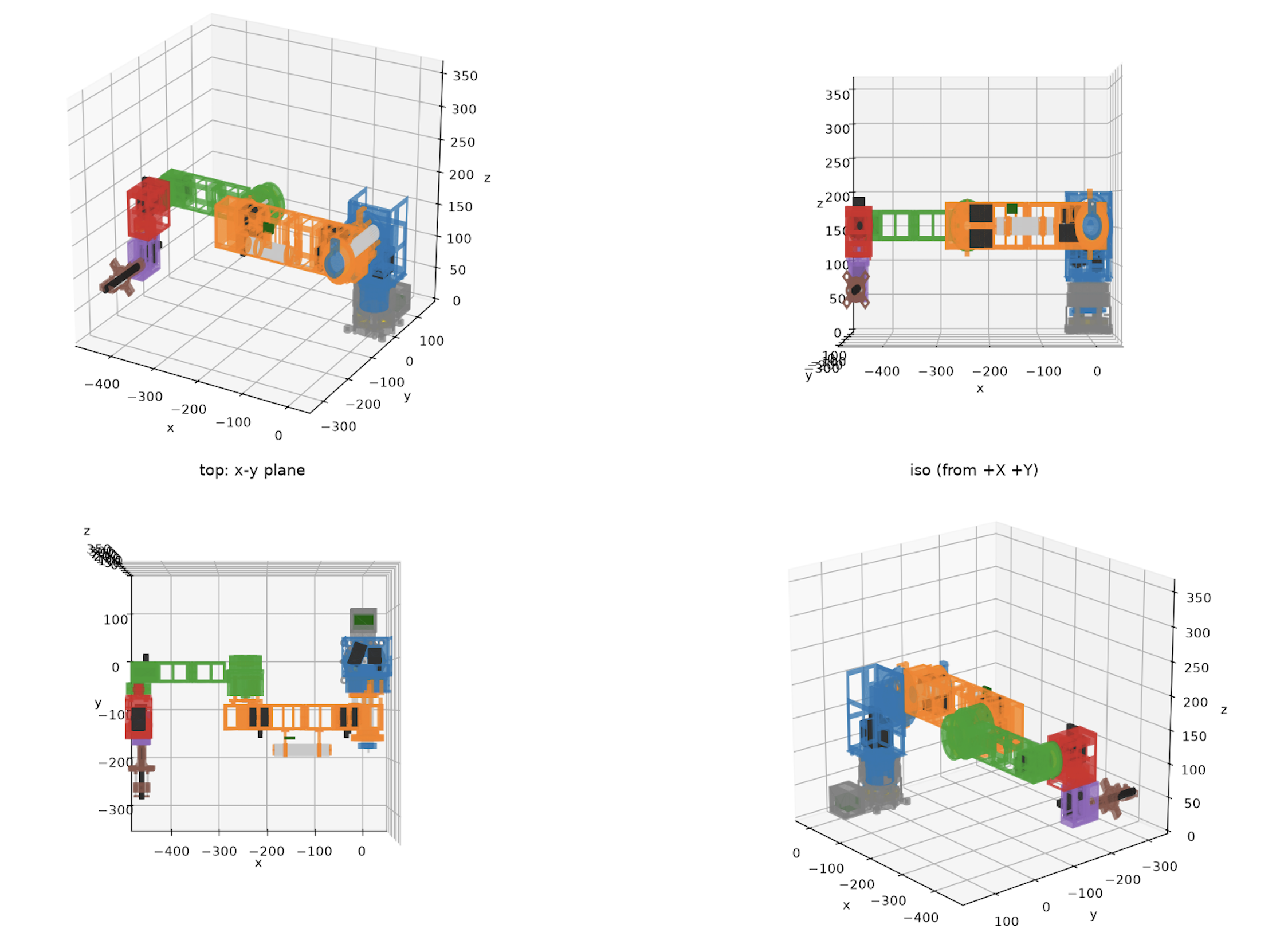
  2. I used MuJoCo simulations to assemble and visualize the finalized robot, check its motion, and compare the simulated geometry with the SolidWorks assembly

MuJoCo robot simulation from four viewpoints

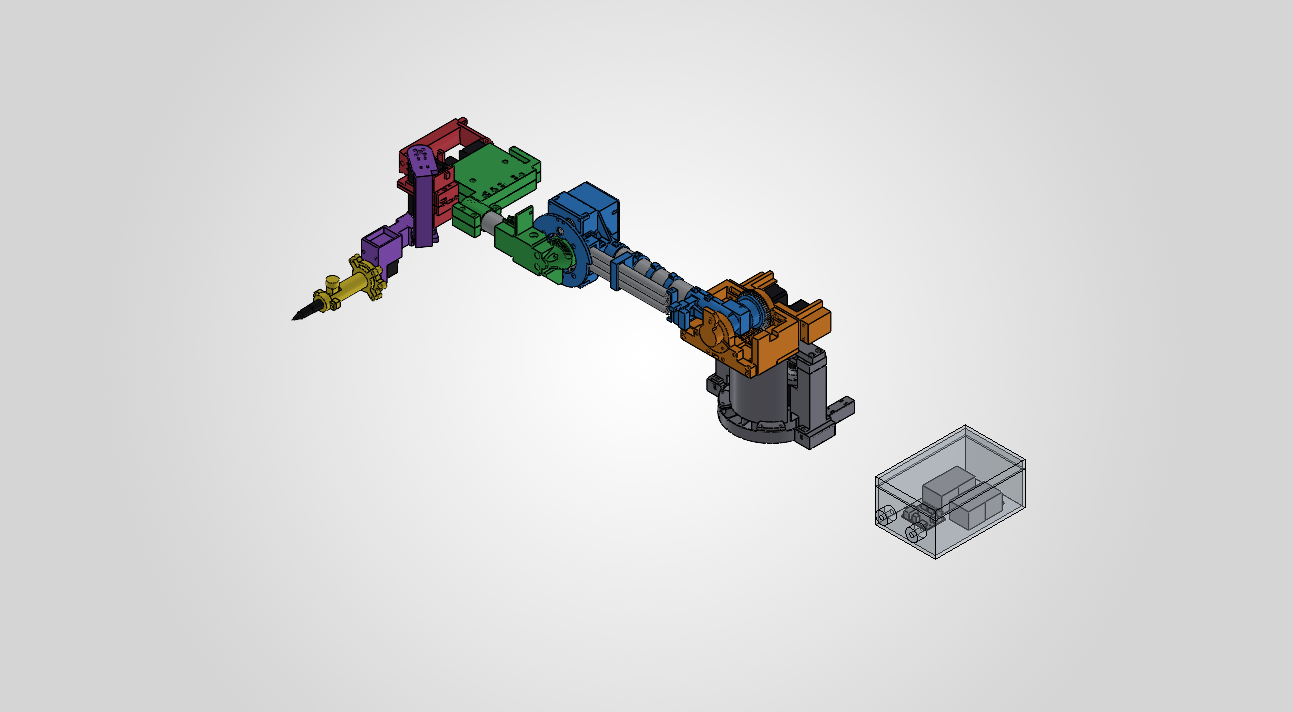
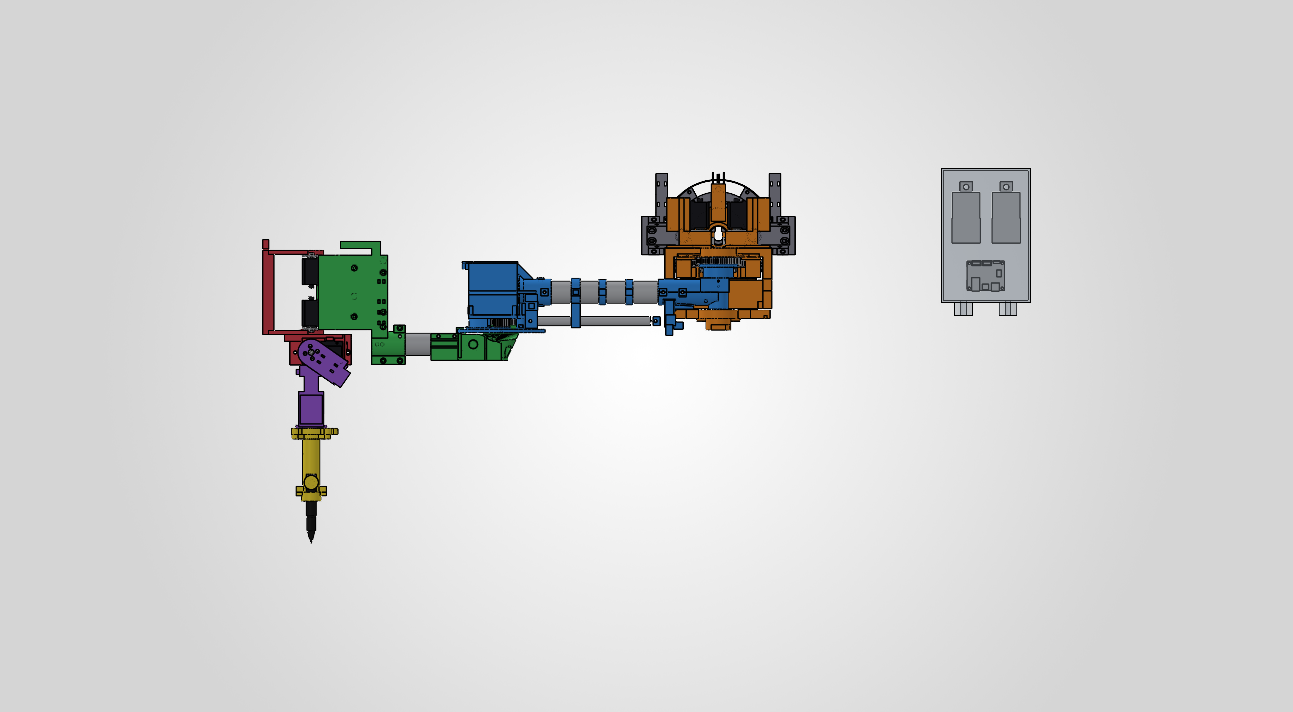
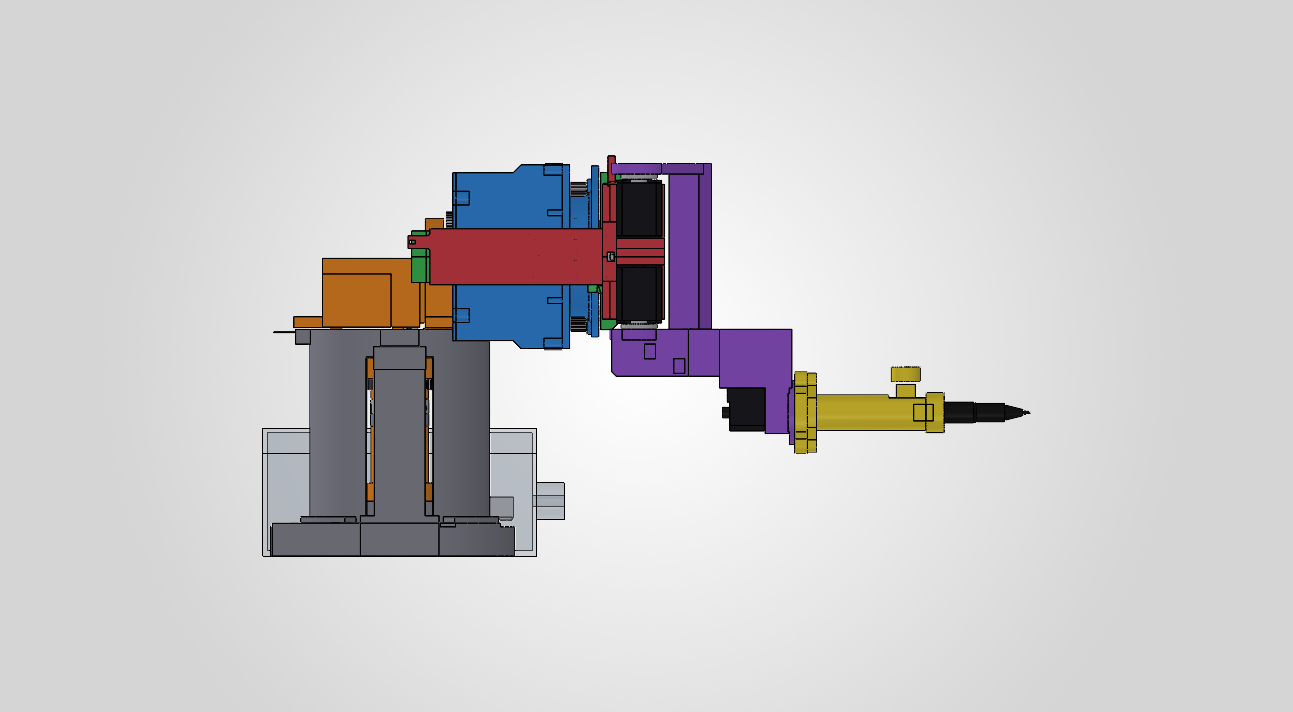
Our final representation in SolidWorks looks like this, with the gray parts being purchased rods and everything else 3D printed links and a manually adjusted end effector for Iteration 1:

Isometric view of the deconstructed robot arm CAD assembly

Top view of the deconstructed robot arm CAD assembly

Side view of the wrist and pen end effector

We have started printing the first plate tonight, and it would likely need around 40 hours of printing, approximately ~900g of filament, which is very close to the 1kg we purchased, so we may need to account for a few more rolls.

Overall the CAD design and simulation work is essentially complete and on schedule, but the biggest risk is with printing and iterating on the prints, as well as ordering the additional parts needed for assembly.

For next week, I plan to:

  1. Print and measure the base and print the base plates first before printing any fully sized arm parts
  2. Outline the remaining order form for additional tubes, screws, filament, and bearings we may need to purchase
  3. Begin printing the finalized build plates in order from bottom to top (with exception of the end effector which we should test early)
  4. Start assembling the printed components and iterate on redesigns quickly

Jonathan’s Status Report for 10/3/26

For this third week, I dedicated my time toward structuring our ROS2 repository on the Jetson Nano, developing custom kinematic and torque analysis scripts in Python, and helping finalize our hardware parts list for Iteration 1. A major milestone for this week was creating a comprehensive mathematical model of our 6DOF arm to verify that our selected serial bus servos can handle expected joint loads across our workspace (see below).

On the software and simulation side, I expanded our ROS2 environment on the Jetson Nano by installing necessary development utilities, creating our team’s official GitHub repository, and laying out the core software framework for our project. To validate our mechanical design before 3D printing, I wrote a dedicated Python robot class to process our arm’s link lengths, joint limits, and component masses. Using this class, I implemented forward kinematics, Jacobian matrix calculations, and inverse kinematics solvers, sampling various coordinate points across our 3D workspace. By coupling these kinematic transformations with static load physics equations, I confirmed that our calculated joint torques fall comfortably within the operating limits of our smart serial bus servos for Iteration 1 (see below for workspace points tested).

Outside of that, I collaborated with the team to finalize our master hardware parts list for Iteration 1 so we can get all necessary servos and power components ordered. Aaron is still working on the the remaining CAD design details for Iteration 1, but I have been giving feedback along the way. Finalizing the CAD model took longer than anticipated, and this pushed the start of 3D printing to this weekend which is a bit later than expected based on our schedule.

I am mostly on track with my individual software and analysis tasks, though as a team we are slightly behind schedule on physical assembly for Iteration 1, so we will need to pick up the pace for printing and using the hardware.

For next week, I plan to:

  • Clean up and document the Python torque and workspace calculation scripts.
  • Expand our ROS2 software framework and construct a preliminary URDF model to visualize the robot arm in RViz2.
  • Begin setting up the initial tf2 frame tree structure for coordinate transformations between the robot base and end-effector.
  • Collaborate with Bryan on 3D printing execution and begin physical assembly of Iteration 1 as motor hardware arrives.

Team Status Report for 9/26/26

Team Status Report

For the week of September 20th–26th, we worked on bringing up the embedded software platform, grounding the mechanical design in a reputable six-axis reference model, refining the Iteration 1 parts list, and preparing the CAD and presentation materials needed for the next stage of the project.

Project Risks & Management Strategies

The biggest risk was figuring out the structural requirements of our manually inferred dimensions on our previous CAD model, as we didn’t have a good basis to figure out if the links would sustain the weight of the joints.

We are managing this risk by comparing our measurements now against Universal Robots’ UR3e, and we aim to calculate the joint torques using the selected components’ estimated masses, and prepare some comprehensive SolidWorks motion and load simulations before printing the final links for this iteration.

Another risk we’ve identified is the integration between the CAD model, ROS2 coordinates, computer vision, and the physical arm. We are attempting to reduce that risk through developing the Jetson software environment early; this week, we’ve already set it up and ran it, and we’re collaborating on defining the CAD workspace and joint constraints before we print the pieces.

System Design Changes

We chose to use the UR3e as reference for dimensions and kinematics, instead of deriving all link lengths and joint placements from scratch which would require continuous testing, and this mechanical specs can get a bit complicated when isn’t the primary expertise or focus of our group. We imported the UR3e STEP model into SolidWorks and recorded its links, joint placement, proportions, and reachable workspace.

We also set up and installed the OS on our NVIDIA Jetson Orin Nano with JetPack 7 Ubuntu and ROS2. This would give us a physical development platform for testing ROS2 nodes and preparing the coordinate-frame and motion-planning architecture before we assemble the complete arm, so we could allow time extra time for adapting the reference links and joints and configuring the Jetson.

Project Schedule Status

The project remains mostly on schedule. The Jetson environment, initial ROS2 publisher/subscriber test, UR3e reference-model import, early test printing, and preliminary CAD work were completed this week. The Iteration 1 CAD, joint-limit definition, surface modeling, and torque/workspace analysis are scheduled through October 3rd and remain in progress. The parts list and the remaining calculations need to be finalized promptly so that the team can place the hardware order and begin manufacturing without consuming the integration buffer later in the semester.

Team Progress & Highlights

The team successfully configured the Jetson Orin Nano from scratch, installed JetPack 7 Ubuntu and ROS2, and verified the environment with ROS2 publisher and subscriber nodes running simultaneously. We also established an initial 3D-printing environment and completed some basic test prints to estimate manufacturing time and evaluate print settings.

Week-Specific Considerations

Part A: Public Health, Safety, and Welfare
Written by Bryan Hong

When it comes to public health, safety, and welfare, our project may not appear at first glance to directly impact any of the three. However, by placing the means of production into the hands of the artist, we have helped the latter avoid employing the services of a third-party manufacturing company that may rely on unethical labor practices and/or unsafe working conditions. By enabling artists and creators to reproduce their work in-house, our system reduces the reliance on these morally-questionable third party manufacturers, and thus indirectly improves global health, safety, and welfare, ensuring that the physical manifestation of art does not come at the cost of others’ health.

Part B: Social Factors
Written by Aaron Tang

Our robot arm is intended to be used primarily by digital artists, students, and researchers who want to transform a digital line drawing into a physical drawing on curved surfaces.

In order to make this design accessible for social and educational settings, our 1. web interface shouldn’t require experience with robotics, CAD, or any sort of electrical/software engineering. Users should be able to submit a drawing on our interface, select a marker color, and follow the robot’s status and receive clear feedback.

This would make the system valuable for classroom demonstrations and creative environments where artists who don’t have engineering backgrounds can safely and easily reproduce their art. It would also take into consideration people who have difficulty drawing manually on large, elevated, or unusually positioned surfaces.

We have also considered some concerns that robotic drawing tools could replace human creativity. Our goal is to create a tool to assist artists, not replace them: the user should ultimately still be responsible for their own artwork and creative decisions, while the robot simply transfers that work exactly stroke by stroke to a physical surface. The system should also respect ownership and consent by reproducing only artwork that artists consent to, and keeping submitted drawings under the user’s control.

Part C: Economic Factors
Written by Jonathan Waller

Our 6DOF drawing robot addresses economic factors in production and consumption by providing a low-cost, accessible alternative to expensive industrial machinery. By utilizing standard off-the-shelf smart servos, 3D-printed structural components, and open-source software, our design significantly reduces the bill of materials. This allows the 6DOF arm to be affordable relative to its capabilities. The system was designed with independent creators and digital artists in mind, allowing them to produce small batches of custom physical works directly from their digital art. Instead of relying on costly third-party manufacturing services or full-scale assembly lines, artists can preserve their preferred digital workflow, fine-tune their designs locally, and economically handle low-volume production without a heavy financial investment.

Jonathan’s Status Report for 9/26/26

For this second week, I dedicated my time toward bringing up our robot’s software and hardware stacks, establishing our 3D printing workflow, assisting with mechanical calculations, and preparing for our upcoming design presentation. A major milestone for this week was receiving our embedded computing platform and setting up a functional, local ROS2 development environment directly on the physical hardware (see below).

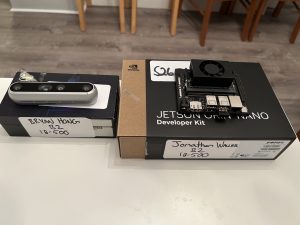
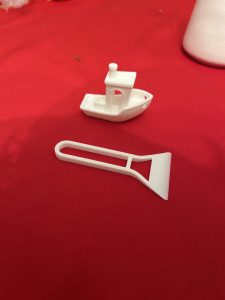
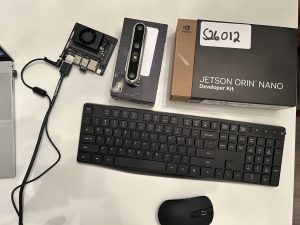
I spent significant time getting the NVIDIA Jetson Orin Nano up and running from scratch. Because the board arrived without an operating system or peripherals, I sourced a DisplayPort cable and a high-speed microSD card for storage, then flashed the Jetson with JetPack 7 Ubuntu. Once the OS was configured, I installed essential command-line tools like tmux and vim alongside ROS2, verifying system stability and environment setups by running the first ROS2 test with 2 publisher and subscriber nodes running simultaneously on the device. Additionally, I helped establish our team’s 3D printing workflow by slicing and executing test prints to evaluate how much time each print will take (photos of these test prints will be on this week’s team report).

Beyond individual setup tasks, I collaborated with the team on refining our master hardware parts list so we can finalize and submit our order for Iteration 1. I also worked alongside the team on CAD Iteration 1, initiating torque and workspace calculations to inform joint placements, limb lengths, and motor specs. Finally, I drafted content for our upcoming design presentation and spent time practicing, as I will be serving as the team’s primary presenter.

I am mostly on track relative to our project roadmap, though we need to make sure the parts list is finalized soon and finish our calculations on torque and workspace in the next few days.

For next week, I plan to:

  • Finalize and submit our master hardware parts list for Iteration 1 components.
  • Deliver our team’s design presentation and analyze the feedback from faculty and TAs.
  • Begin setting up the general software project layout (ROS2) and outline the initial tf2 frame tree structure.
  • Finish torque and workspace calculations with the team to finalize motor placements and limb dimensions in CAD.

Aaron’s Status Report for 9/26

For the week of September 20th-26th, I continued our Iteration 1 CAD design of our 6DoF robotic arm in SolidWorks. After some discussion with the team, we decided to base our structural requirements on an already established and tested design instead of choosing every dimension from scratch.

We selected the Universal Robots UR3e (which is widely used in different industries), since it was essentially the lightest and smallest model from their catalog. It fulfilled all our design specifications as it contained 6 joints and thus 6 axes of rotation and some safety functions we could take inspiration from.

I used it as our reference and imported its STEP model into SolidWorks, which I used to note down its link lengths, joint placement, proportions, reachable workspace, and then used those measurements as a starting point for our arm. The design will not be an exact copy of the UR3e because it needs to fit to our selected actuators, 3D-printed parts, PSU, and end effector (pen gripper)– however, the reference model would give us a more dependable baseline since they’re already validated dimensions.

This week, I recorded some of the UR3e geometry, specifically its physical limits in CAD and how many degrees of freedom it had for six joints. For our robot, the joint limits need to not collide with themselves or block anything and still let the end effector to reach the object inside of our 0.4m x 0.4m x 0.4m workspace. This work is still in progress since the limits depend on the dimensions of our selected servos and the mechanical design of the 3D printed links.

My Iteration 1 CAD along with the joint simulations and surface modeling (which I’ve modeled as a simple cylindrical surface already), and physics work is scheduled through October 3rd, so I’m currently in progress and on track. What’s still remaining is finalizing joint limits by also finalizing what hardware we’re purchasing, build out the Iteration 1 CAD and run it in the workspace with torque simulations/calculations.

For next week, I plan to:

1. Finalize our hardware parts with their physical limits and calculate the range of motion for all six joints
2. Run a SolidWorks Motion simulation to record the arm’s reachable workspace, I need to figure out how to exactly simulate the physics to see if the weight of the arm is also low enough to sustain the end effector without falling over
3. Determine whether our arm’s shoulder needs a stronger actuator, or some sort of counterbalance (I was thinking of accommodating the design for a vise to hold it down)
4. Update the Iteration 1 SolidWorks assembly based on the simulation results and prepare the CAD files for printing

Team Status Report for 9/19/26

Team Status Report

For this week, our team focused on defining the master project timeline, evaluating key system risks, and refining our initial mechanical and electrical hardware architectures.

Project Risks & Management Strategies

Our team identified three primary technical risks that could jeopardize project success and established corresponding management strategies. First, structural deflection in our 3D-printed links under joint motor loads could degrade drawing accuracy. We are running SolidWorks stress and torque simulations on Iteration 1 link geometries prior to printing, with a contingency plan to insert internal aluminum reinforcement rods or increase print wall thickness if excessive flex occurs. Second, dynamic surface geometries could push the arm past its physical reach or into joint singularities. We defined a strict 0.4m *0.4m * 0.4m target workspace and designed our path planner to bound trajectories, utilizing an adjustable mounting base to reposition targets as needed. Finally, subsystem integration between ROS2, microcontrollers, vision tracking, and physical hardware presents a late-stage bottleneck, so we proactively restructured our timeline to include dedicated integration buffer weeks.

System Design Changes

We updated our system block diagram this week to replace traditional stepper motors with smart serial bus servo motors for primary joint actuation. Smart servos provide built-in position feedback controllers and support daisy-chain communication, which drastically reduces physical wire runs and bulk throughout the 6DOF arm structure. While smart servos carry a slightly higher unit cost than bare steppers, they eliminate the need to purchase separate motor driver breakout boards for each joint and significantly reduce wire harness assembly time, keeping overall project costs and risks on track.

Project Schedule Status

The team completed a comprehensive review and revamp of our master schedule this week. We explicitly incorporated dedicated buffer space for system integration and physical hardware debugging toward the end of the term. With these adjustments in place, our overall project progress remains on schedule relative to our updated roadmap.

Team Progress & Highlights

On the design front, the team held a design review forum to critique our preliminary Iteration 1 SolidWorks draft, successfully identifying key structural constraints around shoulder torque distribution, arm reach, and 3D printing clearances. Additionally, we designed a universal object target mounting base equipped with AprilTags. This mounting base allows dynamic target surfaces—such as cups, curved plates, or flat planes—to be secured firmly in the workspace while providing a clear coordinate frame for the vision system to detect relative to the robot base.

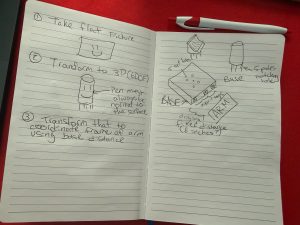
Initial team sketches for helping the robot identify the base and object with AprilTags
1. Initial team sketches for helping the robot identify the base and object with AprilTags

  1. Iteration 1 SolidWorks CAD draft overview showing initial joint and enclosure layout
  2. AprilTag object target mounting base design diagram

Jonathan’s Status Report for 9/19/26

For this first week, I dedicated most of my time toward establishing the software foundation and architecture for our 6DOF surface-drawing robot arm. I focused on investigating robotic software stacks to ensure our arm can reliably handle inverse kinematics, dynamic surface mapping, and low-level servo communication.

I spent significant time evaluating the ROS2 ecosystem and selecting key packages for our software pipeline. I investigated MoveIt 2 for 6DOF trajectory planning and inverse kinematics (IK) solving, alongside ros2_control to serve as the hardware abstraction layer between ROS2 nodes and our physical joint controllers. To handle coordinate frame transformations between the robot base, camera optical frame, and variable target surfaces (planes, curves, cylinders, half-pipes), I started planning the use of a frame tree structure using tf2. For perception, I looked into integrating apriltag_ros and OpenCV vision models, as well as evaluating NVIDIA Isaac ROS packages (specifically isaac_ros_apriltag) to leverage GPU-accelerated pose estimation on the Jetson Nano paired with an Intel RealSense depth camera we will be renting from the ECE department. Additionally, I researched using micro-ROS on a microcontroller to handle low-latency serial bus communication if we decide to use things like bare stepper motors. I alsoexplored vis2 and RViz2 setups for kinematic visualization.

For later reference, here are the ROS2 libraries and tools I researched:

  • MoveIt 2
  • ros2_control nodes
  • tf2
  • apriltag_ros and OpenCV (OpenCV would be easier to test and bring up by itself but more difficult to integrate into the final product)
  • NVIDIA Isaac ROS (for CV and more out of the Jetson Nano)
  • micro-ROS
  • vis2 and RViz2

Beyond software, I participated in team trade-off discussions regarding joint selection and workspace reach, helping determine how our software nodes will enforce physical joint limits during surface tracking. I also created our team’s local ROS2 repository, initialized the workspace directory structure, and wrote initial package configuration files to prepare for integration.

I am scheduled on track relative to our project roadmap.

For next week, I plan to:

  1. Finalize the local ROS2 software workspace structure and pull in required drivers and third-party dependencies.
  2. Build out the initial infra for tf2 robot link tree and create a basic URDF/XACRO model representing our Iteration 1 arm parameters.
  3. Assist the team in finalizing the master hardware parts list (servos, bearings, microcontrollers, power supply).
  4. Collaborate with Aaron on verifying CAD Iteration 1 dimensions to ensure motor mounts and sensor placements align with our software node assumptions.