Delaynie’s Status Report for 04/25/2026

PCB Version 2

Bugs:

  • LED control should not have gone on GPIO46. It’s a bootloader pin, and it doesn’t reliably work as a digital output. There are a couple of other unused pins nearby that can be used instead.
  • The LED control pin also needs a pull-up resistor because it is active-low. This means that when the ESP32 goes to sleep, the screen will still be on, blank white.
  • Green LEDs are way too bright (I see spots in my vision after looking at them). They also get a bit warm. These LEDs are just for debugging.
    • Yellow LEDs could also be a bit brighter.

Things that work:

  • The ESD protection diodes on the USB didn’t break it!
  • The buzzer works now that a pmos is being used.
  • The screen and stuff works after I rewired it.

Pictures of PCB rewire:

Button Debounce Requirements

  • Surprisingly, the buttons we are using aren’t that bouncy. After looking at the waveform, it doesn’t ring for more than 10 ms.

Team Status Report for 04/25/2026

The most significant risk to this team’s success is getting the firmware done in time for the demo. This risk is managed by the fact that we are planning to spend the bulk of our time this week on Capstone. Contingency plan is to get as much work done by the end of Thursday, and decide what to include in the demo on Friday after that.

Progress is behind schedule, but since there are no classes this week, we have extra time to spend on integrating all of the firmware and testing it before the demo.

There are a couple of small design changes we decided to make this week, such as only including battery statuses instead of fine percentage levels. This is due to the variability, and therefore unreliability, in voltage as Remigotchi is being used.

Below is a state diagram of our firmware.

Unit Tests

  • GNSS test: Ran firmware on Remigotchi to interface with its GNSS module. Measured how long it typically takes to get a verified time. We found that we could only reliably get a verified time when outside, or sometimes by a window.
  • RTC test: Synchronized the RTC with the GNSS time once, put the ESP32 to sleep, woke it up several hours later and measured the time difference. We found that over the course of roughly 8 hours, the ESP32’s internal RTC was roughly 2 min, 15 sec ahead. Given this, we are considering synchronizing to GNSS time more frequently than once a week.
  • Power tests: Enabled/disabled various combinations of peripherals connected to the ESP32 and measure how much power the device draws overall. We found that having the GNSS module in use vs not in use didn’t have much of an impact. However, the module itself is embedded onto the board, and its power lines are hard-wired to the board’s main power. This means that even if the GNSS module is not in use, it still does have some amount of power going to it. Should this project be worked on in the future, we would likely have some sort of way to dynamically control access to power for various devices.
  • ADC battery monitor: Read out millivolts measured on the ESP32’s ADC pin, and compared it to what I measured with a multimeter. It was accurate to about 0.01 volts. However, we concluded that voltage is not typically a good indicator of overall battery charge level due to the fact that voltage varies a bit during usage, and the lipo discharge curve is very non-linear. Therefore, we decided to not include a precise battery percentage readout visible to users, but instead, opt for battery indicators when the device needs to be charged or when it is fully charged.
  • Bluetooth connection time: We measured how long it took for the desktop app to connect to Remigotchi at varying distances between the two devices. Average is around 2 seconds.
  • Bluetooth data upload time: We measured how long it took to send a user’s schedule from the desktop app to Remigotchi, once it’s connected. Typical schedule sizes (under 10 reminders/week) result in send times of less than 1 second.

Delaynie’s Status Report for 04/18/2026

GNSS Time Acquisition Testing

  • Indoors, and even outdoors, it takes a while (more than a few seconds) for the time to resolve itself.
  • When to call the time and date “good”:
    • When gnss.getTimeValid() and gnss.getDateValid() return true, then the time and dates provided can be trusted for our purposes. The only major thing to be aware of is that it doesn’t guarantee leap seconds are correct (which means you have a +/- 1 second uncertainty).
    • Even when this happens, the number of satellites reported seen might be zero.
    • When inside the W3VC radio club near the window, it takes 1-2 minutes on average for the time and date to validate from a cold start. (This is different from simply resetting the MCU/code. When simply resetting code, time and date validation takes less time.)
  • A note about “valid” and “confirmed”:
    • There are four functions available: gnss.getTimeValid() , gnss.getDateValid() , gnss.getTimeConfirmed() , and gnss.getDateConfirmed() .
    • “Confirmed” is a more strict check than “valid”.
  • See GitHub repo for modifications on custom library this week.

BLE Schedule Uploading

  • Define a struct for each event to be sent from the desktop app to Remigotchi
#include <stdint.h>

typedef struct {
    // 32 bytes
    char name[32];
    // 2 bytes
    uint16_t period;
    uint16_t start_time;
    uint16_t end_time;
    // 1 byte
    uint8_t days_of_week;
    uint8_t padding[1];
} event_t;
  • Rewrote BLE Serial testbench, there were some bugs with the code blocking until a total of 4 bytes were sent. Now, it doesn’t block, but continuously polls the serial buffer.

Battery Monitor

  • I finally got around to testing the battery monitor, which is a 100 kOhm and 270 kOhm voltage divider connected to one of the ESP32’s GPIO pins.
  • Luckily, the Arduino framework provides a function analogReadMillivolts(), which does in fact work. So all I have to do is call that.
  • I confirmed with a Fluke 233 multimeter that values read by the aforementioned function are accurate.

New Tools and Knowledge

I needed to learn a bit more about how the SPI peripherals on the ESP32-S3 were set up. The main strategies I used were forums about ESP32 SPI usage, as well as ESP’s official documentation page and chip datasheets.

I also learned a bit about communicating with the GNSS module on the board. I learned how to use it by first looking up popular, well-tested libraries, and decided on the SparkFun GNSS V3 library. From there, I learned how to extract the time from the device by reading the library’s docs as well as the device’s datasheet.

Below is a photo of the LCD screen connected to a Remigotchi PCB used for field-testing the GNSS connectivity.

Delaynie’s Status Report for 4/4/2026

GPS

  • Copilot was able to do a lot in this area. Most of my work involved finding the right library to use, finding the right version of that library, and making sure it was properly installed.
  • There were some comments in the library source code explaining some nuance to the order in which functions should be called, so I had to refactor to touch that up a bit.
  • But for filling in functions like estimating UTC offset or calculating the day of the week, Copilot was quite helpful. It’s most useful when I already have the structure and clear inputs and outputs defined.
  • I tested the code by running the code, printing out the number of satellites in view, and printing the time and date received.
  • After I verified the ability to receive time of day from the satellites, I worked on integrating that functionality with the use of the ESP32’s RTC peripheral, and building that into a custom library that will provide the caller with the most accurate time possible.

SPI Issues with the LCD Screen

<aside> ✅

Fix: In the User_Setup.h file in the library source code (terrible architecture by the way) make sure #define USE_HSPI_PORT is uncommented.

</aside>

  • Recall that we are using an external library for driving our LCD screen via SPI. That library is TFT_eSPI.
  • Simply changing the SPI pins between the breadboard version of the code and the version for the PCB did not work.
  • The board would completely crash somewhere within in the tft.init() function call. (To be clear, this is a function provided by TFT_eSPI).
  • So, I went back to the basics and ran the SPI testbench code from last week where it would simply send an incrementing byte across the line.
  • Both SPI buses simply sending an incrementing/decrementing value separately does work. Code is below.

SPI Sanity Check

#include <Arduino.h>

// #include <TFT_eSPI.h>      // Include the graphics library
// TFT_eSPI tft = TFT_eSPI(); // Create object "tft"

#include <SPI.h>
#define SPI2 FSPI
#define SPI3 HSPI

#define LCD_CIPO 13
#define LCD_COPI 11
#define LCD_SCLK 12
#define LCD_CS 10 // Chip select control pin
#define LCD_DC 9  // Data Command control pin
#define LCD_RST 3 // Reset pin (could connect to RST pin)

#define SHARED_COPI 38
#define SHARED_CIPO 39
#define SHARED_SCLK 40

#define SD_CS 41
#define RFID_CS 42

SPIClass lcd_SPI(SPI2);

SPIClass shared_SPI(SPI3);

#define BUTTON_1 14

void setup(void)
{
  pinMode(BUTTON_1, INPUT_PULLDOWN);
  while (!digitalRead(BUTTON_1))
  {
  }

  Serial.begin(115200);
  Serial.println("begin");

  pinMode(LCD_CS, OUTPUT);
  pinMode(SD_CS, OUTPUT);
  pinMode(RFID_CS, OUTPUT);
  digitalWrite(LCD_CS, HIGH);
  digitalWrite(SD_CS, HIGH);
  digitalWrite(RFID_CS, HIGH);

  lcd_SPI.begin(LCD_SCLK, LCD_CIPO, LCD_COPI, LCD_CS);
  shared_SPI.begin(SHARED_SCLK, SHARED_CIPO, SHARED_COPI, -1);

  // tft.init();
  // Serial.println("tft init");

  // tft.setRotation(1);
  // tft.fillScreen(TFT_DARKGREY);
  // tft.setTextFont(2);
}

uint8_t l = 0x00;
uint8_t s = 0x00;
void loop()
{
  Serial.printf("lcd spi = %x shared spi = %x\\n", l, s);

  lcd_SPI.transfer(l++);
  shared_SPI.transfer(s--);

  delay(250);

  // tft.fillRectHGradient(0, 0, 160, 50, TFT_MAGENTA, TFT_BLUE);
  // tft.setCursor(10, 10);
  // tft.print("Horizontal gradient");

  // tft.fillRectVGradient(0, 60, 160, 50, TFT_ORANGE, TFT_RED);
  // tft.setCursor(10, 70);
  // tft.print("Vertical gradient");
}
  • I went back and tried to make it not crash during tft.init() again.
  • What ultimately fixed it was simply configuring the library to use the HSPI port. It’s a line in the User_Setup.h file that you uncomment. I’m attaching a full copy of the User_Setup.h file to this web page for reference.
    • Interestingly and frustratingly, the ESP32-S3 doesn’t necessarily have FSPI, HSPI, and VSPI ports anymore. Instead it has two SPI peripherals, SPI2 and SPI3. However, the old terminology appears to have stuck around for backwards compatibility reasons. ChatGPT explains it some more at the beginning of this conversation here (scroll up all the way to the top).
  • Lastly, I added some SD card code from last week into this project, and I’ve verified that at the very least, I can display a static picture on the LCD screen and then

RFID Scanner

  • I first encountered an issue where the RFID scanner would not communicate back to the ESP32.
  • After looking at it with an oscilloscope, the SCLK and COPI lines looked normal. However, the COPI waveform looked incredibly weak.
  • I eventually realized that I did not have CS connected to the RFID scanner itself.
    • Part of this oversight was due to the fact that on the module’s silkscreen, there is no “CS” pin labeled. It’s just that the pin labeled “SDA” also doubles as the CS pin while being used for SPI 💀
  • After connecting a CS pin, the RFID scanner functioned just fine, and I was able to read the UID from an RFID tag.
  • Next, I need to verify that the RFID, SD card reader, and LCD screen all work in conjunction with each other.

PCB Work

  • Now that most of the elements on the PCB have been validated, and not to mention the deadline is drawing near, I went back to making edits to the schematic and redoing the layout.
  • I decided to completely redo the layout because I added a few things to the schematic, I got rid of all jumper bridges (we’re not in prototype mode anymore), and I wanted to prioritize a compact and smooth form factor.

Photos

Current layout and 3d model (components not yet routed):

What happens when you forget to include a CS line on your SPI-connected device:

Delaynie’s Status Report for 03/28/2026

SPI Struggles

  • This board uses a different set of SPI pins from the default Arduino SPI pins. Because of how the Arduino library and examples are written for SPI, and specifically, SD card interfacing, it makes this a little more difficult.
    • A lot of “out-of-the-box” example code fails when I try to run it.
  • After a lot of code failing, I decided to break the problem down further: first make sure the SPI pins that I want are indeed the ones being used. And only after that’s been confirmed worry about SD card interfacing.
  • The easiest way to do this is to simply have the ESP write a byte to the SPI bus, and look at the output with an oscilloscope. Luckily, there is a SPI.transfer(uint8_t) function provided by the library.
  • To make things even easier, I have the byte increment every cycle so that I know that what I’m looking at is in fact the data I’m trying to send and not something else. See below for full code.
  • This worked, click here to see a video of the oscilloscope measurements.
  • Also, I noticed my silkscreen labels are wrong—SPI CIPO and SPI_SCLK are swapped.

SPI Testbench Code

#include <Arduino.h>
#include <SPI.h>
#include <SD.h>

#define SD_COPI 38
#define SD_CIPO 39
#define SD_SCLK 40
#define SD_CS 41

void setup()
{
  Serial.begin(115200);
  delay(500);

  SPI.begin(SD_SCLK, SD_CIPO, SD_COPI, SD_CS);
}

uint8_t c = 0x00;

void loop()
{
  uint8_t x = SPI.transfer(c++);
  Serial.printf("transfer %x\\n", x);
  delay(500);
}

SD Card

  • Once I determined that I could interface with the correct set of pins for SPI, I started interfacing with the SD card.
  • I modified the code to see if I can successfully talk to the SD card. See below for code.
  • At first it failed. Specifically, somewhere in the card mounting, it failed. I formatted the micro SD card with my laptop, and tried again. It worked this time. I would have guessed that the library would be able to handle something like this, but I guess not. It may also be worth noting that this card was fresh out of the box.

SD Card Initialization Code

#include <Arduino.h>
#include <SPI.h>
#include <SD.h>

#define SD_COPI 38
#define SD_CIPO 39
#define SD_SCLK 40
#define SD_CS 41

void setup()
{
  Serial.begin(115200);
  delay(500);

  SPI.begin(SD_SCLK, SD_CIPO, SD_COPI, SD_CS);

  if (!SD.begin(SD_CS))
  {
    while (true)
    {
      Serial.println("failed to begin SD card.");
      delay(500);
    }
  }
  else
  {
    while (true)
    {
      Serial.println("success");
      delay(500);
    }
  }
}

uint8_t c = 0x00;

void loop()
{
  // uint8_t x = SPI.transfer(c++);
  // Serial.printf("transfer %x\\n", x);
  // delay(500);
}
  • I then moved on to reading and writing text to and from files. That test was a success.


Delaynie’s Status Report for 3/21/2026

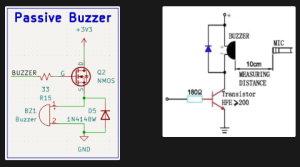
This week, I continued working on figuring out how we’re going to use Bluetooth in Remigotchi’s firmware. I built a testbench that implements BLE Serial, where you can stream bytes from one device to another once they are connected via BLE. This simplifies the firmware that we need to write by a lot. Instead of us directly manipulating GATT tables and defining our own standard of communication, we can treat it like something closer to just a serial stream. That being said, we will probably still have to handle things like our own error detection/correction and data packet structure. I also began testing our custom PCB that we received earlier this week. BLE works! I can get a serial stream to and from it via USB-C. The power seems functional enough. The charger IC gets up to 75 deg C while charging, which is mildly concerning, but potentially still within spec, so I’ll have to check on that. I tested the passive buzzer and realized that it’s unnaturally quiet. I measured the peak-to-peak voltage and eventually looked back at the datasheet and realized I wired the NMOS driver on the wrong side of the buzzer. It should be pulling the buzzer down, and the NMOS source has a stable “ground” so that the gate-source voltage is definitively 3.3V or 0V when being driven by the GPIO pin. To fix this, I’ll de-solder the buzzer from the PCB with a hot air gun, attach jumper wires to it, and use a breadboard NMOS to wire it up correctly and see if that works.  Below is a picture of what my schematic is on the left, compared to the recommended application from the datasheet on the right.

I’m a week or two behind schedule because we underestimated how long it would take for the PCB to get here. According to our original schedule, I think I would be either ordering or testing the second PCB by now. However, I still need to confirm with Italia whether or not the pinouts for the RFID reader and LCD screen work. To catch up, I’ll spend extra time next week testing the PCB.

Deliverables I want to have done next week are: working breadboard model of adjusted passive buzzer circuit, testbench firmware proving that the micro SD card slot works, testbench firmware proving that getting the time of day via GPS works, and testbench firmware proving that the RFID reader works.

Team Status Report for 3/21/2026

A significant risk that could jeopardize the mission are not having edits to the new PCB done in time, which could, once we get the hardware in hand, have some surprises in store for us. Our contingency plan for this includes having the old PCB as a backup for demo, along with components on a breadboard to fix the bugs in the old PCB.

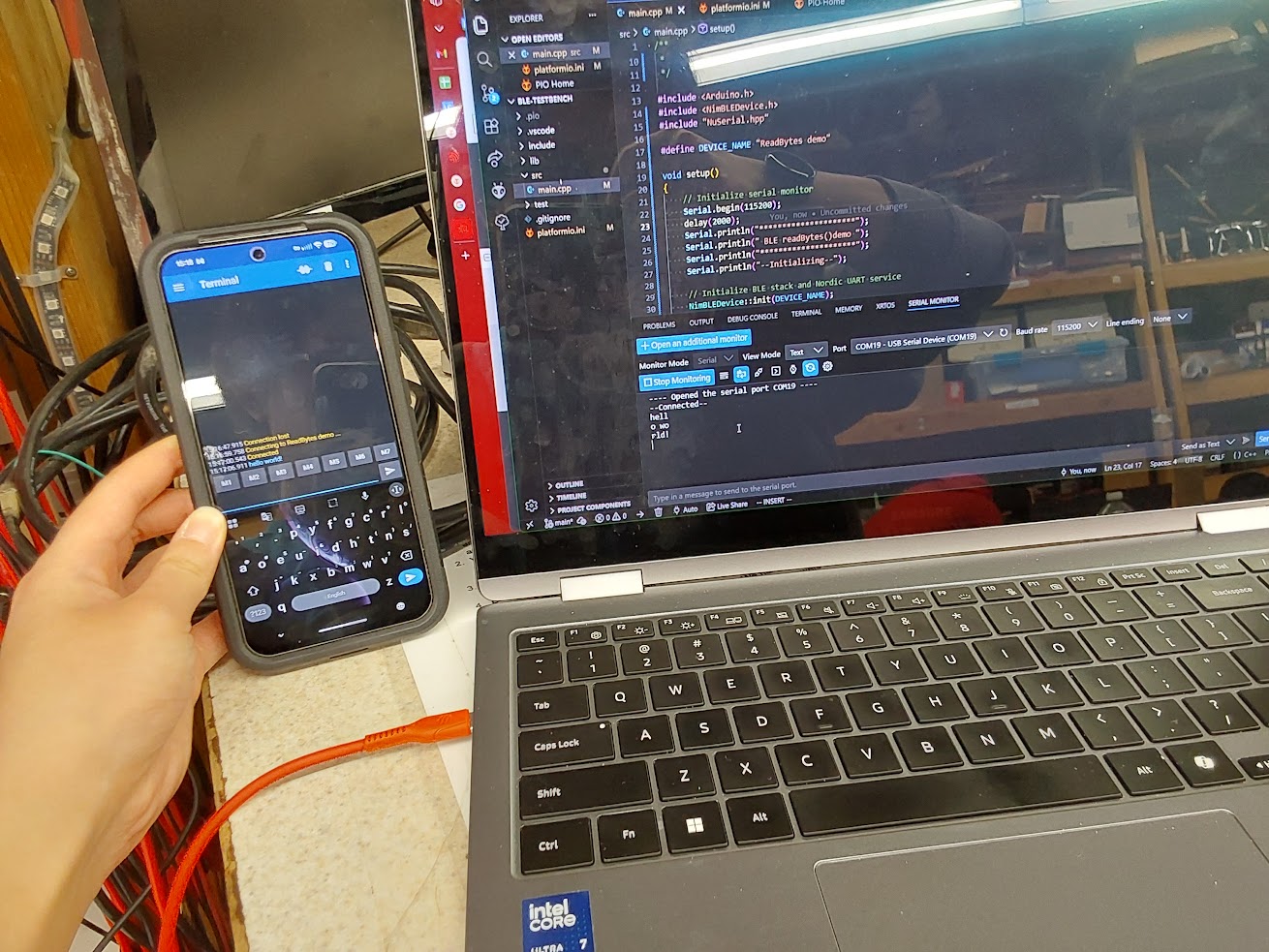
One change Felipe and Delaynie decided on this week was to specifically use BLE Serial to communicate the user-generated schedule from the companion app to the Remigotchi device. Earlier discussions involved manually editing GATT tables until we did a bit more research into what BLE-related technology was already available that might be tailored to our needs.

No schedule changes have occurred. Below is a photo of testing some basic BLE serial firmware on the custom PCB we received last week!

Delaynie’s Status Report for 3/14

This week, I began writing a testbench for familiarizing myself with the BLE software interface in Arduino/ESP-IDF. It took some trial and error until I found a sample code that was able to effectively utilize the BLE hardware in the first place.

My main responsibilities include hardware design and testing, and I am a bit behind because the PCBs didn’t arrive last week. To catch up this week, I am going to continue working on the BLE firmware while I wait for the boards to arrive (should be Tuesday), and then test the boards when they get here.

Next week, I need to have an updated schematic done, and the week after that, the final board design and layout.

Team Status Report for 3/7/2026

The most significant risks that could jeopardize the success of this project are issues with the PCB we ordered. We have taken a number of measures to mitigate against this risk. The first is that we are planning to order two different PCB designs. Version 1 is already in production, and the second will be an improvement upon the first based on any bugs we find with the first PCB after testing. Additionally, the design for version 1 has been made to be as reconfigurable as possible, by using solder jumpers, test points, and breakout headers. If there’s a mistake on version 1, it should be relatively easy to fix, so we’re not waiting for an entire new PCB before we can test any modifications.

There were no significant design or schedule changes made since last report.

The product solution we are designing meets specific needs as they relate to global factors in that this interface and this device is meant to be universal. Anyone, no matter their technical background, should be able to intuitively use Remigotchi. We hope to appeal to a wide range of ages, although as stated earlier, our primary design focus is college-age students, specifically at CMU. We are designing an easy-to-understand and an easy-to-use graphic user interface for Remigotchi to minimize the barriers between individuals and their wellness goals.

With consideration of cultural factors, we are designing a product that will allow users to be more present in what’s going on around them while still helping them stay on top of their health. Remigotchi provides user-specified reminders, but since it’s a separate device, it won’t hoard users’ attention, preventing them from interacting with the world and people around them.  Another concern with cultural factors is considering how groups respond to devices taking in potentially identifiable data that could be used to link them to a specific identity, which may cause legal trouble.  As an example users might worry that telling the device whether they walked or how much they drank might be used to infer details about their life including location data which could then be used to harm them.  Of course Remigotchi as it stands has  no plans to implement any location tracking or sharing of any personal user data, but if the user fears that they might, then that will interfere with Remigotchi fulfilling its intended purpose of providing stress free motivation.  Our current solution to this problem will likely be to add information screens to the Remigotchi companion application that provides assurances to the user on what data the device will and will not collect.  This will hopefully be sufficient to ease the concerns of vulnerable users.

Another group of people that we need to consider in our device is those suffering from depression and other mental illnesses.  As discussed in a previous status report, while we want the Remigotchi device to be motivating to users, we do not want to add additional stress in the form of a virtual pet.   While those suffering might benefit the most from a second entity to take care of as they improve their lifestyle, they are also the group that may take it the hardest should their virtual pet begin to suffer from a few honest mistakes.  This complication is slightly harder to address, since it requires surveying those with a condition that people generally don’t like to advertise they have.  A simple solution would be to interview users after letting them test the device in order to find out what is an appropriate level of motivation in letting the virtual pet be damaged, but without specifically interviewing those with depression results may be wildly incorrect.  Overall there is no easy solution to this issue but the team will discuss it further and attempt to make sure our device does not cause active harm to vulnerable users.

With consideration of environmental factors, device is meant to be low-power, reducing users’ carbon footprint when compared to electricity used to charge ones phone for constant use. Additionally, Remigotchi encourages users to take care of themselves in a sustainable manner—and users are also living organisms on this planet.  Possible suggestions include taking walks outside, which could reduce the time users spend in front of a screen drawing power to various devices.  In addition, text reminders can be programmed to provide basic advice like recycling water bottles when appropriate.  While these reminders may go ignored they serve to show that we at Remigotchi do care. Other considerations made is using sturdy, yet widely available materials so that the device is unlikely to break warranting a user by more devices therefore adding to general electronic waste.  Remigotchi also has no plans for forced obsolescence, meaning that it will be designed to last with minimal part replacement again reducing overall waste.  While this is less applicable in the testing stage where construction is extremely small scale and devices need not last months or years, should the time allow we could also look into how this device would be manufactured in a sustainable way.

Part A, was written by Delaynie.

Parts B and C were written by Felipe and Delaynie

Delaynie’s Status Report for 3/7/2026

Over the past two weeks, I finished the layout for the PCB, finalized all 39 parts that are being placed on it, and ordered it. After ordering, JLC reached out to me because there was one small issue with two of the three LEDs I selected. These LEDs were in a reverse-mount package, meaning they are placed on the board “upside down,” and also require a hole drilled through the board for their light to shine through. I did not realize this, and thought that they were just your normal 1206 SMD LEDs. After emailing JLC, I replaced the reverse-mount LEDs with normal ones.

Additionally, I worked with my team to complete our Design Report due before spring break. My contributions included detailing certain design decisions and tradeoffs we thought through, as well as calculating conservative estimates for Remigotchi’s power requirements. We concluded that Remigotchi would, at most, require a 2000 mAh 1S lipo battery to ensure a full day’s worth of power.

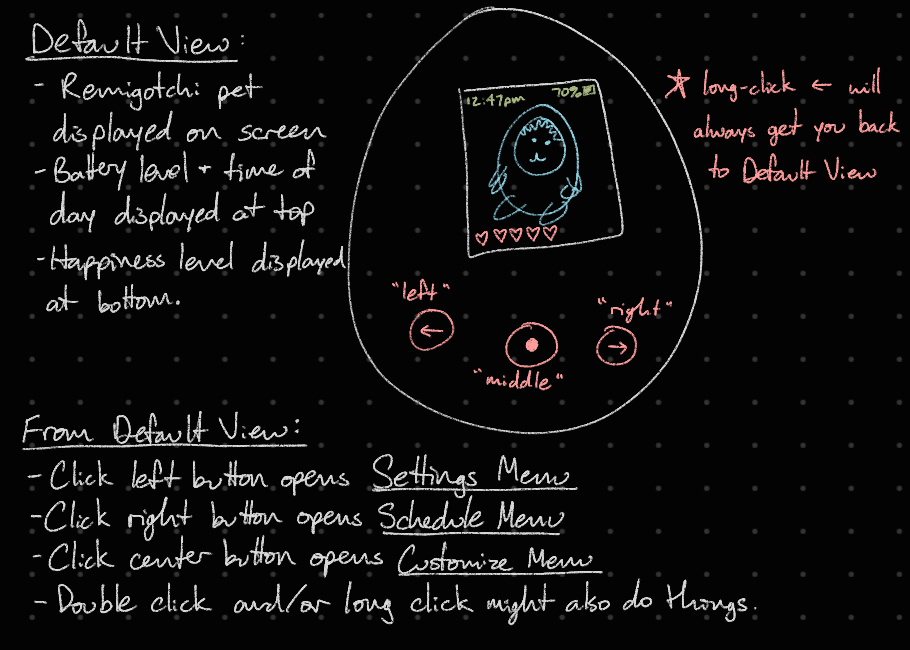
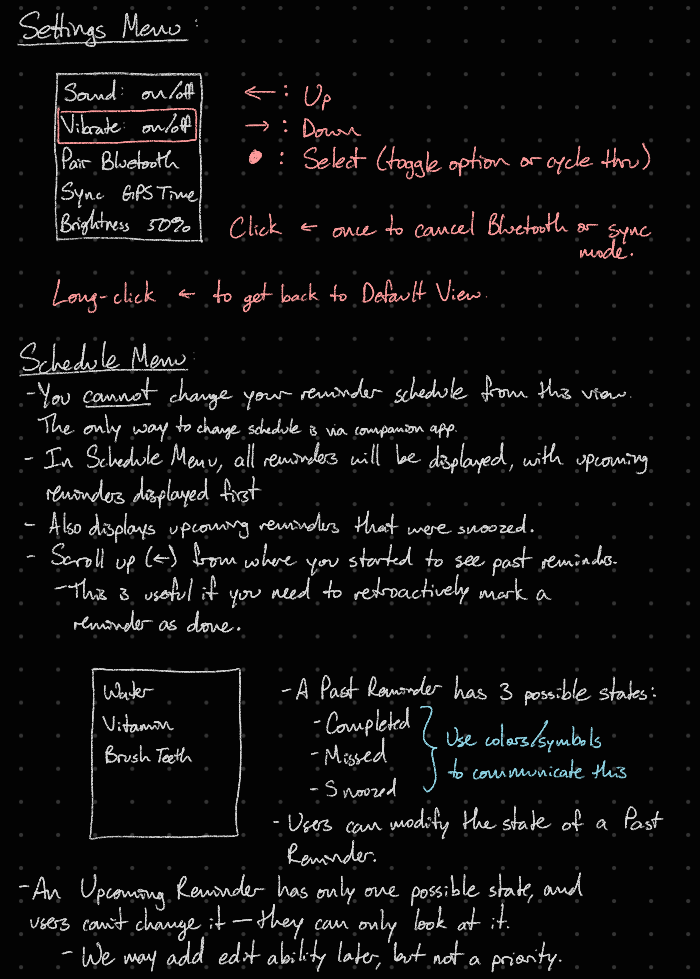
Also, I started drafting some ideas for what the menu options in Remigotchi are going to look like, and how users are going to navigate through them. Below are notes I wrote down. They are just a first draft, and are not set in stone.

According to the Gantt chart, all hardware development is on schedule. I achieved my deadline of ordering the PCB by the Friday before spring break. However, it’s possible I may fall behind schedule if the boards don’t arrive soon. I’m supposed to test the PCB next week, and I may have to push that back by a few days. At the time of writing this, manufacturing and PCBA has completed, and the boards are on their way to the JLC shipping center. I expect them to arrive sometime before next Friday. To catch up and keep this project on schedule, I will work on testbench firmware while I wait. This will start out as basic sample programs to ensure that the ESP32 can effectively communicate with the other sensors and devices onboard.

Deliverables I hope to have next week are a completed and finalized idea for menu architecture, to be discussed with Italia. Additionally, I’ll have a more detailed PCB test plan before the boards actually arrive. I’ll start out by simply testing electrical connections, then move onto testing it’s DC-DC conversion capabilities, make sure I’m able to flash the ESP32 onboard, then move onto running some sample firmware to make sure I mapped the pins correctly.