
## Screen test with ESP32 Dev board
– Had trouble wiring the ESP32 to the display to use 8-bit protocol because [the guide from Adafruit](https://learn.adafruit.com/adafruit-2-4-color-tft-touchscreen-breakout/8-bit-wiring-and-test) had hardcoded the pinouts for an Arduino Uno, and the pinout wasn’t compatible 😡.
– Pivoted to finding another library: [TFT_eSPI Library](https://doc-tft-espi.readthedocs.io/starting/).
– Widely recommended for ESP32 and other microcontrollers, according to Google AI summary.
– Despite its name, it does support both SPI and 8-bit protocols for ESP32 and the ILI9341 display driver.
– Before getting started with 8-bit, I decided to make things even simpler and try to make it work with SPI first.
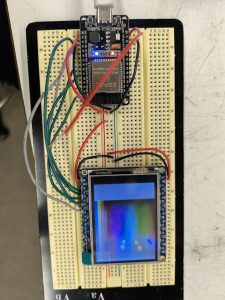
– After wiring up everything and flashing the example code, the screen was still blank white.
– Looking at the SPI guide from Adafruit, I realized I had to solder together 3 of the 4 jumpers on the back.
– After that, it worked.
– I hooked it up to a power supply. The whole system uses about 300 mW
- Image of setup:
## Work on pcb schematic
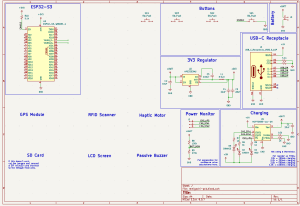
– added battery charging circuitry
– added USB-C circuitry
– decided to put SD card slot
– current schematic:
Schedule
My progress is on schedule, and in order to keep it that way, I will finish the schematic by the middle of next week, and begin working on the layout.