Matthew Kwee – Status Report for 10/11

This week, in addition to writing the Design Review document with my team, I started work on the performance history utilities for the web-app, drafting databases and Django templates.

Much of my contribution to the Design Review document involved putting existing, unrefined ideas into clear, concise terminology, particularly deriving the quantitative Design Requirements and Trade-Offs from qualitative ideas such as “user comfort/convenience” and “low-maintainance systems.”

Additionally, I assisted Jeffrey in assembling the wearable prototype, soldering the power shim to the RPi Pico* and covering as many sharp edges with hot glue as possible – the glue is necessary because we will be testing the prototype device in the CUC pool during free swim hours and would like to minimize the risk of water leaking into the plastic bag housing the device.

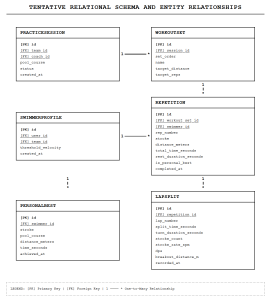
Below is the tentative database relational schema for the site:


I am still on schedule. Next week, I plan to complete the web-app’s View History functions and move on to setting up the Raspberry Pi that we will use as the base station, so that we can begin testing ASAP.

*If anything goes wrong with the Pico’s connections, I accept full responsibility and apologize in advance I am confident that my ability to solder connections was adequate for this task – there should be no issues.

Team Status Report for 10/3

Overall Summary:

This week, we delivered our design review presentation and focused on component selection, toolchain configuration, and prototyping our initial development hardware. We verified the functionality of our core dev boards (u-blox ANT-B10, Raspberry Pi Pico WH, and FPGA), established communication with the FPGA’s Linux core via SSH, and finalized key wearable components, such as selecting the low-power ST LSM6DSOX IMU on a breakout board to de-risk prototype assembly. We also set up our Nordic direction-finding software environment. Our project is on schedule for fabricating the prototype next week to gather data.

Key Progress

Design Presentation:

Haowen + Matthew: Assisted in writing the Design Presentation slide deck.

Jeffrey: Wrote and delivered the Design Presentation on Wednesday.

Signals:

Haowen: Unboxed and verified the u-blox ANT-B10 antenna array, mapped SWD and UART pin headers, and configured the nRF Connect SDK environment to prepare for flashing the direction-finding firmware and testing 20 Hz BLE Constant Tone Extension (CTE) packet broadcasts from the Pico WH.

Software:

Matthew: Maintained development trajectory for the web platform’s upcoming historical data portal, setting up infrastructure for serving performance insights to users.

Jeffrey: Established SSH access to the FPGA’s Linux environment and began implementing a C benchmark suite on the ARM core to evaluate processing latency against FPGA SystemVerilog logic.

Hardware:

Matthew: Evaluated multiple IMUs and selected the ST LSM6DSOX 6-axis chip for its ultra-low power consumption (~0.5 mA) and decently low output error.

Jeffrey: Validated basic power and GPIO operation across all received microcontroller boards.

New Risks + Mitigation: Dead Reckoning Drift vs Angle of Arrival Inaccuracy

Tracking swimmer position down the lane relies on combining wearable IMU dead reckoning with Bluetooth Angle of Arrival (AoA) direction finding at the poolside base station. However, both modalities face compounding error sources. Dead reckoning suffers from exponential integration drift within seconds of forward swimming, while AoA suffers from signals reflecting off the water’s surface, and periodic signal loss when the wearable is submerged

We plan to manage these issues through a combination of the two systems:

1. Swimmers should be physically restricted to linear lanes, and cannot deviate from a 1D line by more than 1.5m. Rather than solving for 2D/3D positions, we will project AoA angle rays directly onto the swimmer’s known 1D lane vector.
2. The continuous IMU dead reckoning model will be updated periodically whenever the wearable surfaces and transmits a valid AoA packet.
3. Zero-Velocity Reset: Every time the IMU detects an impulse from a swimmer pushing off the wall, their spatial position and velocity will be hard-reset to the known physical pool boundary, clearing all accumulated dead-reckoning drift every lap.


No significant changes to the schedule were made at this point in time.

Matthew Kwee – Status Report for 10/3

This week, I worked on the design presentation slides with my team and compared IMUs for our product. I decided on the ST LSM6DSOX ($5.30 at the time of writing) for its low power requirements, which draws only 0.5mA (~1.7mW @ 3.3V) in high-performance mode (many comparable IMUs draw around 1-3mA). One downside is that it outputs raw acceleration/gyroscopic/temperature data, likely requiring us to process it into real-world values on the compute unit.

Two alternatives I rejected were the Bosch BNO085/086 and the ST LSM6DS3TR-C.

– The Bosch BNO085/086 was designed specifically for use in wearable devices and calculates acceleration and quaternions on-chip, but its relatively high power draw (10-15mA) made it too costly for our device’s limited battery life to utilize. While not directly useful, the temperature data from the ST LSM6DSOX will allow us to optimize the thickness of the wearable’s casing if overheating ever becomes a problem.

– The ST LSM6DS3TR-C is a simpler, cheaper chip that can carry out many of the functions that the ST LSM6DSOX can, and would definitely work as our device’s IMU. However, it draws significantly more power, and its measurements are noisier. As such, I decided that the ST LSM6DSOX for our IMU.

For our prototype, we will be ordering the IMU on a breakout board. While buying them separately would save about $7 on our budget, I am not confident in my surface-mount soldering ability – failure might require us to purchase a second or third chip. The prototype does not have the strict size limitations of the final wearable (for which we will order the full PCB assembled by a manufacturer), as it will be used primarily to collect data. Comfort is secondary with the prototype; as long as it can be strapped to one’s forearm, its size is acceptable.

I am not behind schedule, but will work to ensure I do not fall behind.

By next week, I hope to have the webapp’s history tracker implemented.

In two weeks, I would like to have the device prototype completed so that we can gather motion data for use in the compute station.

Matthew Kwee – Status Report for 9/26

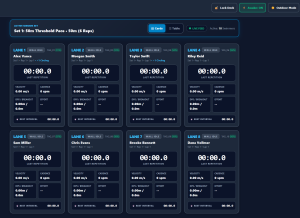
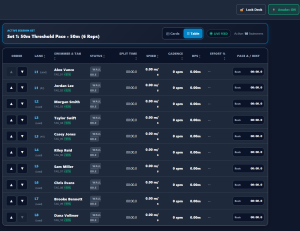
This week, I started coding the webapp (GitHub link), as per our ideal schedule. Brainstorming the site specifications took longer than I expected, but I was able to make decent progress in setting up the relevant architecture/libraries and building the UI.

This project is intended to provide a low-cost, low-config web and telemetry application that ingests positioning and inertial data from swimmer wearables and poolside compute, extracts biomechanical and split metrics in real time, and presents actionable data to coaches standing on a wet pool deck via standard consumer tablets.

When considering how the site should function, I took into account:


  • Wet-Deck Ergonomics and Water Splashes:

Water droplets, wet hands, and poolside humidity can cause unexpected inputs on mobile touchscreens. To mitigate this issue, I constructed a mobile-friendly UI with large, easy-to-find buttons. Additionally, I implemented a “lock” function that disables all screen inputs while keeping data live, unlocked only by a deliberate 2-second press-and-hold gesture.


  • Direct Sunlight and Outdoor Visibility:

Standard dark interfaces or subtle gray text are completely washed out by glare and midday sun at outdoor pools. I added an alternate Outdoor High-Contrast Mode with a monochrome light palette and thick solid black borders to maximize visibility, while allowing users to choose between it and a lower-contrast Indoor Mode.


Display Sleeping after inactivity:

Many tablets will automatically sleep after a few minutes of inactivity – coaches cannot be expected to repeatedly tap the screen to keep it awake. Fortunately, modern browsers provide a Screen Wake-Lock API that keeps tablet displays awake indefinitely while active – I added a toggle that enables/disables this API.


Wireless Jitter and Out-of-Order Sensor Packets:

RF signals around water tend to reflect or scatter, causing packets to arrive out of chronological order or duplicate unpredictably. While the physical poolside central compute unit will deal with the interference when receiving data from the wearable devices, we cannot guarantee that the packets it broadcasts for the web-app will not also be distorted. As such, a stream-level Jitter Buffer was added to the ingestion pipeline to reorder packets by sequence ID, discard duplicates, and smoothly flush packets to the analytics engine.


  • Inaccurate Splits on “Soft-Touch” Finishes:

When tired, swimmers may finish a set with a gentle glide rather than a violent slap against the wall – as such, the wearable device may not be able to determine when the swimmer completes the lap. To address this, I implemented a Timestamp Backtracking Algorithm to scan through recent position and velocity history once a wall dwell is verified, finding when speed drops below 0.2m/s (value subject to change).


Rapid Staging and Hardware Swaps:

Coaches will only have a few minutes before practice to assign wearable devices to their swimmers, and must have the ability to switch out tags for any reason (malfunctioning, low battery, swimmer leaving practice early, etc.) so a 3-Tap Pairing Workflow (tag -> swimmer -> lane) and a 1-Tap Swap Tag Menu were implemented, allowing a coach to quickly assign a name to a tag, or re-assign a tag mid-session.


(Apologies for the poor image quality; WordPress has a 2MB file size limit)
AI was consulted for the site’s frontend, especially the stylesheet and UI, since I have little experience in UI design.

While the website still needs more work, I plan to take a break from software development next week to focus on the wearable device; we need to finish a prototype wearable and start gathering real data before we can test the compute unit and webapp.


Matthew Kwee – Status Report for 9/19

This week, I worked on the project proposal presentation slides with my teammates and began drafting the specifications for the web-app: historical data, the dashboard, and other insights. The web-app must be optimized for a mobile device (tablet/smartphone) since a swim coach can’t be expected to carry a PC while monitoring swimmers. Because the coach’s attention will be focused primarily on the team, the website’s UI should be simple to understand and use, allowing easy navigation and handling for minimal distraction.

In the coming week, I will be implementing the base web-app and determining the wearable device’s ideal dimensions. Our initial concept is a watch-like device that can be worn around the wrist – like all other aspects of this project, we want to design it such that its users can forget about it and focus on their primary goal: training. Additionally, I plan on researching and comparing the necessary components for the wearable with my team as we settle on a design for the prototypes.