Felipe Status report for 4/25/2026

This week saw me finish work on the desktop app prior to the demo.  I added additional notifications and a way to modify what pet the user displays on the Remigotchi device, while providing a preview of what that pet looks like.  This also led me to conducting additional tests on the Bluetooth capabilities, which confirmed that I was sending data in the correct manner.  Future changes to the app will likely be limited to minor bug fixes prior to the demo.

Deliverables for the coming week are the final deliverables of the project, those being the poster and the video.  The poster I will be working on today and will likely be ready for team review by Monday, with the video following in short order.   I will also be responding to teammates requests for aid in their areas.

Overall I am excited for the demo this week and feel that we are in a good position for a final push to completion.

Team status report 4/18/2026

This week saw the testing portion of our capstone take off.  Felipe started talking to other students to review the UI of the desktop app, Delaynie tested the functionality of the gps portion of the device and timed how long it took to start connecting to satellites, and Italia continued testing out different graphic libraries to find out which one works best for our use case.  Such testing will be incorporated into our final presentation which will be happening this week.


In terms of what we have left before the final demo, integration between the board and the companion app has been nearly completed, as Felipe and Delaynie were able to establish what a sent schedule looks like and how a schedule is turned into a stream of bytes to send, and have confirmed that the bytes can be sent within and acceptable range of time (around 1-1.5 seconds).


In terms of changes there are very few.  Felipe has really nailed down what the UI is looking like and while Italia has made some changes to the colors of some graphics, the core look remains the same.


Overall we are excited to finish the semester strong and are looking forward to showing off our hard work in the coming weeks.

Felipe Status Report for 4/18/26

This week saw me finalizing the desktop app, as well as beginning some testing on it.

Below are some updated screenshots of both the schedule creation screen and the bluetooth screen:

This also saw me responding to advice given by my peers in regards to what should be included to make sure the desktop app is easy to use and understand.  Results from this advice centered on increased notification as to when tasks like saving schedules are completed.  The biggest thing added this week would be toast notifications that alert the user before fading automatically, allowing for easy notification that is hard to ignore yet also doesn’t require undue effort to react to.  I also made changes to certain portions of the color scheme, but had to consider the visually impaired in what colors were selected.  I defaulted to soft greens for most selected options, and am awaiting feedback on whether the color is distinct enough without causing eye strain.

Overall I feel that the app is almost complete, and only requires a couple more quality of life changes before the demo in 1.5 weeks, which gives me time to aid teammates in integration so the demo goes well.


In terms of new knowledge I required to finish this project, I found myself reviewing and reflecting on work I had done during a prior internship that was also centered on desktop application UI design.  I had to learn to put myself in the mind of the user when designing the app, since they would know less about the project and thus would require more aid in tips when using the app.  This then led to me trying to find a balance between making the app easy to understand and clean to look at, as drowning the user un additional messages seems like poor design.  Learning good UI design involved me navigating common websites (google, canvas, discord) and taking note of the UI choices made there.  What colors worked well together, how often were error messages displayed and in what format, what was the user informed about and what was relegated to the backend.  All of the observations informed my decisions regarding the desktop app.

In addition to UI design, I also had to learn how to use new libraries and language, especially in regards to how to connect to bluetooth devices.  While flutter/dart is similar enough to kotlin as both use the google material library that learning the language was not needlessly complex, I had never had to deal with bluetooth before, so learning how to use the flutter_blue_plus library was fun.  In terms of how I learned to use the library, it generally involved reading official documentation and parsing example code that could be adapted to serve my purposes.  In addition, forum posts like those from stackOverflow were helpful in identifying bugs, as most common bugs I ran into were not exclusive to my project.

 

Team Status report 4/4/2026

This week saw the first demo of our device, which seemed to go well as the currently implemented features worked with only very minor issues that were subsequently fixed.  However, this next week will serve as the true test as we start to work on interfacing between different subsystems of our project.  Felipe and Delaynie will work on connecting the companion application to the handheld device, first sending over constant strings of varying lengths before moving to sending over schedule JSON data which will then  be interpreted by the device.  Meanwhile Italia will continue work on the graphics of the device, before communicating with Felipe how the user will communicate graphics decisions from the companion app to the device.


We have made little impactful changes to the design of our project or our schedule.  Felipe has made minor changes to app layout, but the features remain consistent, and similar things can be said for Delaynie and Italia.  Overall as we move into carnival we hope to get solid work done before member are siphoned to work on personal tasks, but we expect Monday to be a very productive day that prepares us well for the final weeks of the semester.

Felipe status report 4/4/2026

This week saw the creation of the basic Bluetooth screen that allows the app to connect to local devices.  Once connected users should be able to send some basic example strings to the device for printing.  This should serve to prove that data can be sent over Bluetooth from a computer to a board.  Next steps would be sending the schedule json as a series of bytes for the device to interpret, which should be done by Wednesday afternoon, assuming testing of current Bluetooth features goes well.  These tests will be simple, just connecting to a device and seeing whether the data is transferred in a timely manner.  The long string, which is the entirety of Edgar Allen Poe’s “The raven”, should be long enough to simulate large schedules the device will be expected to handle.  Overall I feel as I am on pace and should finish the bones of the app by next week and be able to move to improvements based on user review.  Again, currently the app looks fairly bland, but will be updated with better theming once features are confirmed.

Felipe Status report 3/28

This week saw me finish the basic schedule creation page for the companion application.  Features added were the ability to save and load schedules into a text JSON.  Currently files are saved to a static location on my computer that likely would not function if the app was loaded onto another device, but that can be easily fixed with the path finder library that is already linked in the project.


With this I have enough functionality to demo the app, and while adding user control to handle mistaken inputs will b helpful in improving the user experience, that can be done after the remaining functions are implemented.  The next major task will be implementing Bluetooth connection with the device sending key schedule data over the air.  I hope to have the basic functionality complete by early next week so I can spend the rest of the time improving user functionality.

Felipe Status Report 3/21/2026

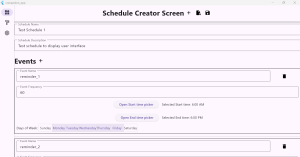
This week involved making the bare bones of the schedule creation screen, pictured below

Currently the user can use the plus shaped icon button to start the schedule creation process, and edit the created schedule setting all parameters, even being able to add and delete events.  Furthermore, input control was implemented in the event frequency parameter preventing the user from inputting strings.

Unfortunately, due to a bout of illness later in the week, I was unable to reach my goal of saving and loading schedules to and from JSON files, but that feature should be completed by Monday as it only involves loading the preexisting schedule class into a map and writing that to a JSON.


Once that step is completed, the next step will be making the UI more visually distinct and intuitive to use, as currently the shoddy alignment and dull colors do not lend themselves to the best user experience.


Overall despite the small delay I believe that I can still complete work according to the planned schedule.

Team Status Report for 3/14/2026

As with last week, the largest risk to the project is the arrival of the ordered PCB.  It is expected to arrive by Monday, so we should be able to test with it on the day we don’t have our ethics meeting. Unless it is delayed further, we should be able to continue with our current schedule.

In terms of design changes, we are considering moving from Bluetooth low energy to Bluetooth classic, due to an improvement in documentation providing additional aid in troubleshooting, but the decision is not final.  We did not plan to implement Bluetooth functionality this week so this decision does not undo any previous work or cost much time, but a decision will likely be made before starting implementation.

In addition, after discussion we have settled on the desired variables to be tracked by the schedule JSON, details of which can be found in the individual status reports for this week.  Since this was largely changing fields from strings to integers, it has a very small upfront cost but will hopefully make our run more efficiently as we now don’t have to parse/interpret as many strings.

Felipe Status Report 3/14/2026

This week I finalized the plans for the schedule JSON structure that will be created in the companion app and sent over to the device.  This did involve some small minor design changes, but shouldn’t affect the planned user experience of the app and device, as most changes were made in the backend structure.  Most of these small changes were made to transform as many of the JSON field as possible into integers, since those are easier to send as characteristics which is what the device will save relevant data as.

For example, while users can select what days of the week they want to receive certain reminders through a series of toggled buttons, the actual JSON will save the days active as a seven bits, where each 1 corresponds to a day the reminder will be triggered.  As an example, a reminder triggered only on weekdays will have value 0111110.  This prevents us from having to save a list of strings and instead only work in the form of an integer.

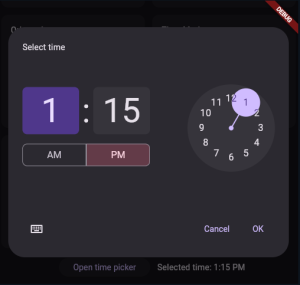
In a similar vein, start/end time selection will be done with a standard time picker included in material (example shown below), but the specific time will be saved as a single integer that corresponds to minutes after midnight.


The final major change comes in the parameter that determines how often a reminder should be repeated.  User will be given several initial options like every hour or every three hours, but will also have the option to set an hour and minute value so they can have reminders repeat whenever they want.  In the backend again it will be saved as a single integer that corresponds to the minutes between each reminder.


Overall these changes don’t much impact my planned schedule, as they all involve simple material components that are largely interchangeable.  I should have a first look at the schedule creation application done in a week, but medical appointments may push me to next weekend.  Overall I feel like I am in a good position and am ready for the coming weeks.