Cole’s Status Report 02/14/2026

This week I focused on finalizing the hardware components for our design and finalizing the hardware design requirements. The majority of the time I spent this week was analyzing tradeoffs between the hardware components and determining how it would affect the feasibility on the software end.

Hardware Finalization:

Processing:

Our initial design requirements were set on using a Raspberry Pi 5 with 8GB of RAM, due to availability our team has decided to instead use a Raspberry Pi 4 with GB of RAM. As a result of this change my work this week focused on reverifying the USB bandwidth limits, CPU performance headroom, power supply requirements, cooling needs, and camera interface compatibility. 


Audio

This week I considered different options for mic arrays and analyzed their performance metrics to determine which was the best for our design needs. 


Chosen Component: MiniDSP UMA-8 USB Microphone Array V2.0. 

Specifications:

  • 8-microphone circular array
  • Built-in beamforming capabilities
  • USB interface (plug-and-play with Pi 4)
  • No external ADC required
  • Reduces custom PCB complexity


Why this is the best option:

An 8-channel mic array offers a far more precise angular resolution compared to 4 and 6-channel mic arrays. For our design this is vital to achieving accurate direction of arrival and maintaining stable speaker tracking. This component is also USB compatible which offers more simplicity in hooking it up to the Raspberry Pi. Alternative components that utilize GPIO/I2S would require Kernel-level configuration, device tree overlays, and tight synchronization control. This would have made our design far more complex than necessary and difficult to achieve during the time period for this project.


Visual

This was by far the most difficult component that needed to be selected. Our design has a heavy focus on the visuals so this component had many constraints to consider when determining which option was the best. The design constraints I considered when determining which camera to use were: 360 degree field of view, multi-camera operation on a single Raspberry Pi, and synchronization with audio direction of arrival. 


Chosen Component: Arducam IMX291 160° USB camera

Specifications:

  • 1080p resolution
  • 160° ultra-wide FOV
  • Sony IMX291 sensor
  • USB UVC compliant


Why this is the best option:

This camera by far offered the best balance between integration simplicity, coverage, and performance. The most important feature of this camera was the ultra wide field of view. By having a 160 degree field of view our design can now attach three of these cameras, all with USB, making the connection to the Raspberry Pi simple. Alternative cameras such as CSI camera modules that I considered would have required a CSI multiplexer module to connect to the Raspberry Pi since there are only two CSI ports available. This would complicate the design and also prevent simultaneous 360 degree visual coverage. The camera I selected is also UVC compliant. This is huge plus on the software end since the cameras are recognized automatically by Linux and are able to work with OpenCV, FFmpeg, GStreamer, V4L2 tools.


Procurement and BOM

Once I finalized the components that we will be using in our design, I analyzed prices from different suppliers and updated the BOM. Once the budget requirements were determined to be met I placed the orders for the components.


Schedule

As of right now I am on track with my schedule.


Next Steps

Next week I am looking to start testing the hardware components on the Raspberry Pi 4 as they begin to arrive. The biggest focus I will have is on monitoring the USB bandwidth of the system because the Pi 4 shares USB bandwidth. I will begin by testing one individual camera at 1080p resolution and monitor: CPU utilization, USB stability, Frame drops, and Temperature. These will ensure that as the rest of our components get integrated we are on track with the design requirements.
 

Omar’s Status Report 02/14/2026

Omar’s Status Report – 02/14/2026

This week I focused on transitioning FocusField from a local prototype into a deployable, reproducible system on the Raspberry Pi. The primary emphasis was observability, hardware bring-up, and eliminating ambiguity during debugging.


Run Artifacts & Deterministic Debugging

Every run now produces a fully self-contained artifact bundle under:

artifacts/<run_id>/

Each run includes:

  • run_meta.json (platform, versions, git commit, resolved devices)
  • config_effective.yaml (exact merged config used)
  • logs/events.jsonl (structured logs)
  • logs/perf.jsonl (latency + performance snapshots)
  • traces/*.jsonl (VAD, DOA peaks, beamformer debug, lock state)
  • audio/enhanced.wav (+ raw multichannel when enabled)
  • thumbs/*.jpg (1 FPS camera thumbnails)
  • crash/crash.json (traceback + last-known state on failure)

This allows us to zip a run folder and fully reconstruct what happened without attaching a debugger or guessing.


Raspberry Pi Bring-Up

I wrote a complete Pi runbook (docs/30_pi_runbook.md) covering:

  • OS package installation
  • Python virtual environment setup
  • Editable project installation
  • Stable /dev/v4l/by-id camera mapping
  • UMA-8 calibration workflow
  • Smoke testing procedures
  • Common failure modes (USB bandwidth, MJPEG, underruns)

Supporting automation scripts were added:

  • pi_setup.sh – installs dependencies and environment
  • list_cameras.py – verifies stable camera paths
  • calibrate_uma8.py – channel order + yaw alignment calibration
  • pi_smoke.py – full pipeline validation test
  • install_systemd_service.sh – deploys FocusField as a boot service

The smoke test validates 8-channel audio capture, enhanced output generation, camera frame ingestion, and artifact creation.


UMA-8 Calibration

I implemented a structured calibration helper for the miniDSP UMA-8:

  • Tap-based channel detection (clockwise ring)
  • Automatic channel order reconstruction
  • SRP-PHAT-based orientation test for yaw_offset_deg
  • Auto-generated YAML snippet for device_profiles.yaml

This ensures DOA and beamforming geometry align with physical orientation and camera reference.


Audio Pipeline Hardening

Major upgrades to the audio stack:

  • Dynamic device resolution (substring matching + required channels)
  • SRP-PHAT DOA with configurable bins and smoothing
  • MVDR beamformer with diagonal loading and condition number checks
  • Delay-and-sum fallback logic
  • Wiener frequency-domain denoiser
  • Channel drift detection (GCC-PHAT offset estimation)
  • Beamformer debug telemetry (target, fallback, gains, conditioning)

The UI now includes:

  • Beamformer status panel
  • Gain visualization bars
  • Health monitoring display
  • Runtime latency metrics

Crash Handling & Fail-Fast

Thread-level and system-level exception hooks were installed:

  • Automatic crash reports in crash/crash.json
  • Traceback + last known system state
  • Configurable fail_fast behavior

This makes Pi debugging viable even without live introspection.


Observability & Monitoring

  • Health monitor with topic staleness thresholds
  • Bus drop counters
  • Runtime performance monitor (latency estimation)
  • Structured JSONL logging
  • Live telemetry aggregation

The system now explicitly surfaces degradation rather than silently failing.


Current Pi Setup Status

  • Stabilizing 3-camera bring-up via /dev/v4l/by-id
  • Validating UMA-8 7+1 geometry alignment
  • Testing USB bandwidth under full load
  • Repeated smoke tests for deterministic startup
  • Preparing systemd deployment for continuous runtime

The objective is a configuration that boots cleanly, auto-starts the pipeline, generates valid artifact bundles every run, and remains stable under sustained load.


Next Steps

  • Validate MVDR stability in real room conditions
  • Tune DOA bin count vs CPU load on Pi
  • Run extended stress tests (30+ minutes)
  • Confirm thermal stability
  • Finalize systemd deployment
  • Begin quantitative FocusBench replay evaluation

FocusField has now transitioned from prototype to deployable system. The Raspberry Pi environment is structured, reproducible, and debuggable. The remaining work is stability tuning and performance validation.

— Omar

Team Status Report for 02/14/2026

Most Significant Risks & Mitigation Plans

Risk: Processing Overload

This is by far the biggest concern within our project. Right now our design will process three 1080p USB cameras and an 8-channel microphone array in order to achieve vision detection with audio direction of arrival tracking simultaneously on a Raspberry Pi 4.


The risks associated with this processing overload can lead to potential frame drop, increased audio latency, and overall system instability.

Risk Management:

  • Switched from CSI camera plan to UVC USB cameras for easier driver support.
  • Reduced camera resolution target from 1080p at 30fps to 720p at 30fps
  • Raspberry Pi Cooling system

Contingencies:

  • Adding an additional Pi for vision processing and communicate via Ethernet
  • Lower camera frame rate (20–24 fps).
  • Using hardware-accelerated vision libraries

Risk: USB Bandwidth & Power Limitations

This is our second main concern with our design. Since we plan on using a single Raspberry Pi, with all three cameras using USB connections can lead to possible power instability and audio glitches.

Risk Management:

  • Using 27W power supply
  • Ensuring cameras all UVC
  • Planning controlled USB port distribution
  • Monitoring power draw under full load.

Contingencies:

  • Using an externally powered USB hub.
  • Reducing camera resolution
  • Moving mic array to dedicated USB controller

Design Changes Made Since Last Report

Change:  Raspberry Pi 4 Model B instead of Raspberry Pi 5

This is by far the biggest change in our design. Our original design was set on using a Raspberry Pi 5 in order to maximize CPU headroom, USB bandwidth capabilities, and any future scalability. Our updated design will now use a Raspberry Pi 4 Model B with 8GB of RAM as the primary processing unit.


Reason:

In order to maximize the use of our budget we were looking to get our Raspberry Pi 5 (8GB)  from the ECE inventory, however at the time of requesting for a Pi 5 there were none available. Raspberry Pi 4s were available with 8GB of RAM, which will still meet our project needs. This change was technically not necessary, as we do still have room in our budget to order a Raspberry Pi 5 if it is absolutely necessary.

Tradeoffs:

Switching to Pi 4 introduces a few key technical constraints:

  • Lower CPU Performance
  • Decreased USB Bandwidth
  • Thermal Headroom

This increases the importance of software optimization and staged testing

Mitigations:


  • Lowered Resolution – Setting camera default resolution to 720p instead of 1080p. This will decrease the total required processing of the Raspberry Pi
  • Integration by Subsystem.


  • Validating the visual system independently first
  • Validating the audio system next
  • Integration of fusion system at the end


  • Performance Budgeting


    • Monitoring CPU usage during each subsystem test to ensure that we are on target for the final design.
    • Setting hard thresholds for CPU usage during tests
  • Contingency Plan
    • Reduce frame rate (20–24 fps).
    • Use more lightweight detection models.
    • If necessary, disable one camera and reduce the system to 240° coverage.
    • As last resort: distribute workload across two Pi 4 units.

Overall Impact of Pi 4 Transition

  • Reduces cost
  • Slightly increases performance risk
  • Forces stronger optimization on the software end
  • Does not fundamentally change system architecture

The system remains feasible, but integration and benchmarking are now higher priority tasks.

Change: CSI Cameras to USB Cameras

Our original design had us using 3 CSI wide angle cameras to reach a 360 degree field of view. Our updated design will be using 3 UVC USB wide angle cameras.

Reason:

  • The Raspberry Pi only 2 has two CSI ports. If we were to use three CSI cameras it would require multiplexing for the cameras. This would complicate the system and prevent simultaneous 360 visuals.
  • USB cameras simplify driver management and scalability.

Cost Impact:

  • There is a slightly higher per-camera cost
  • THe total USB bandwidth load is now increased.

Mitigation:

  • Reduced resolution target.
  • Using efficient compression formats.
  • Planning bandwidth testing early.

Schedule Changes

There are no changes that are being made to our schedule. 

Global Factor Considerations


A was written by Cole Franklin, B was written by Nasir Crownie and C was written by Omar Ghabayen.

A. Public Health, Safety or Welfare

This does not apply to our application.

B. Social Factors

The Focus Field project considers social factors by addressing how people communicate across different environments shaped by cultural, social, and economic differences. Many individuals work or study in shared spaces, crowded homes, or community settings where background noise can limit their ability to participate fully in conversations, meetings, or classes. By providing a low-cost, easy-to-use device that improves speech clarity without requiring specialized spaces or equipment, the project supports more inclusive communication and helps people engage more effectively within their social and professional communities.

C. Economic factors

The project also considers economic factors by prioritizing affordability, scalability, and practical deployment. Focus Field is designed to undercut expensive enterprise communication systems while still delivering meaningful performance improvements, making it accessible to students, remote workers, and small organizations. By keeping hardware costs low and setup simple, the system supports wider adoption and aligns with real-world constraints around the production, distribution, and use of technology in everyday work and learning environments.

Nasir’s Status Report for 02/14/2026

This week I was traveling and did not complete hands-on development work on the project. However, this time away was planned in advance and communicated clearly with my team. During this period, I stayed in consistent contact with teammates to keep up with development, design discussions, and any decisions being made. I reviewed updates and provided input when needed. I do not have new files but I maintained active involvement through virtual communication.

My progress is still on schedule overall because this travel period was anticipated and built into my planning with the team. There is minimal ramp-up needed to return to development tasks. To stay aligned, I will prioritize requirement follow-ups and prototyping support when I return.

Next week, I plan to re-engage with active development by solidifying our devices performance to make sure we are hitting our requirement benchmarks. I also aim to rescope any requirements so the team can move forward confidently into our implementation.

Cole’s Status Report 02/07/2026

This week, I focused primarily on defining, validating, and assembling the hardware architecture for our tabletop audio-visual speaker isolation system. My work this week was aimed at ensuring that our components are realistic, compatible, and achievable within our budget and skill constraints.

Main highlights of this week:

  • Finalized the core processing platform by evaluating multiple Raspberry Pi options and confirming that the Raspberry Pi 5 provides sufficient CPU performance, I/O bandwidth, and camera support for running multi-camera vision processing alongside real-time audio DSP.
  • Researched and selected camera hardware capable of supporting our 360° field-of-view goal. I evaluated CSI vs USB camera tradeoffs and confirmed that using three wide-angle CSI cameras is feasible from a hardware and bandwidth standpoint.
  • Confirmed microphone array approach, comparing USB microphone arrays versus raw I²S/TDM mic arrays. Based on complexity and development risk, I helped justify the decision to use a USB microphone array to reduce low-level driver and embedded system overhead.
  • Created and refined system-level hardware block diagrams, showing how the cameras, microphone array, processor, power, and USB interface connect. These diagrams help ensure the team has a shared understanding of how data flows through the system.
  • Generated a preliminary bill of materials (BOM) listing exact parts (processor, cameras, mic array, power supply, cables, and accessories), ensuring the design stays within budget and can realistically be sourced through university resources or online vendors.
  • Verified physical and electrical feasibility, including USB bandwidth, CSI lane usage, power requirements, and enclosure considerations for a tabletop form factor.

Across the week, I spent significant time iterating between hardware choices and system requirements, documenting tradeoffs, and communicating constraints to the rest of the team so that software development aligns with what the hardware can reliably support.

Overall, the progress I have made up until this point is on track with our schedule. The hardware architecture is now sufficiently defined to support parallel software development. Any remaining uncertainty (such as exact camera mounting geometry or enclosure layout) does not block near-term progress and can be refined during integration and testing.

In order to continue staying on track:

  • I will continue validating assumptions as components arrive.
  • I will work closely with my partners that are working on the software to ensure that the camera and microphone components align with their library and performance expectations.
  • Any hardware risks identified during early testing will be documented early so adjustments can be made without impacting the overall timeline.

ml In the next week, I plan to complete the following deliverables:

  • Physical setup of core hardware, including the Raspberry Pi, microphone array, and at least one camera for initial bring-up testing.
  • Power and connectivity validation, confirming stable operation under load with all peripherals attached.
  • Initial hardware bring-up tests, such as:
    • Verifying that cameras are detected and stream correctly
    • Confirming the microphone array is recognized as an audio device
  • Updated hardware documentation, including finalized wiring diagrams and an updated bill of materials based on any changes discovered during setup.
  • Support software integration, assisting the team in confirming camera orientation, field-of-view coverage, and basic sensor synchronization assumptions.

These steps will move the project from a design-focused phase into early system integration and testing, reducing risk later in the semester.

Omar’s Status Report 02/07/2026

This week I focused on getting the vision side of FocusField off the ground so we have something concrete, demo-able, and measurable—rather than just a block diagram and good intentions.


Work Completed

Repository & Project Presence (Scalability & Clarity)

  • Set up and organized the GitHub repository to support both MVP and full system builds, with clear separation between contracts, configs, documentation, scripts, and core modules (vision, audio, fusion, UI, benchmarking).
  • Created/updated the GitHub project page/site to serve as a single public-facing reference for staff and TAs.
  • The goal was to make “what exists” and “what’s next” obvious in under 60 seconds.

Face & Lip Detection Bring-Up (Core Vision Primitive)

  • Implemented and validated face detection and facial landmark / lip-region extraction on live video input.

  • Confirmed stable face identification, frame-to-frame tracking, and reliable extraction of a mouth/lip signal.
  • This signal will later drive active-speaker scoring (using mouth activity as a proxy).
  • This work establishes the foundation for the video heatmap and a stable VISION_ONLY target-lock mode prior to audio fusion.

Early Active-Speaker Signal Exploration

  • Began translating lip/landmark motion into a normalized “mouth activity” value.
  • Designed the signal to be smoothed and thresholded to avoid flicker or instability.
  • The approach is intentionally robust to wide-angle distortion and non-studio lighting, reflecting real deployment conditions.

Reference Material

Useful video reference used to align intuition and implementation choices:

https://www.youtube.com/watch?v=03SQxyOz7f8


Risks & Constraints Identified (Hardware–Software Reality Check)

  • Wide-angle / fisheye cameras introduce geometric distortion at the edges, which can break naive pixel-to-bearing mappings and degrade landmark quality.
    → Bearing estimation should be treated as a calibration problem (e.g., LUT-based mapping), not assumed linear.
  • Raspberry Pi compute limits mean multi-camera face/landmark inference will require disciplined FPS and resolution choices, plus tracking between detections to reduce inference load.

Next Steps (Planned for Next Week)

  • Build the video heatmap layer: convert per-face mouth activity and global bearing into a 0–360° polar heatmap suitable for clean UI rendering.
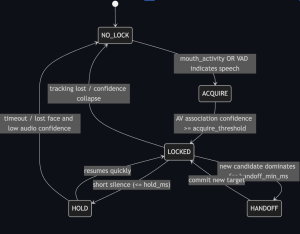
  • Implement VISION_ONLY target-lock behavior (stable acquire, hold, and handoff) to reliably highlight a speaker without audio input.
  • Add basic calibration scaffolding (camera yaw offsets and bearing mapping) so the heatmap corresponds to real angles rather than heuristic visuals.
  • Package a short demo artifact (screen capture + logs) for team review and staff feedback.

Net Result

The vision pipeline is no longer hypothetical. We now have working face and lip detection, a concrete path toward a robust speaking proxy, and repository scaffolding that cleanly supports future lock logic and UI integration without rework.

Team Status Report for (02/07/26)

There are two main risks that could jeopardize the success of our project: delays in receiving hardware components and the possibility that our initial proof of concept does not work as expected. To manage potential shipping delays, we planned ahead by identifying alternative components already available in our inventory so we can continue early testing/proof of concept while waiting for ordered parts to arrive. For technical risk, we are allocating sufficient time to build, test, and debug a minimal working prototype before scaling the system. If challenges arise, our contingency plan is to focus on engineering a simpler version of the design first, then iteratively expand functionality once core performance is validated.

Following our project presentation, we began reviewing our ASR error reduction requirement after Professor Qing questioned how directly it reflects system performance. The concern was that demonstrating a functional prototype may already imply improvements in speech recognition, making the requirement less meaningful as a standalone metric. As a result, we are refining how this requirement is framed so it better represents measurable system impact and aligns with our project goals. This requirement change does not introduce significant cost.

At this time, no changes have been made to the project schedule. Our development timeline remain aligned with the original plan.

Nasir’s Status Report for 02/07/2026

This week I have spent most of my efforts on the Proposal Presentation. I have also been working on finding the exact components that we will need use that are not in inventory. During this search I have found some optimization in certain products that make our hardware requirements very feasible. In some cases I even have pushed our requirements further in hopes of getting better performance. I have also spent time during my status report and the team status report.

I think I am still tracking fine but the mishap this week with group presentations did cause more time to be spent focusing on the presentation slides than expected. This in turn has taken about 2.5 work hours that could have been spent elsewhere but no extreme impedance.

By this weeks end, I want to have a list of all components that we have from inventory and all the exact components we plan to purchase so we can move past the part of questioning which hardware components are being used.

Team Status Report for (01/31/26)

Project Progress and Risks

The main risks that we face in the early stage of our project are related to planning accuracy and technical feasibility. The more important risk is technical feasibility, which could lead to us having long stints of stalling and “working in circles”. We are addressing this  through regularly scheduled meetings outside of class time where goals, roles, and milestones are clearly defined and documented. Our team has focused on developing a detailed roadmap that breaks the project into incremental, testable steps. If unforeseen challenges arise, the contingency plan is to prioritize core functionality and to put stretch goals/features on the back burner.

Design Changes

No changes have been made to the system requirements, block diagram, or overall system specification. Since we have not started physical development, the team has intentionally focused on validating our initial design and refining the project roadmap before locking in design decisions. This approach minimizes the risk of costly redesigns later in the project.

Scheduling

The project schedule remains largely unchanged, as the current phase was allocated for planning and coordination. Progress to date includes the creation of a detailed development roadmap, alignment on team expectations, and consistent meetings outside of class to track progress and address questions.