Bruce’s Status Report for 12.07

This week, I optimized the YOLO-based object detection system by migrating it to a cloud-based solution using the free tier. I constructed an API endpoint, which allow the Raspberry Pi to send images to the cloud for processing and receive responses. The reason for this change is because we run 20 tests on the pi, the yolo itself works pretty great, but when we incorporate other tasks like cv for feedback control, the computational power of pi seems insufficient to do it, and the yolo itself running on pi can cause some computational delay. Therefore, after I switch the yolo to cloud, the pi could distribute more computational power to other tasks, like feedback control for charging pad and gantry system. The cloud running app is registered as services to make sure it is always available, and I test for 30 times, the average detection time is 1.3s, which is below our requirement, and the accuracy is still around 90 percent as we are using the same model.
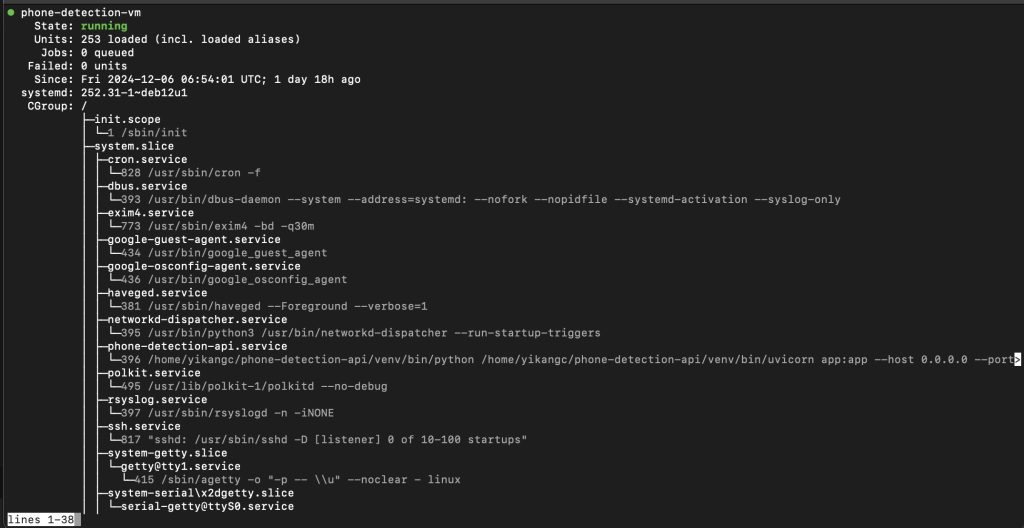
(yolo service on cloud || endpoint:  http://35.196.159.246:8000/detect_phone)

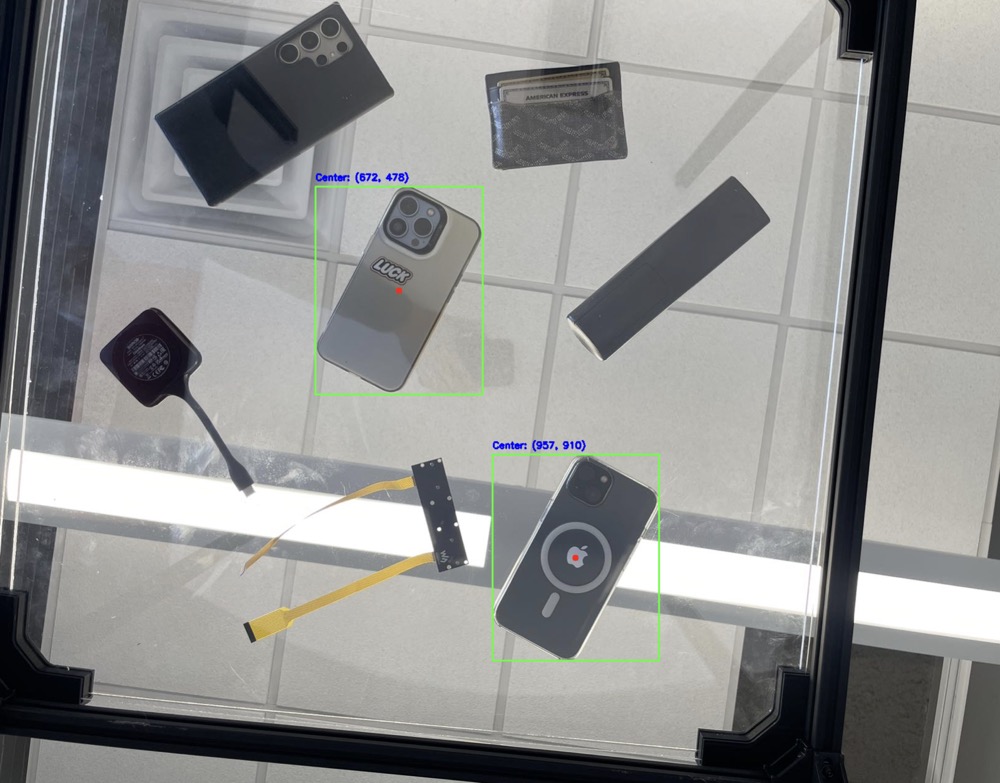
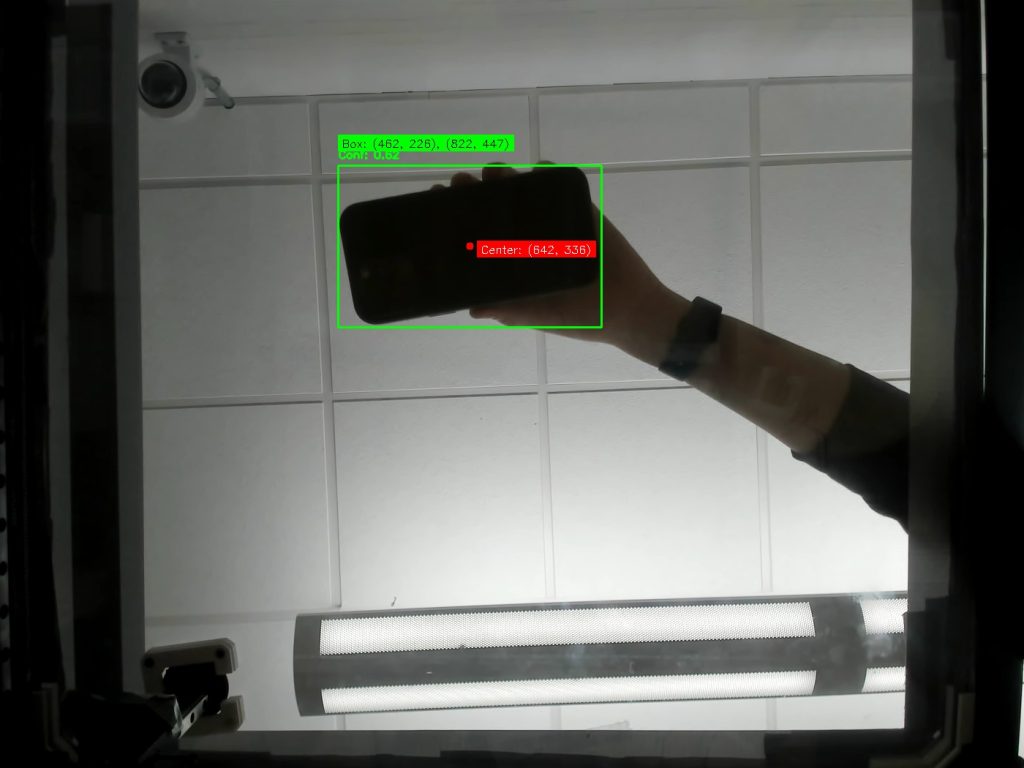
I also improved the vision detection workflow by modifying how images are processed. Instead of sending the entire picture for detection, the Raspberry Pi now sends cropped images representing only the table area to cloud. This change reduced data size and processing time and also improve the accuracy. Additionally, I updated the gantry system’s coordinate calculations to match the revised coordinate system, and we tested for about 20 times, each time the alignment will be within 1.5cm.
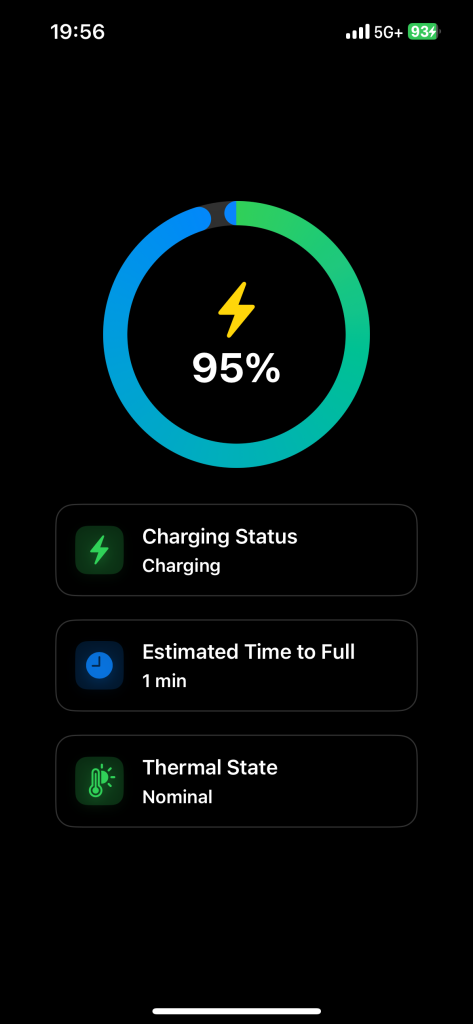
What’s more, in terms of the feedback control, I use computer vision to detect the light indicator on the charging pad as a real-time feedback mechanism. This approach provides immediate feedback on whether a device is charging, which is faster and more reliable than relying on the app. I initially try to read the cloud database from the app, but the app-based feedback system suffers from delayed polling rates, especially when running in the background. Therefore, Incorporating the light-based feedback is a better way to do this. I tested on about 10 images, and there is only 1 time it did not correctly identify the blue light on back of the charging pad(which indicate it is charging), so I may need to still update the HSV threshold value.

As mentioned before, I conducted several unit and system-level tests to evaluate performance and identify areas for improvement. Unit tests included verifying API response times for YOLO processing, ensuring coordinate adjustments matched the new cropped image detection system, and validating the detection of the charging pad’s light under different lighting conditions.

I am currently on schedule, and next week is basically just fixing small bugs and incorporate everything.
Bruce’s Status Report for 11.30

This week I worked closely with my teammates to ensure that the gantry system, a critical component of our design, became fully operational. Together, we collaborated to identify and address mechanical and software-related issues that were hindering its performance. By developing and fine-tuning the gantry control code, we achieved smooth and precise movement, ensuring the charging pad can accurately align with the detected device’s position.

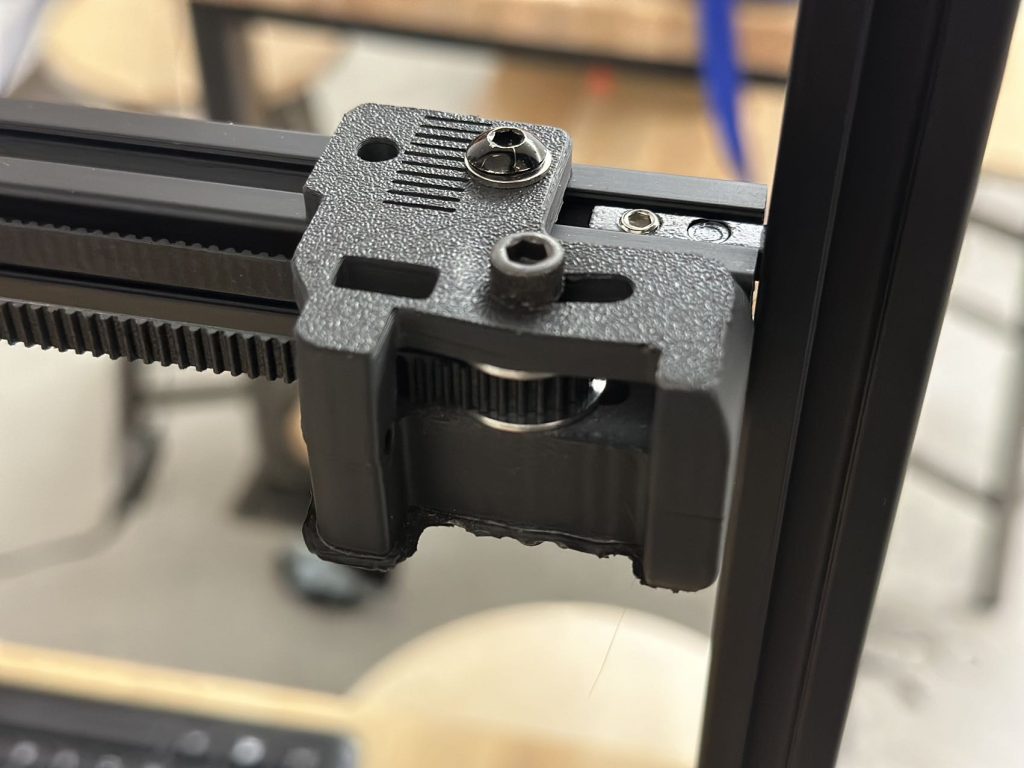
(The problem is the deformation of this 3d part, which makes the belt hard to rotate smoothly)

On the vision system front, I successfully deployed our object detection software onto the Raspberry Pi. During the deployment process, I noticed that the original code caused high latency when running on the Pi’s constrained hardware resources. To address this, I reviewed and optimized the code, making key modifications that significantly improved its efficiency and performance. These changes have resulted in faster detection and response times, which are critical for seamless interaction with the gantry system.

The final step this week involved integrating the software and hardware subsystems to evaluate the entire system’s functionality. I conducted extensive testing, including a comprehensive suite of unit tests to ensure the individual components were functioning correctly and integration tests to validate the interaction between subsystems. These tests demonstrated promising results, with the system operating effectively and meeting our performance expectations.

I am currently on schedule. there isn’t many specific tasks left for next week, since we have done most of them. Therefore, for next week, I am going to focus on testing, and resolve some minor issues for system integration.

Bruce’s Status Report for 11.16

This week I focus on charging app development and CV development, and did some testing related to the subsystem.

Charging App Development

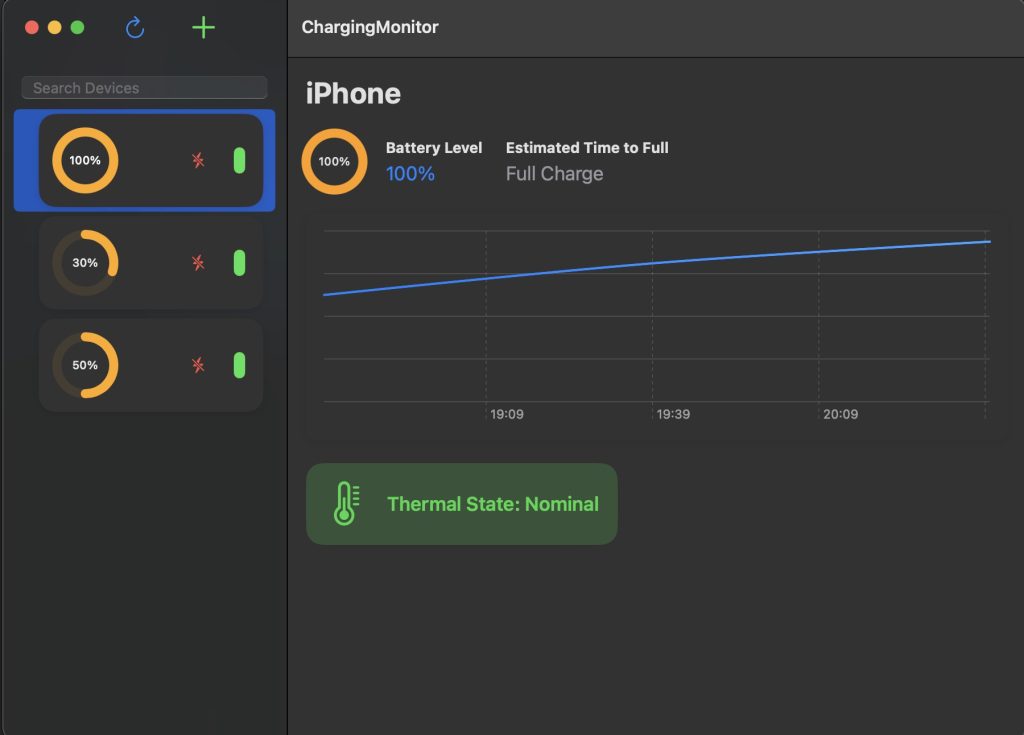
  • Completed the development of the iOS and macOS apps, enabling users to monitor their phone’s charging status in real-time.
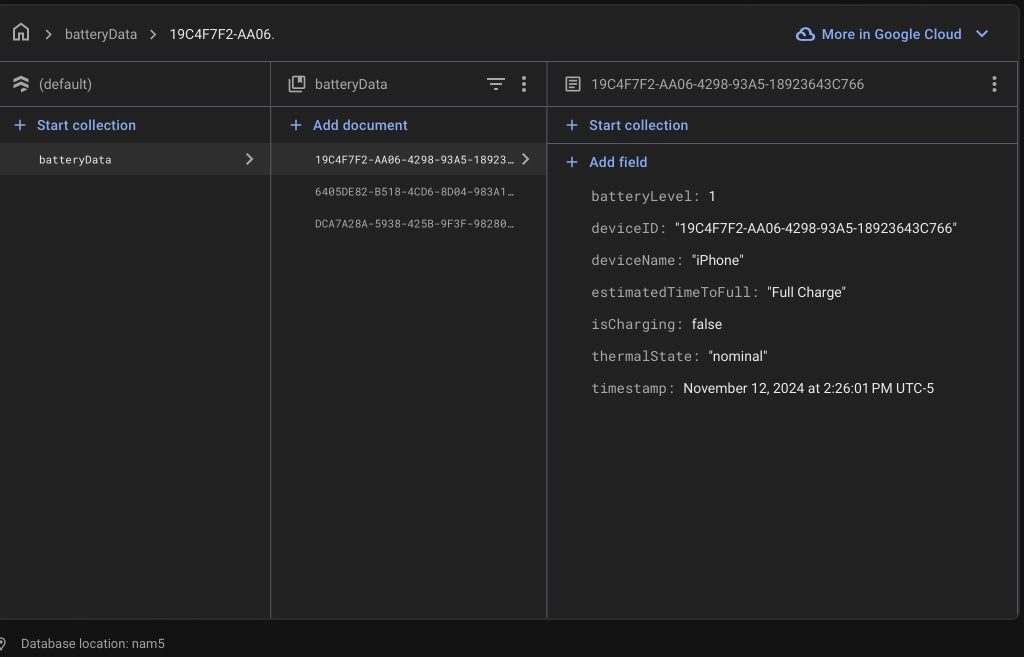
  • Successfully integrated Google Cloud Firebase storage, providing a centralized system where users can view and manage the charging statuses of all their devices from the macOS app.
  • Added features to enhance the user experience, such as real-time updates and seamless synchronization across devices.

    Computer Vision System
  • Finalized the object detection module, achieving approximately 90% accuracy in detecting phones on the table.
  • Implemented a two-frame difference technique to identify significant changes between video frames, signaling the potential placement of a phone, and also avoid using yolo model at all frame to save performance.
  • Incorporated a YOLO model to confirm the detection, identify the phone, and calculate its center coordinates for precise localization.
  • Enhanced the detection pipeline to minimize processing time while maintaining high accuracy.

The project is on track, with key software systems functional and aligned with the project timeline. Significant progress has been made on both the app and vision subsystems, ensuring they are ready for integration.

Next Week’s Plan:

  1. Enhance Charging Pad Stability:
    • Focus on improving the stability and reliability of the charging pad system to ensure consistent wireless charging performance.
  2. Optimize Phone Detection:
    • Fine-tune the YOLO model to reduce false positives and further improve accuracy.
    • Test the system with various phone models and orientations to enhance robustness.
  3. Integrate Vision and Gantry Systems:
    • Begin integrating the computer vision system with the gantry system, enabling the seamless transfer of phone location data to control the movement of the charging pad.

Test the communication between the vision system and Raspberry Pi to ensure smooth coordination.

Testing
Software Testing (iOS and macOS Apps) (Already did):
Ensure real-time updates of charging status for multiple phones through Firebase. Therefore, for this test, we need to test multiple different devices (iPhone 12 Pro, iPhone 13 Pro, iPhone 14) charging simultaneously, and we need to measure the time taken for status changes to reflect on the apps and repeat for 10 times. The test result shows an average update delay <500 million seconds, meeting real-time requirements, and it verified seamless synchronization across iOS and macOS platforms.

Data Consistency Testing (Already did)
Verified data consistency between Firebase and app interfaces by making real-time changes to device charging status and observing updates on both IOS and MacOS platform. The test was conducted 15 times, and the data are all consistent and updated in a very short time period. (< 500 milliseconds)

Object Detection Accuracy Testing (Already did)
Evaluated the accuracy of the YOLO model with a dataset of 3 phone placements in various conditions such as different lighting, orientations, and phone models. The test was conducted 20 times, and in 18 of the times all phone locations are correctly identified, achieving an overall detection accuracy of 90 percent with occasional false positives for phone-like objects.


Bruce’s Status Report for 10.26

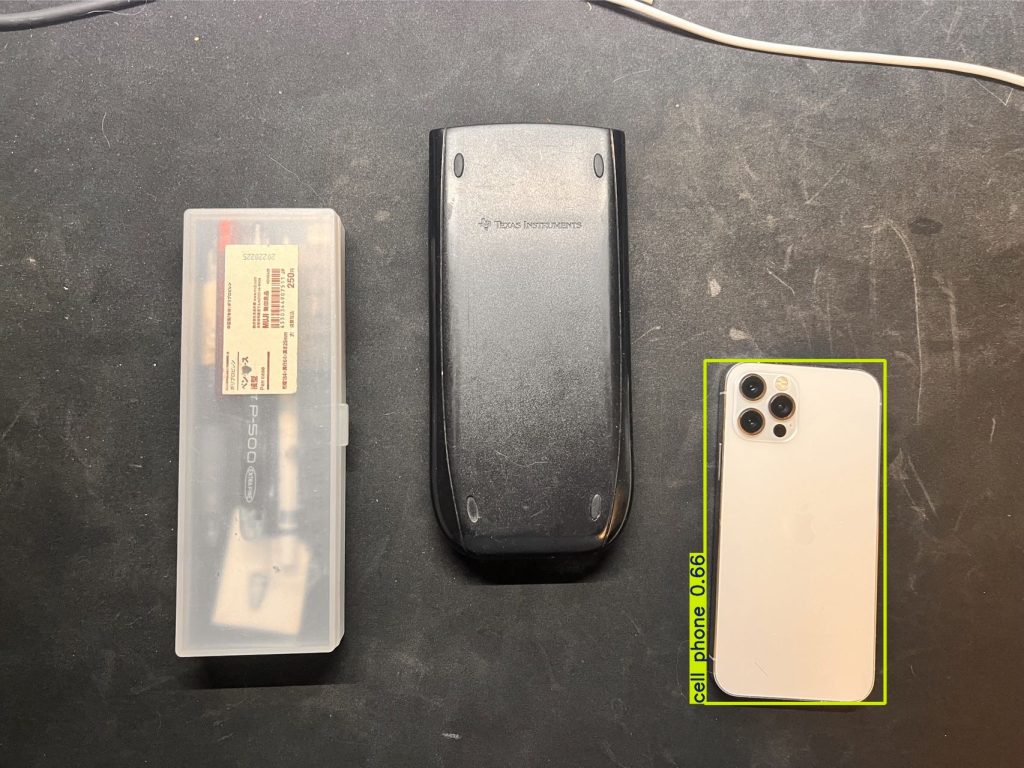
This week, we received our Stereo Camera module (NVIDIA JETSON NANO/XAVIER NX, DUAL OV2311 Monochrome Camera Module). I tested the existing phone detection algorithm which I developed last week, implemented with YOLO, on the new camera hardware. Initial tests indicated a slight drop in detection accuracy, with only 12 out of 15 tests successfully detecting the phone’s location. To address this, I am currently retraining the YOLO model to better suit the parameters and specifications of the new camera setup.

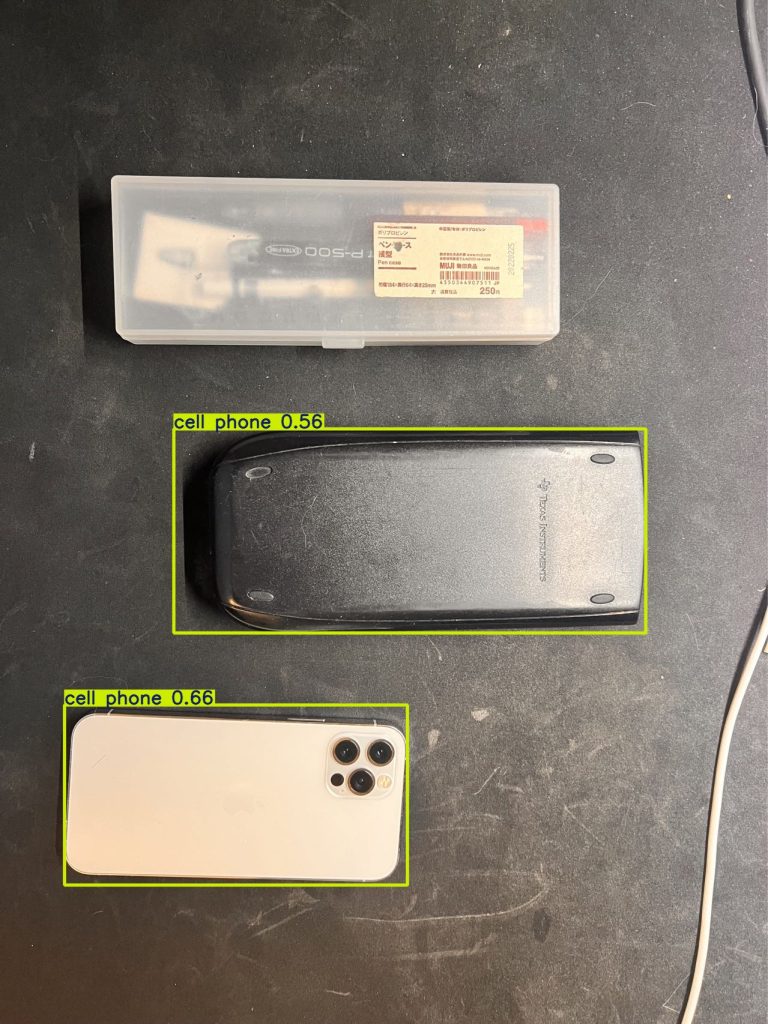
(As shown above, the current Yolo model detects the calculator as an cell phone)

Next, I finished the project’s ethics documentation, focusing on our commitment to public health, safety, and welfare. This report outlines the ethical considerations for the smart charging table, ensuring that we adhere to necessary standards.

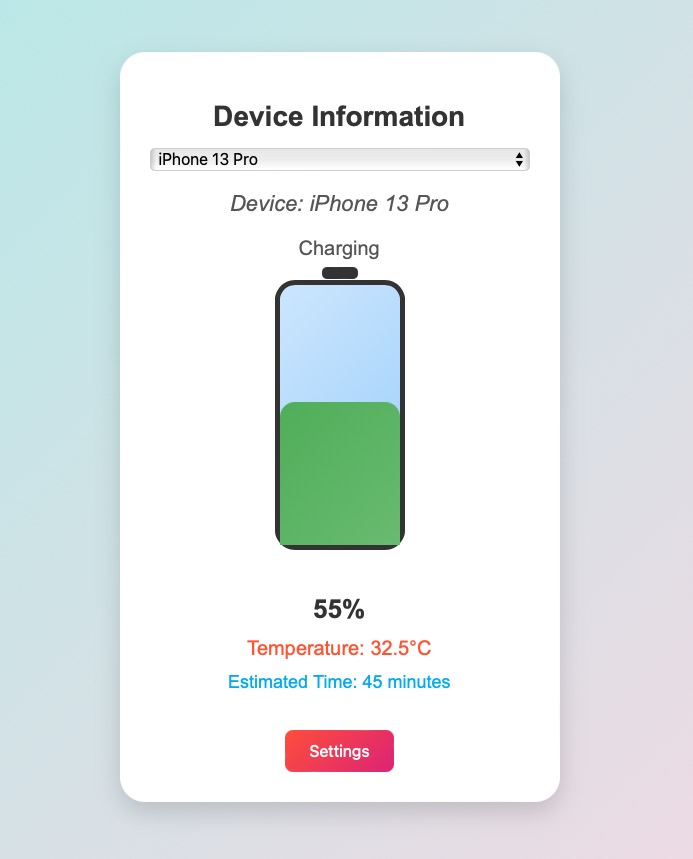
Then, I improved  the software app by integrating the Phone API. Before, I have designed the UI of the software, but the values shown is a preset values. Now I have successfully call the iPhone API to demonstrate the device information, which allows the UI to display actual phone temperature and charging status instead of using preset values. The update offers a more realistic demonstration of the charging process.

I am currently on schedule with our project timeline. Each milestone this week has contributed to refining the system’s functionality and user experience, ensuring that our project objectives are met.

Next Steps:

Continue Training the YOLO Model to improve detection accuracy with the new camera.

Further Test and Validate the Updated UI, ensuring data accuracy for all phone models.

Collaborate with the Team to begin designing the gantry system with the camera-based detection system, ensuring seamless communication with the central unit (Jetson Nano) once all our parts arrived.

Bruce’s Status Report for 10.20

The first task I completed was finalizing the system implementation and testing plan in our design report. This is a crucial document that will guide the integration and verification processes for the project’s three core subsystems: the gantry system, vision system, and charging system. The plan outlines detailed steps for ensuring that each subsystem functions as expected and interacts seamlessly with the others. For instance, the testing plan includes scenarios that simulate real-world usage conditions, such as cases where the phone might be placed at varying orientations or positions on the table, or where the gantry system must make rapid adjustments. It also includes edge case testing, ensuring that the system can handle situations like multiple phones or objects being placed on the table simultaneously.

In parallel, I worked extensively on the computer vision system. Using the YOLO (You Only Look Once) object detection algorithm, I developed the first version of our vision system, which is capable of identifying the location of a phone on the table with an accuracy rate exceeding 90%. Since our parts have not arrived yet, I use my own camera to take pictures and detect the existence of the phone. In order to simulate the charging table situation, I intentionally make the phone face down, so the camera is taking pictures of the back of the phones.  The first version implementation ensures the system’s ability to detect phones reliably in most situations, which is essential for the proper functioning of the gantry system. The YOLO algorithm, known for its speed and precision in object detection, was trained on a custom dataset that reflects the specific conditions of our table—such as the camera angle, lighting conditions, and various phone models. I dedicated significant time to training the model and testing it against different cases to ensure accuracy, and the results so far have been very promising. The system is able to successfully detect phones in a variety of orientations and under different lighting conditions, which provides confidence in its real-world application. However, there is still room for optimization, particularly in reducing the time it takes for the system to process each frame and communicate the phone’s coordinates to the gantry system. It is also possible to improve the accuracy in some edge cases, such as when the light is not sufficient or too strong.

I have made several iterations of testing, refinement, and retraining to reach the desired accuracy level. I invested time in adjusting hyperparameters and improving the training dataset to enhance the system’s performance. Moreover, I spent time debugging certain cases where the system initially struggled to detect phones placed at extreme angles or partially obscured by other objects. These issues have largely been resolved, and I am confident that the system is now reliable enough for initial integration with the gantry system.

At this stage, I am happy to report that my progress is on schedule. The development of the vision system and completion of the design report are major milestones that were planned for this week, and I am confident that we are moving forward according to the timeline we established. The next step will be to begin the process of developing other systems as soon as our parts arrived. Also, I would continue to improve my algorithm for the vision system and continue developing the app for our smart charging table.

In terms of deliverables for next week, my focus will be on continue to develop the app we have right now.  Additionally, I plan to work on optimizing the vision system. While the system currently performs well, there are improvements that can be made in terms of speed and accuracy, particularly in handling more challenging scenarios like detecting phones in low light or at difficult angles. Reducing the latency of the system’s response is also a priority, as faster detection will allow the gantry system to move more quickly and efficiently.

Bruce’s Status Report for 10.5

This week, I took on the role of presenting the design introduction for our project. To ensure a smooth delivery, I thoroughly prepared my part, focusing on clearly conveying the main concepts and design rationale. I spent significant time rehearsing the presentation and refining the slides to make sure they were visually engaging and easy to follow. I also gathered feedback from my teammates during practice sessions to further improve the clarity and flow of the content.

In addition, I was responsible for selecting the components for the charging pad module in our purchasing list. I researched extensively to determine the best options for our charging system, comparing various models and their specifications to ensure compatibility with our requirements. I also coordinated with my teammates to finalize other essential components, such as mechanical parts, ensuring our choices align well with the overall design and meet the project’s technical needs. This involved multiple discussions and iterations to balance cost, availability, and performance.

Lastly, I made improvements to the existing features of our app. I implemented a communication protocol that now allows the app to connect with other devices via WiFi, enabling real-time data exchange and expanding its functionality. Additionally, I started investigating the iPhone API to access information about temperature and charging status, which will further enhance the app’s capabilities. I looked through the API’s documentation and experimenting with different methods to retrieve the relevant data effectively. These improvements aim to make the app more user-friendly and provide more comprehensive information to users, preparing for our final design.


I am currently on schedule, and for the next steps:

  1. Finalize the purchase of the selected components and begin testing their integration into the system.
  2. Continue refining the app by completing the implementation of the iPhone API to gather temperature and charging status data, ensuring seamless integration.
  3. Work on the prototype of the charging pad module to verify its functionality and compatibility with the rest of the system.
  4. Collaborate with my teammates to set up a testing environment for the system, allowing us to identify any issues early and iterate on improvements.

Bruce’s Status Report for 9.28

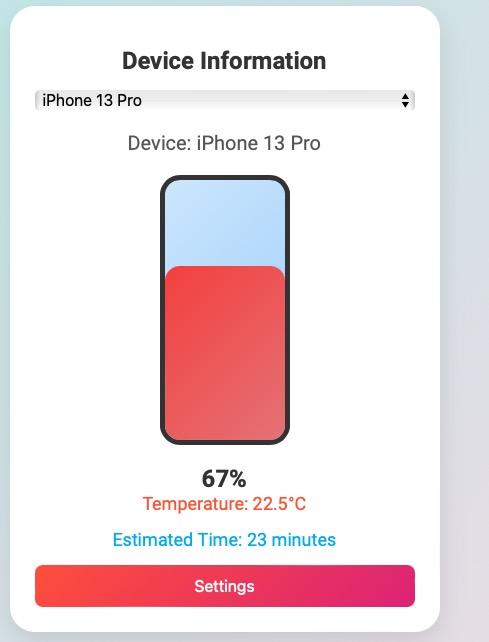
This week, I focused on creating a working prototype of the mobile app that will interface with our smart charging table. The app is designed to display essential information, including:

  • Charging Status (whether the device is charging or not)
  • Device Name (currently connected device)
  • Battery Percentage (real-time battery level)
  • Temperature (monitoring device temperature)
  • Estimated Time to Fully Charge
  • Settings (for customization and additional functionality)

The prototype was developed using HTML, CSS, and JavaScript, offering a sleek and intuitive user interface. The app will be the central communication tool between the table and the user, allowing real-time updates on charging status and other metrics. It will also serve as a feedback to the whole system, so that we know whether the phone is charged, and whether we need to adjust the charging pad position.

Coordination on Final Design

I had multiple discussions and feedback sessions with my teammates, and we finalized the core design of the system:

  • We are opting for a gantry system to move the charging pad to the desired location.
  • Instead of attaching the charging pad directly to the gantry or a robot arm, we decided to make the charging pad constantly powered. This pad is placed between two layers, and the gantry system will use magnetic forces to move it to the correct position for charging the device.
  • This approach reduces mechanical complexity and ensures constant power flow to the charging pad, making the system more reliable and efficient.

Component List and Part Sourcing

This week, I also started working on assembling the component list for our smart charging table. This involved:

  • Researching suitable parts for the gantry system, such as motors, magnetic components.
  • Evaluating charging pad technology that can be integrated seamlessly into the table and be constantly powered without overloading or power loss.
  • Ensuring that all components align with our design constraints, including size, power requirements, and budget.

Design Presentation

In addition to technical work, I began working on some parts of the design presentation slides. Some of the parts I worked on:

  • Overall concept and design goals.
  • The functionalities of the smart charging table, with visuals of the app interface and how it will communicate with the table.
  • A detailed explanation of how the gantry system and magnetic movement will work.

This presentation will help convey our design decisions and ensure that everyone is aligned as we move forward with implementation.

I am currently on schedule.

Next Steps:

  • Finalize the component list and begin buying parts.
  • Add more features to the APP.
  • Start implementing the communication between the app and the table’s hardware.

Bruce’s Status Report for 9.21

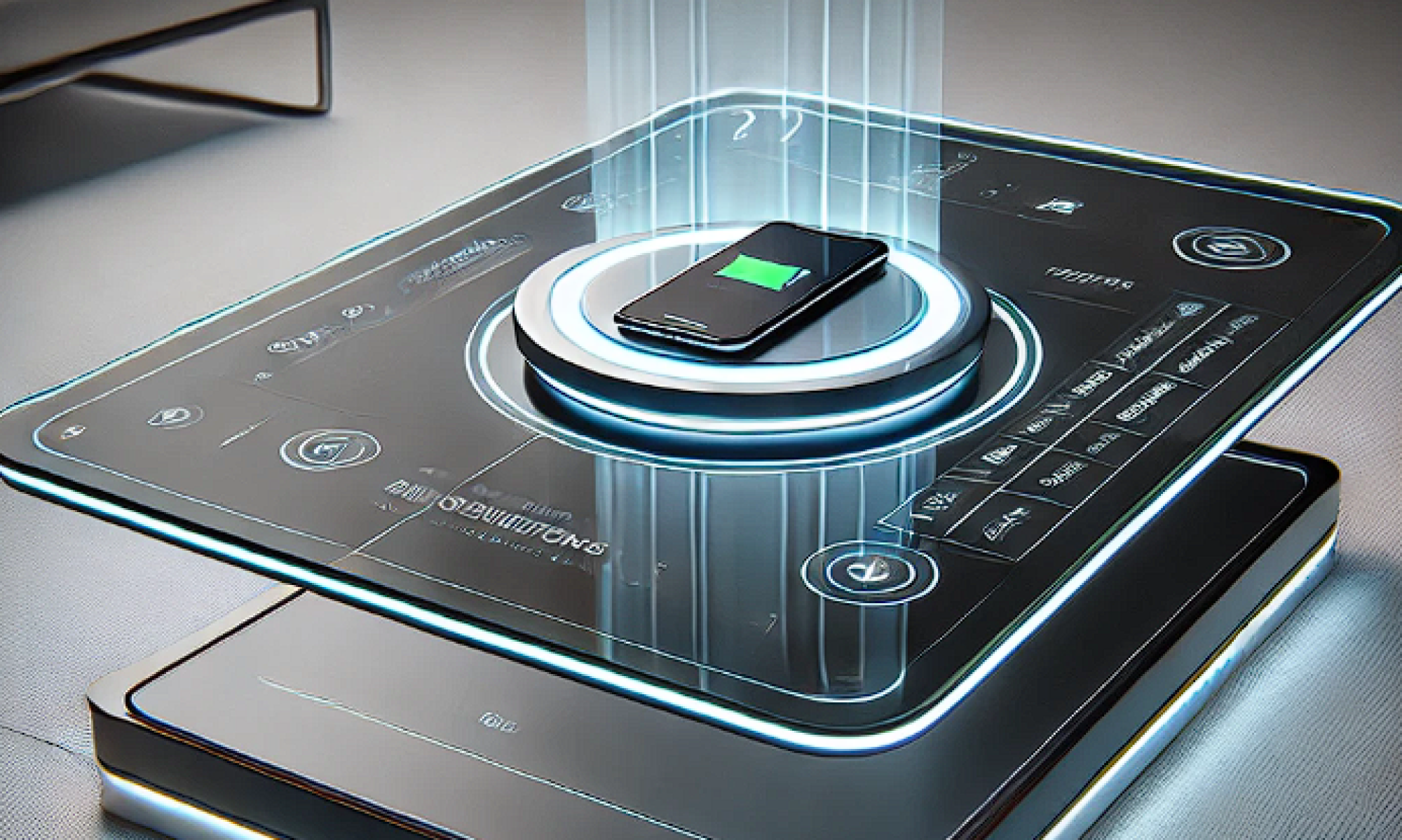
Overview: This week, I focused on key elements in the design and development of our smart charging table project. The core goal of the project is to create a system where robots underneath the table can automatically locate a smartphone (or other Qi-enabled devices) and initiate charging seamlessly. I contributed by researching potential solutions, designing the system architecture, and preparing the project’s presentation material.

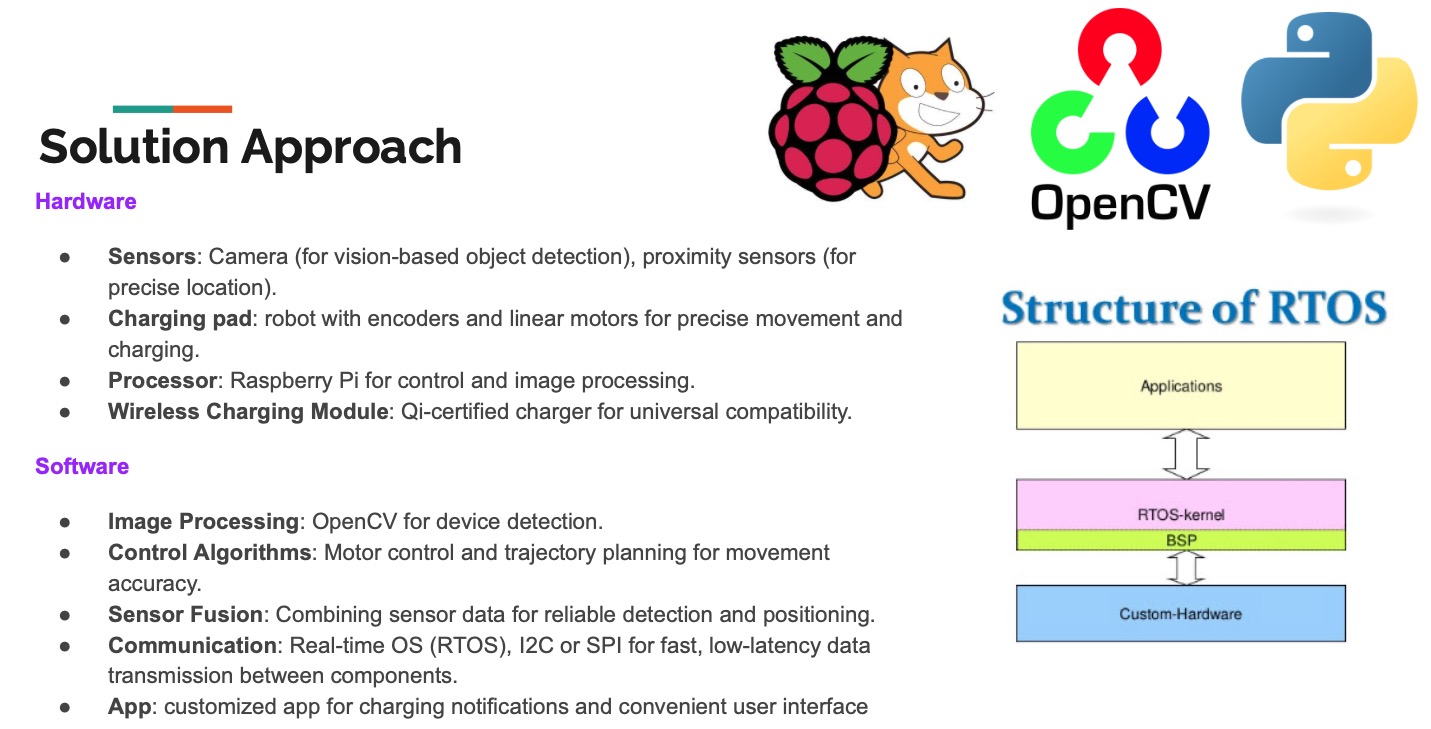
I took the initiative to research possible technical solutions for both the hardware and software layers of the project. Key aspects I worked on include:

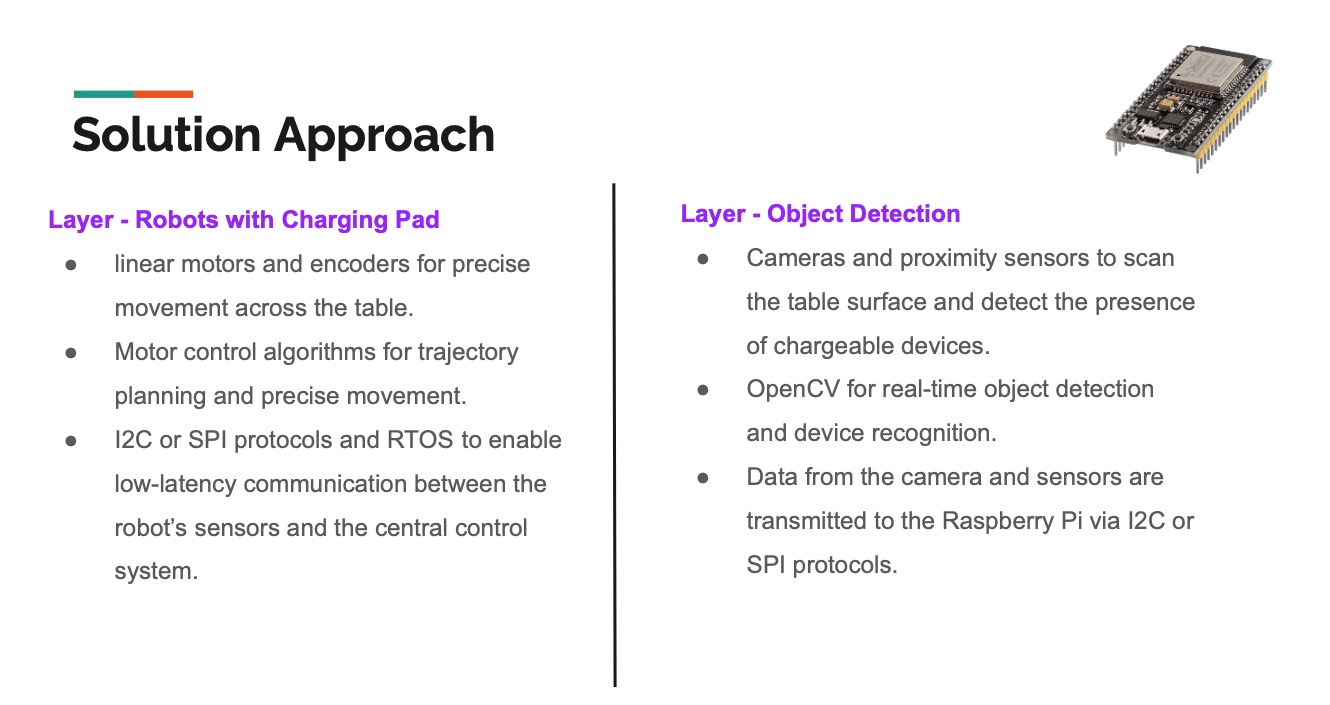
  • I devised a system approach where there is a separation between object detection (handled by the upper layer) and charging pad movement (managed by the lower layer). This dual-layer system ensures efficient detection and charging.
  • I proposed integrating cameras and proximity sensors for detecting devices. I identified OpenCV as the tool for real-time object detection and suggested the use of sensor fusion techniques to enhance detection accuracy.
  • For precise movement, I researched the use of linear motors and encoders to achieve the required sub-centimeter accuracy in the robot’s movement. I also identified control algorithms that would optimize movement planning and trajectory.
  • Based on the system’s needs, I suggested using real-time operating systems (RTOS) with I2C or SPI communication protocols. This would allow fast and reliable data transmission between sensors, motors, and the central processing unit (Raspberry Pi).
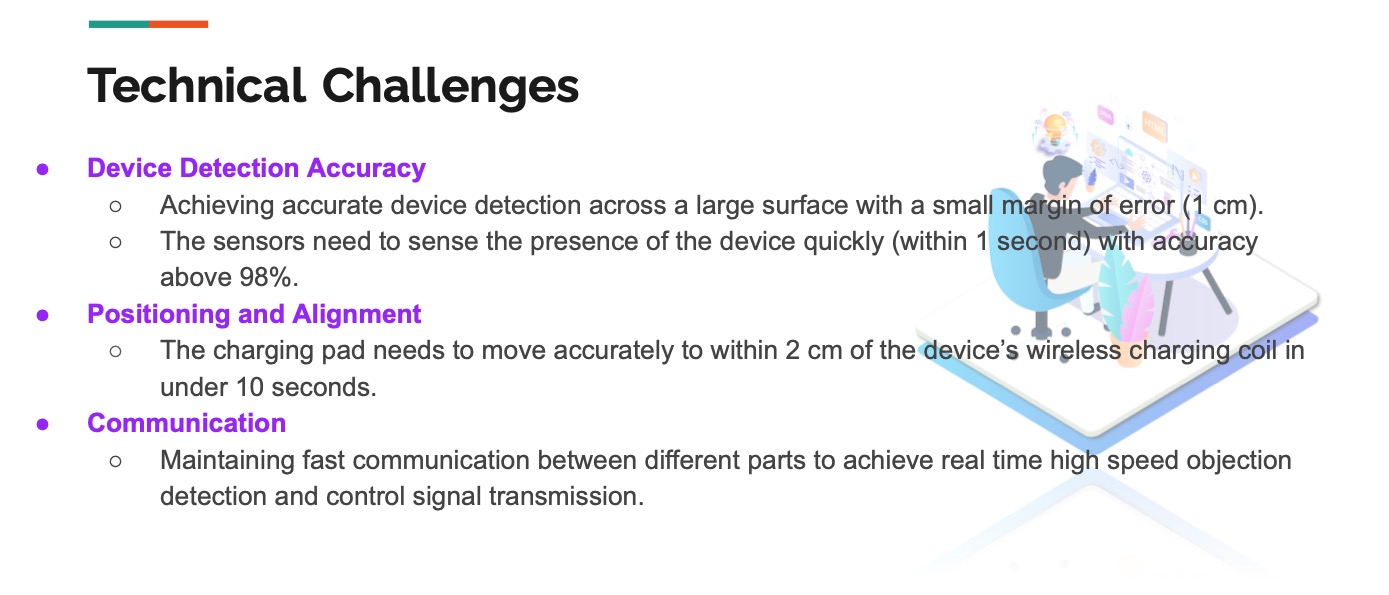
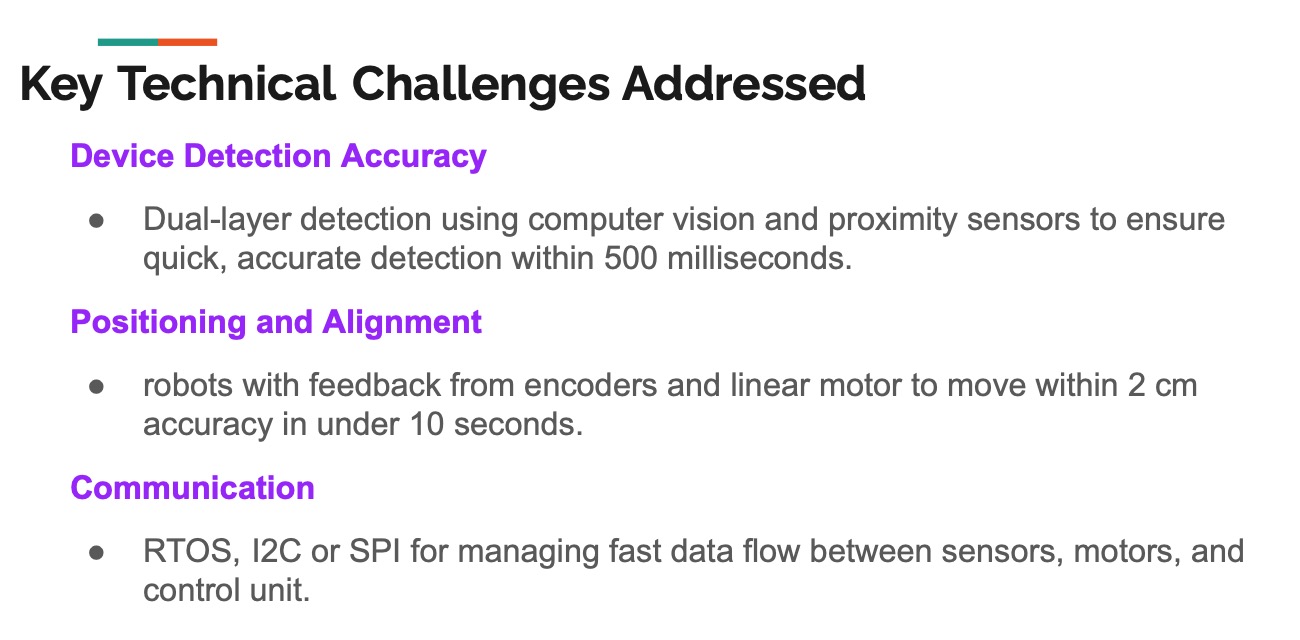
  1. While preparing for the project presentation, I identified the main technical challenges, including:
  • Device Detection Accuracy: I emphasized that the system needs to detect devices across a large surface area with a margin of error of less than 1 cm. My proposed solution involves dual-layer detection using both computer vision and proximity sensors to enhance speed and accuracy, targeting detection within 500 milliseconds.
  • Positioning and Alignment: I helped define that the charging pad must align with the device’s wireless charging coil within a 2 cm accuracy range in under 10 seconds. The encoders and feedback system on the robot will ensure precise alignment.
  • Communication Efficiency: I addressed the importance of high-speed communication between the sensors and the control unit, ensuring low-latency data transmission using I2C or SPI protocols.
  1. Minimum Viable Product (MVP): As part of the MVP, I along with my other teammates outlined the essential features that need to be completed for the first iteration of the smart charging table:
  • A three-layered table system, including a transparent surface, the robot movement platform, and the camera hub for object detection.
  • An automated device alignment system using dual sensors to detect and position the charging pad within a 3 cm range of accuracy.
  • Integration of a basic Qi-certified wireless charging module providing up to 15W power output.
  • A feedback control system to monitor and update system parameters in real-time.
  1. I created the PowerPoint presentation used to explain the system approach, technical challenges, and proposed solutions. I ensured that the slides clearly outlined the hardware, software, and layered approach that the project will follow.
      
  2. I worked closely with the team to review our progress and ensure that we are all aligned on the next steps. I also facilitated discussions to resolve any design issues, particularly regarding motor control and sensor integration. Feedback was incorporated into both the presentation and the technical documentation.


We are currently on our schedule.

Next Steps: For the upcoming week, I plan to focus on the following tasks:

  • Begin prototyping the detection system using OpenCV and test proximity sensors with the Raspberry Pi.
  • Finalized the component list and start design the system.
  • Refine the MVP features based on the system and iterate the design as necessary.