Harry’s Status Report for 12.07

Based on our final presentation, the remaining for us contains software (gantry system tracking, alignment feedback control) and hardware (workload test and cable management)

For the past week, after our presentation on Wednesday, we begin to test on charging pad alignment with the camera. The work I completed (primarily with Steven together for the hardware part) contains:

  1. Test original center manipulator. Use test code to let center manipulator drag the charging pad. However this configuration is not stable: sometimes can’t successfully drag; center manipulator very unstable with PLA shaft and rail. We tested for around 20 times, and around 8 times the center manipulator can’t successfully drag around the charging pad with wire. Therefore, we intend to modify the material of the center manipulator, the design of corner fasteners as well as the charging pads.
  2. Change to steel rail and shaft. Change screwing methods. Fix the shaft and rail right to the center manipulator. These changes are made to ensure the center manipulator is very stable and can successfully drag the charging pad.
  3. Help with corner fastener redesign and charging pad structure redesign.
  4. Help with software integration tests. Camera detect phone –> gantry move charging pad to the position of the phone –> start charging. Still tuning
  5. We increased the distance between the two glass boards. Increased the height of the charging pad. This makes sure the type C wire does not come out the charging pad at the bottom. 20 trails were implemented and 18 trails completed. One fail trail the charging module was not fixed well to the charging pad. The other fail trail the manipulator failed to drag the charging pad.
  6. Fine tuning of the CV system was also implemented. We placed the camera at several different positions to ensure it can view the whole top of the table. Based on the fixed position of the camera, we record the position and begin to fine tune the movement of center manipulator. We transform pixel distance to real world distance and change input values for fine tuning,

Next week: Video, poster, final report ongoing. Overall on time. Still a lot of paper work to do.
Harry’s Status Report for 11.30

The work I finished for the past week is described as below:

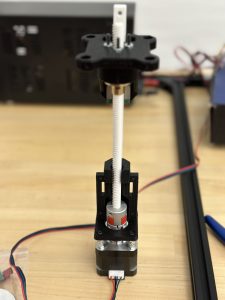
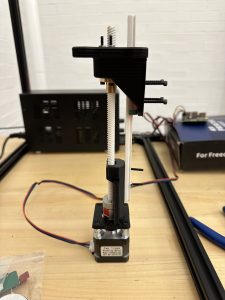
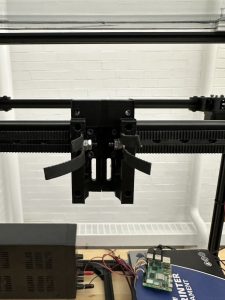
  1. Center part design/printing/purchasing/assemblyAssembled center part. Contains stepper motor, base, shaft, rail, upper part. The rail and the shaft are printed. Steel made rail and shaft are ready for cut (will be performed in machine shop). The upper part (primarily for charging pad attraction using magnets and movement) can move up and down on the shaft. Video was taken. This part is fixed onto the center manipulator as shown below: 
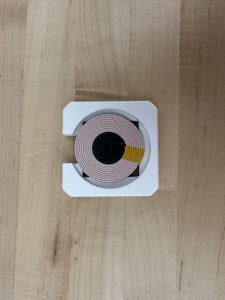
  2. Charging pad (charging pad was reprinted two times before it can work as intended) Steven will show in detail regarding charging results.
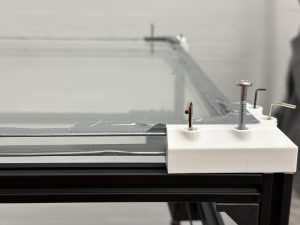
  3. Acrylic boards are replaced by glass boards and are fixed to the top of the table. Corners are reprinted to make sure they matches with the size of the glass board as well as the height of the charging pad
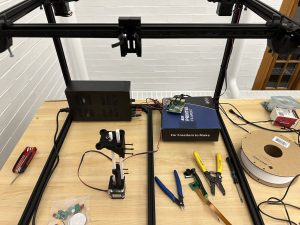
  4. Whole system overview with motor drivers fix into a box.Power supply under the table. All hardware parts completed. Assembled and tested for many times. Gantry runs good with odometry, can operate in all x, y and z axis. Center manipulator can drag charging pad around using magnets. 
  5. System integration already began. Camera control gantry movement. Bruce will update on this.

Tools and knowledge needed to accomplish these tasks:

  1. Mechanical design skills
  2. Understanding of Rpi programming logics (eg: gpio),
  3. Gantry system principles
  4. Testing and troubleshooting methods: hw, sw, meche, external force
  5. Quick 3d printing skills
  6. system integration skills, how to connect sw, hw and meche together. How to control the subsystems.

learning strategies

  1. Online documents blogs for Rpi use
  2. Online videos for specific motor driver use
  3. Rpi/Motor/Motor driver operational manual
  4. Consult other students, professors

We will continue system integration and work on slides.

Harry’s Status Report for 11.16

First, the manipulator for the center part (moves up and down) is drawn and printed. Shown as below:

The third motor will allow the center part to move up and down. The motor will be connected to a shaft. We will obtain the shaft when the central manipulator is printed out.

This week we focus on the gantry system by combining all the printed parts. We went to the machine shop to cut the aluminum extrusion, the rail. We use zip ties to tighten the belt. we test x-axis and y-axis and the gantry can move very smoothly on both axis.

Large amount of time was put into gantry testing. The belt vibrated a lot at the beginning but we found out the problem was caused by nails and belts that are not tight enough. Many trails were implemented and now the gantry can move without restriction quietly.

Steven and I worked on the gantry system together this week and more details will be included in his report. Notice we made the whole gantry system together so there isn’t clear work division between us. Since the gantry system is quite complicated, two people are needed to complete it.

Next week, we will begin assemble the center part for z-axis movement testing. Charging pad holder will be redesigned ant printed. Camera will be introduced to combine with the existing gantry part.

Verification

  1. Gantry System: gantry system can move freely and smoothly on x and y axis. This situation is desired. We let the gantry move forward and backward a lot of times to view the movement. We intend to ensure the gantry is move straight back and forth without pause and stuck. The part we did aligns with our goal for gantry system design. However, because our gantry system can only operate on x and y axis, the system requirements is not fully met until the central manipulator is built and tested.
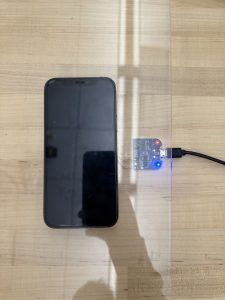
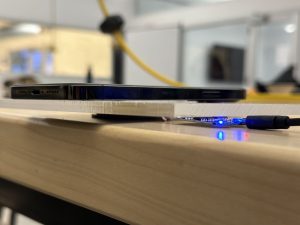
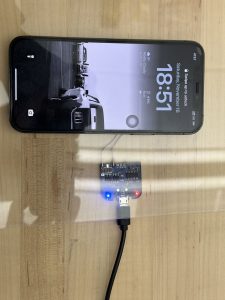
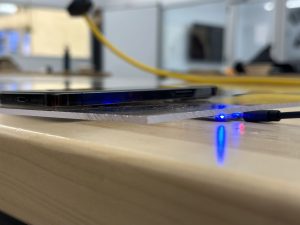
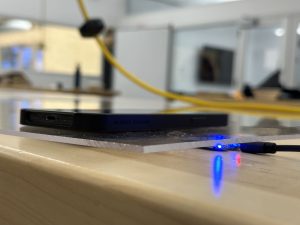
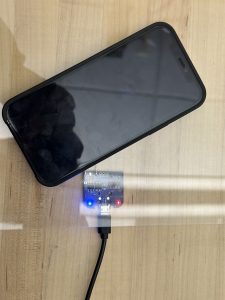
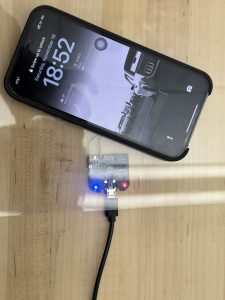
  2. Charging coil: We bought two types of charging coil and verified them  1) they can charge the phone when placed beneath the acrylic board. 2)The phone does not heat up to a very high temperature. As shown below when the blue light turns on, the phone is being charged. When the red light is on, the phone is not charged. For the 3mm acrylic board, phone can be charged with back cover or non precise alignment. For the 5,, acrylic board, phone can be charged without back cover. Relative precise alignment is needed.      5mm board:   3mm board:   This meets the design requirement of successful charging. Further data will be obtained regarding the time to fully charge the phone.

Harry’s Status Report for 11.9

This week I primarily work on the gantry system of the charging table, details are demonstrated as below.

Gantry Overview:

Front Corners (they are the same) are compose of 3 pieces:

Bottom:

Top:

Corner Tensioner:

These three pieces already submitted for 3D printing.

Rail Slider – Magnetic system Connector:

Block that fix the left and right end of the magnetic system rail:

Motor Side Corner:  (bottom layout, cap, and tensioner) the other side is symmetric to the side displayed as below:

Magnetic System will be further developed next week.

Overall progress on track.

Plan to finish most parts of the gantry system before next demo.


Harry’s Status Report for 11.02

This week I primarily work on the structures of our charging table. On Monday and Wednesday, the last few parts we ordered arrive so we could have a clear view regarding the components we purchased.  I examined the aluminum extrusions that will be used to form the frame of the table then studied on parts that could connect them. I used Fusion 360 to draw out some important parts as described below.

  1. Table upper corner: this part is used to hold the two transparent thin layers(either  acrylic or glass)   This component had already been submitted for printing at TechSpark on Thursday. We will gather the four pieces on Monday for further testing.
  2. Transparent layers side holder (further support two layers)
  3. Charging pad holder (will place the coils inside the groove and on the bottom of the charging pad holder will have magnets that allows connections with gantry system) 

3. Bottom corner


Overall, our progress is on time. Next week we will continue to perform on testing on difficult mechanical parts and consider parts that may not be good to be printed. We will then purchase them online. We will build the structure as fast as we can. Electronic parts testing will also go on.


Harry’s Status Report for 10.26

This week we have obtained the camera borrowed from 18500 Inventory: Stereo Camera NVIDIA JETSON NANO/XAVIER NX, DUAL OV2311 Monochrome Camera Module. The specification of the camera can be obtained from the following website: https://www.arducam.com/product/arducam-2mp-stereo-camera-for-raspberry-pi-nvidia-jetson-nano-xavier-nx-dual-ov2311-monochrome-global-shutter-camera-module/

The Arducam 2MP Stereo Camera MIPI Module is tailored for integration with the Jetson Nano/Xavier NX platforms, enhancing our capabilities in stereo vision for applications like depth sensing, 3D mapping, and SLAM. This module incorporates two synchronized 2MP monochrome global shutter OV2311 image sensors, providing high resolution and sensitivity essential for precise depth information. It connects via the MIPI CSI-2 interface and operates with V4L2 camera drivers. Although it can achieve frame rates up to 50fps at 3200×1300 resolution, it does not support ISP processing on the Nvidia Jetson platform. We must utilize external image processing tools and applications that comply with the V4L2 framework. The camera module includes a selection of mounts and cables, but does not come with the Jetson board itself. Therefore, we are working on our openCV code for the camera, currently using Gaussian Blur for image smoothing and the Sobel Operator for edge detection. After the code done early next week we will begin testing on the camera.

Apart from the camera as well the testings for Jetson Nano, I spent a long time together with my teammates to go over the design review report. During last week’s meeting, many problems with our design report was pointed out and we need to fix all of them. For some of them we do have a clear idea while for the remaining parts we still need to consult professors and TAs. We will continue refining our design review report next week.

Overall, my progress is on schedule. For the next weeK, I plan to continue the testing on the camera we obtained last week.  At the same time, as mentioned earlier, our motors and linear rails have arrived. We will begin to divide the work and start cutting rails and construct the gantry system. For the motors, we will start testing next week as well.

Harry’s Status Report for 10.20

During the week prior to the fall break, we focused on our design review report for the project. I completed the use case/design requirements, design trade studies, and related work parts.  In the related work part, I looked into the team that has a similar project last year, discussed their problems and ways we could do better.  Some of these thoughts are reflected in the trade studies part because we modified our design several times to combine the gantry system and robot ideas.

Also, we received our central control unit: Nvidia Jetson Orin Nano. At the same time, we tested some basic circuits during the class time at Techspark. Also, we implemented some testing on the camera we have because we haven’t got the ordered camera yet. We looked into come basic implementation regarding image filtering and segmentation and we will continue to work on our original camera next week. After we got the Stereo Camera Nvidia Jetson Nano, we will compare these two devices and pick the one that is easier to program.

For me, this week I mainly familiarize myself with the Nvidia Jetson Orin Nano. There are detailed descriptions on Nvidia website regarding the ports names and usage. With my own keyboard and monitor, I’m able to connect the Jetson Nano with them using the DisplayPort connector. Then I was able to begin programming. At the same time, I gathered info about the gpio header pinout.

https://jetsonhacks.com/nvidia-jetson-orin-nano-gpio-header-pinout/

I followed this pinout to implemented some basic testings, for example use wires and breadboard to light up and LED, power a motor driver, etc. Also, this pins support UART, SPI as well as I2C communication protocols. I also test the existing camera with the Jetson Nano to complete some basic image filtering. It works now but I believe further testings should be implemented because this time I randomly take pictures. Detailed testing regarding taking pictures from the bottom to view the electronic devices on top of the table should be taken into consideration. We only confirmed there are transparent acrylic boards in Techspark but haven’t test them together with camera. I also dig into camera settings and found that environmental lights may also affect image filtering results, so we assume this table is placed indoor without too strong light from the top.

Overall, my progress is on schedule. During this week I begin to familiarize myself with Nvidia Jetson Nano and implemented some basic testings. Next week we will combine the Jetson Nano with components that will arrive. We will continue to develop the image filtering code with our existing camera. At the same time we will begin to construct the gantry system as well after receive the corresponding components.

Harry Status Report for 10.05

Followed the finalized implementation plan to sort out the basic components we need. For example, in order to construct the table, we decided to purchase 12 pieces 600mm Aluminum Extrusion European Standard Anodized Linear Rail from Amazon. This rails will serve as the basic frame of our system. Apart from the rails, we together decided to purchase 3 NEMA17  motors,  2 stepper motor driver, long belts, and rail set that magnetic platform movement in x,y,z directions.

At the same time, I work together with teammates to look into the detailed design layout of our system. Because our system contains a lot of components, we need detailed layout design, especially for the charging pads. Because each charging pad is responsible for 1/4 section of the table, we will have wires connected to them from the four corners of the table. In this way, the charging pads will not affect each others’ motion and their wires will not twist with each other. We also did some research regarding how to place our Jetson Nano as well as wires that control the gantry system, making sure the wires will not affect our detection and motion system. Test and research on the camera will be further tested in the future.

Overall, my progress in on schedule. We confirmed a lot of quantitative details regarding our mechanical, electrical and software design this week. Next week we will first double check our component list with Nathan, our TA, and submit first round of components by Wednesday. We have a detailed list with components name and corresponding links. I believe each of us work well and collaborate well.

Next week, we will begin to gather components. Apart from the components we will purchase, some other components can be directly obtained from ECE department such as the Nvidia Jetson nano, camera, etc. We are still looking into the camera type we want. At the same time, the wires, LEDs, transparent acrylic board can be directly find in Techspark. We will begin some basic testing after some important components arrive as soon as possible.

Harry Status Report for 9.28

Personal Work this week:

  1. Work on the design presentation, responsible for use case, quantitative design requirements, and solution approach parts.
  2. Proposed the idea of using armed robot (R robot, single arm) that could rotate. The charging station could then move forward and backward on the arm and finally reach desired charging position. In this condition, the wires and be placed inside the arm, successfully eliminate the original concern regarding the cubic robot’s (our original design) motion affected be charging wire. However, we think the limited area the end effector could reach and the precision issue caused by the arm robot will make our job extremely difficult. So we moved on.
  3. Meetings with teammates to review the design of our system. We went through in detail regarding our original design, which contains four cubic robots operating on the second layer of the system with each robot hold a charging pad (the charging pad is on top of the robot). However, one important fact that need to be taken into account is the way the robot and the charging pad is charged. Wireless charging can’t ensure constant power supply to the robot system; as for wired charging, the robot will drag the wire during the movement. In this condition, there will be great difficulty to prevent the wire from affecting the robot’s motion. Therefore, we worked together and decided to modify the design. In our new approach, between the second layer and the third layer will be a xy-axis motion system accomplished by belt (also consider linear motors, currently researching on some cheap options). as for the second layer, there will be four charging pads. The motion system (gantry) will use magnetic field to move the charging pad around. In that way we don’t need to worry about wire affecting the motion of the robot.
  4. Work on the component list. While some parts of the system can be directly produced using 3D printing, some other parts such as the layer, which will be either glass or transparent plastic, will be bought online. I have completed part of the component list and will continue to work on it.  We plan to use Nvidia Jetson nano instead of Raspberry Pi. Also, we are considering to build our own charging pad instead of directly purchase existing ones by creating magnetic field between the electronic devices and the charging station.  Qi-certified contract is being studied at the same time.
  5.  More details regarding the newest version of our design is included in team status report.

Overall, my progress in on schedule. Because we have finalized our design plan and begin to work on our component lists, we believe we are on the right track.

The next week, I will work together with my teammates for the component list. Because we have finalized our design, we are searching for corresponding components that matches with our design. At the same time,  I will work together with Steven to figure out the mechanical design of our system. Because now the second layer only contains the charging stations, the distance between layers will be modified. Also, we will continue to work on the presentation together to ensure our presentation can successfully illustrate and deliver our ideas.

Harry Status Report 9.21

During Wednesday, we presented our idea and proposal to the whole class to demonstrate our project: AutoChargerX. As the presenter, I carefully practiced to ensure that my presentation will be clear, insightful and easy to understand. At the same time, I dig into some specific design part of our project to make sure I can answer questions raised by professors, TAs, and other students.

Because the presentation is divided into many separate parts, we my teammates and I prepare for the presentation, we first divided the work between us thus each of us were responsible for several parts. After everybody finish his work, we then combined our work together.

My parts include use case introduction, use case requirements, part of technical challenges and the MVP definitions. I searched online for a variety of resources and listed some common problems for today’s charging systems. I pointed out that an automated wireless charging system will greatly help people with their everyday life because a home based wireless charging table can offer then convenience and high efficiency.

I also communicated with my teammates and drew out the brief design layout of our table system as shown below:

The three layered table system contains the surface, robot operating platform and the camera hub. The robot will hold the charging pads, which are on top of the robots and pair with the electronic devices on the surface of the table. The camera on the third layer will monitor the whole system and send feedbacks to control software, robots, and other devices in the system.

For MVP, I discussed from several viewpoints: table system, wireless charging module, automated device detection and alignment, robot motion plan, and feedback control software. In MVP, the numerical requirements are not as strict as those we mentioned for our final target because we want to make everything work first then try to reach higher efficiency.

Next week, we will further discuss our design with the professors and listen to their advice.