Italia’s Status Report 04/4/2026

This week, I was able to get the graphics I designed to display on the screen and move like animations. Previously, I was struggling to get any animations to play on the screen at all, which is not ideal since our device needs to have animated details. I looked into animation libraries for Arduino and found Animated GIF, which I used to animate the character. While I was able to get the character animation to work, I am still trying to figure out animating other objects on the screen while the character animation is playing.

I was also able to test the button functionality on the PCB board. However, I am experiencing issues with getting the screen to work when connected to the PCB, so I was only able to test the buttons by printing out a message to the serial monitor.

In the upcoming week, I will work on having multiple graphical assets on the screen at a time and figuring out what may be causing the screen to not work with the PCB. Currently, I am off schedule due to TFT library issues on the screen and PCB issues, so I will work to resolve them promptly to ensure I can move on to full firmware coding.

Italia’s Status Report for 4/18/2026

This week, I had to troubleshoot many issues I was experiencing with the firmware and graphics. There were two main issues I ran into: the screen not RemiGotchi screen not showing anything, and graphics glitches. The first issue was solved after figuring out the correct ESP32-S3 board. The two issues were, however, a lot more complicated, as it was a multitude of issues, such as library function compatibility and mismatched data sizes for pushing graphics.

After solving these issues, the buttons and screen can now interact properly: Menu Toggling

Due to these issues, I am off schedule by quite a bit. I plan to work on the project on the firmware and have it completed by this coming Wednesday. After that, I will have other people test it for a few days to fix any issues.


Unit Tests and System Tests

To monitor user input to device reaction time, I booted up the RemiGotchi device and tested the device reaction time from pressing the buttons ten times in a row. I also performed this same test after the device had been sitting for a while. The results from both these tests yielded approximately the same reaction time of 72 milliseconds, which is almost half of our anticipated reaction time. When this same test was performed with long button presses instead, the reaction time was 77 milliseconds, despite the button press performing a much more strenuous task ( switching from a PNG image to a multi-part graphical interface).

When trying to decide on animation libraries, I tested out 3 graphic libraries: eSPI TFT, Animated GIF, and the LVGL library. Initially, the Animated GIF library looked promising as it was able to quickly render animated characters, but it was extremely difficult to use, with drawing static assets on the screen. Static assets often ended up as corrupted files on the screen, and hid parts of the character animation from view.  I did some research into other animation libraries and found the LVGL library. There, however, was not enough documentation for me to feel comfortable using this library. As a result of my difficulties with the other libraries, I decided to use the library for the TFT screen, as it had the most documentation and included multiple ways to parse data into an animation-style format.

Italia’s Status Report for 3/28/2026

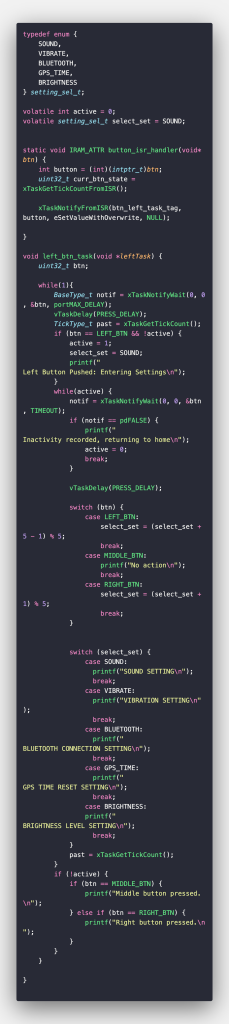
This week, I worked on coding the buttons and menu functionality. At the start of the week, I was troubleshooting issues with the buttons not outputting anything to the serial monitor. I was able to resolve this issue and figured out that there was a baud rate mismatch for the board, and the code set the baud rate.  Then we encountered an issue with the LCD screen not turning on due to the NMOS being flipped, so I wasn’t able to test the button to screen connections with graphics.

Currently, I have written code to output a message in the serial monitor representing different setting menu states, as well as button functions outside the menu (Shown below).

I am currently on schedule in terms of what I wrote for last week’s update.

In the coming week, I hope to get the button to screen functionality working in a temporary capacity until we get to the new PCB. I hope to have full functionality for the RemiGotchi firmware.


Felipe Status Report for 2/14/2026

The main focus of this week was getting ready for the design review presentation approaching next week.  I was selected to give the presentation so I spent a lot of my time this week taking a look at our slides in order to give a well rehearsed presentation.

In addition for the design review I made some decisions regarding what platform the companion app would use and how it would be organized.  The platform I decided on was Flutter, as it contains multiple BLE libraries that have received somewhat recent support which means that should some libraries fail I will have additional options in the Flutter space that will prevent me from having to delete all previous work.  Another advantage of flutter is that is is easy to integrate with vs code and naturally contains a material library with easy to use UI elements.  Unfortunately the dart language does contain some specifications that I will have to learn, but there are plenty of resources online that I can reference in the creation of the necessary app screens.

In terms of scheduling I feel that I am on pace for our current schedule.  Due to the design review I have largely finished my research and design decisions and will be ready to jump into app programming immediately after the presentation and feedback have been gathered.

Future deliverables for this week will be finishing the design review slides and creating the design review document.