
Week of Sep 27
I am writing this progress report a bit early, as I am out of town and offline Fri Oct 2 – Sun Oct 4.
Progress: CAD
I printed the first crawler frame, and did a mock assembly (waiting for heat set inserts, etc to arrive) to test the fit of various components.
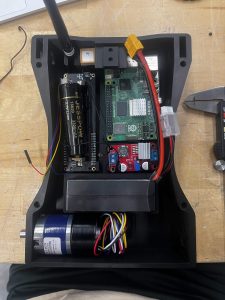
I made the following adjustments after checking fit:
update all heat set insert dimsupdate motor clearance- nub clearance: updated depth
1.5mm -> 2,5mm - shaft clearance: updated ID
8.5mm -> 10mm
- nub clearance: updated depth
increase z clearance for frame- updated
37mm -> 39mm(1mm z clearance)
- updated
add debug port for pi5check csi connector clearance- updated
14mm -> 16.5mm
- updated
check bearing fit with calipers0.24 layer height: 0.4mm undersize- avoid variable layer height
- updated bearing holes
+0.4mm oversize
- updated boost converter mounting dims
- updated drive shaft pressfit:
8mm -> 8.1mm - reworked tbeam mounting
- full disassembly, full screw down
- moved antenna mounting point up
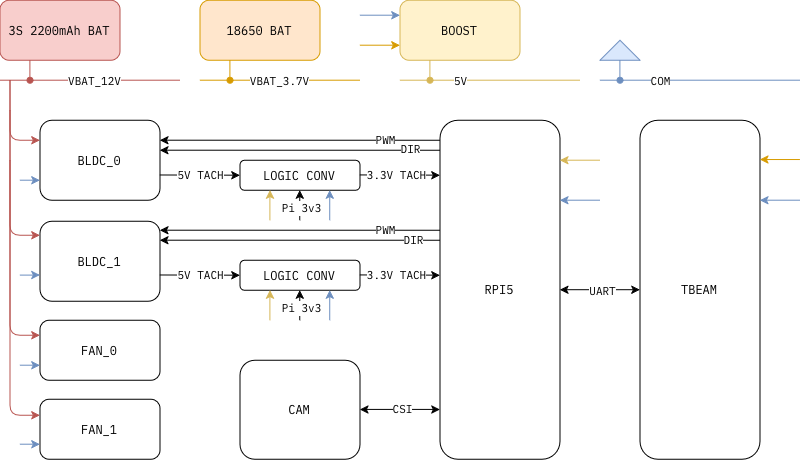
Also, after checking the drive LiPo specs, the max rated temp is 60C, which we could easily hit. I added 20mm intake/outtake fans, and a Pi5 cooling fan. The case cans will be tied directly to the 12v rail.

The final V0 cad looks like this:

Finally, I made a wiring diagram for the V0 build:
Remaining work:
1. Print 1x v0 crawler
2. Assemble 1x v0 crawler
3. Test v0 crawler
4. Add router drop mechanism (electromagnet, solenoid)
Week of Sep 20
Progress: GPS
Continuing work from last week, I validated the GPS on both boards, with LoRa link saturated. This was the final acceptance test for the GPS firmware modifications.
I also added UART support (instead of serial-over-USB) to the modified RNode firmware and tested that with the RPi 0_2. USB for robotics is a personal no-go for me (for reliability purposes), so this is a great change. To test the UART support, I saturated the LoRa air between two nodes, polled the IMU at max frequency, and polled the GPS at max frequency. Over 100s period, UART drop counter was at 0. To achieve the 0 frame drop number, I bumped the baud rate in firmware up to 230400, up from 115200. I first increased it to 460800, but sometimes got UART overrun flag on Pi, so I dropped to non-standard 230400.
I also validated the freshness of IMU readings. Over a 100s period, I polled the hardware at 100hz, and observed source timestamps of 9.996–10.004 ms. This is super consistent.
Remaining work:
1. Characterize if IMU readings are reasonably accurate
Progress: Power
The BLDC motors arrived, and because the documentation was limited, I wasn’t sure about the pinout. I tested and validated the pinout to be:
RED: 12V, BLK: gnd, BLUE: pwm, WHITE: dir of rot, YLW: tach square wave
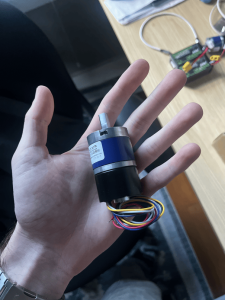
I made a mistake when reading the tach output, and pulled too much current through, which damaged the encoder. I confirmed this on the scope, thge encoder just reads noise now instead of the square pulses. Good to know this mistake now, but a bit of a setback.
I also validated the motors can be powered off the 3S 2.2Ah battery.
Remaining work:
1. Map pulses / gearbox rot
2. Add velocity control to driver
3. Push driver code to main
Progress: SLAM
I rendered some more diverse scenes, there are 7 scenes. Full playlist here:
https://youtube.com/playlist?list=PLF-3LrHYO10c&si=75cfseLHm1imou-5
Scene names:
1. Pine ridge: outdoors, forested, incline
2. Parking garage: indoors, low lighting
3. Warehouse: indoors, mixed lighting
4. Abandoned city: large space, dense urban
5. Forest field: sparse outdoors
6. Classroom: dense indoors, small space
7. Hidden alley: dense urban
In addition, I instrumented all but forest field for online testing. By online testing, I mean running odometery and path planning in the loop (as opposed to the static paths I worked with last week). This does not mean realtime, as rendering a frame is on the order of 5-10s, but I did test the realtime performance of any models/algorithms on the pi5.
Here, I am running ZipDepth at 2 Hz. The depth map is fed into an implementation of Dieter Fox’s Dynamic Window Approach for classical obstacle avoidance. The video shows strong results in this dense visual scene, for both odometry robustness and obstacle avoidance. The odometry algorithm is OpenVINS which runs a mixture of SLAM and optical flow, which are fed with IMU fixes into an EKF.
This setup allows to:
1. Test odometry algorithms on dynamically generated paths, various scenes
2. Test obstacle avoidance algorithms on realistic scenes
Week of Sep 13
Progress: GPS
I modified the RNode firmware , which is an open source ESP32 firmware that drives various LoRa radio hardware. This is the firmware I previously had flashed onto our TBeam Supreme radios.
The new firmware fork supports the following additions:
1. GPS fixes @ 1Hz
2. IMU fixes @ 100Hz
3. UART to host linux device (instead of only serial-over-USB)
I then tested this firmware, using my phone as a ‘ground truth’ GPS device. I moved in a unique pattern, at approx 2m/s continuously on Gesling stadium. Here, the pattern is ‘BEN’ (N gets cut off part way through). TBeam GPS fixes are in red, phone fixes are in blue. I also disabled cellular on the phone to give a more apples-apples comparison.

I also tried the GPS in a more occluded urban area (behind techspark, severe occlusion from Scaife, Hamerschlag, Ansys). And found high GPS drift (up to 20m). I compared the GPS satellite count, and the Gesling setting both established the minimum lock faster (>8 satellites in under 5s), and a higher steady state satellite count (~14 satellites). This indicates that even in outdoor settings, we may not be able to fully rely on GPS for localization. We should fuse with SLAM and IMU to generate more robust localization.
Remaining work:
1. Flash other board with GPS firmware
2. Test GPS firmware under LoRa saturated, to ensure the serial link has sufficient bandwidth
3. Characterize if IMU readings are reasonably accurate
Progress: Power
I soldered the headers onto both the RPi Zero 2 W and the TBeam Supreme. The Tbeam Supreme has a built in slot for 18650 3.7V battery. I used a DC voltage booster to boost VBAT to 5V, and that 5V rail powers the Pi.
Remaining work:
1. Test this for Pi5 under load
2. Test battery life
Progress: SLAM
I generated some synthetic videos to help us iterate on SLAM faster, without needing hardware. These videos are rendered in Blender, on 8×2080 over 12 hours. Rendered videos:
These videos are rendered at 60fps, 120s length. They contain traversal, rotation, and pauses. There is also mocked vibration and terrain change. The output of the rendering step is both the video, and the ground truth robot pose. Camera parameters were aligned to our target camera which is 120deg, grayscale, global shutter, 1280×800 or 640×400 at ~140fps. Source asset packs:
https://download.blender.org/demo/test/classroom.zip
https://dl.polyhaven.org/file/ph-assets/Scenes/hidden_alley.zip
https://dl.polyhaven.org/file/ph-assets/Scenes/the_shed.zip
https://www.blendkit.com/asset-gallery-detail/665e2d80-6e77-403f-a84d-704934de982d/
Then, I used these videos to run realtime vSLAM (no synthetic IMU data), using the OV2SLAM and ORB3-SLAM monocular vSLAM libraries. This ran on a Radxa Rock5C, 8GB memory cap, pinned to only 4 cores as a proxy for Pi5 performance. I swept a variety of parameters, including but not limited to:
1. source framerate: 15, 30, 60fps
2. source resolution: 640×400, 1280×800
3. scene: forrest field, hidden alley, classroom
4. native knobs for each library
Results are detailed, so I won’t enumerate them here. Still thinking on the takeaways and iterating. For the compute side, it fits easily on 4 cores, with a peak memory usage of < 1GB. As the map grows, the memory usage might increase, but with > 4GB we have tons of headroom.
Remaining work:
1. Render more diverse scenes
2. Render scenes with limited loop closure, higher velocites
3. Test more parameters and libraries. Explore gauss splat or learned visual odometry strategies
4. Transfer to real hardware and run in-domain testing
Progress: Crawler CAD
CAD is mostly drafted, as well as the associated BOM. The Crawler uses two BLDC motors, a 3S 2200mAh drive battery, and a 18650 compute battery. It is a skid-steer setup, with a unibody frame.

Remaining work:
1. Finish up top plate to enclose wires
2. General CAD finish-up
3. Print and assemble first Crawler
4. Test crawler