Tedd’s Status Report – 12/6

This week was pretty hectic. Early this week, we had our final presentation, where we presented our final designs and finishing touches on our project. However, we ran into a few issues with some parts, causing us to find alternatives specifically in the firmware. The software components stayed the same and there is still consistency for that portion. However, we have a lot of wires and still need to get servos to get fully working.

A large part of this week was implementing the reset mechanism. With a transparent plate as our reset plate and with two linear actuators, we were able to fully implement this on our pin board, allowing us to automatically reset the pin board when the image is created.

The finishing touches on our product will just be gluing more dowels and wiring the servo motors and finally integrating all the subsystems before the final demos on Monday.

Tedd’s Status Report – 11/22

This week, I worked on designing the reset mechanism system and gathering all the moving parts that would feed into the system. In addition to refining this subsystem, I began integrating a Raspberry Pi as the primary controller for communicating with the STM32 via UART. The goal of this setup is to reliably transmit the full 32×32 pin array data, ensuring low-latency, error-tolerant communication between the two devices.

To move toward this, I configured the UART interface on both the Raspberry Pi and STM32 and started developing a structured data-packet format to handle the larger pin-array payloads. Looking ahead, I am planning to build a GUI system on the Raspberry Pi to make the user interface cleaner, more intuitive, and maintainable. This GUI will eventually allow users to interact with the depth camera more intuitively and  edit and send the 32×32 pin configurations seamlessly. It would also ideally control the reset mechanism as well.

This Thanksgiving break, I am planning on working on the presentation slides as well.

Tedd’s Status Report – 11/8

This week, I worked on getting the Raspberry Pi script done for the depth camera and the csv output. However, upon setting up the Raspberry Pi, I realized that it is actually faulty. As a result, we will be using my Intel NUC for the time being, just so that we have something to demo on for this week.

The script works well and prompts the depth camera when run, but I suspect that there is an issue with the camera because it is not able to pick up important facial features and details that other cameras should be able to pick up. We suspect that it may be a problem with the Intel Realsense camera and are hoping to find an alternative or purchase another one. It is important for us to be able to have a camera that can pick up small details because our picture will ultimately be downsampled, so if we are already at a disadvantage with our camera quality, we will be at a bigger disadvantage when it comes to our image output on the pin board.

Regardless, I am still able to run the script on the NUC, and it works well. All we need to get done is figure out a way to send the CSV file to the STM32 for further computation and ultimately allow us to push the pins out.

Tedd’s Status Report – 11/1

This week, I continued to work on getting the script that I created onto the Raspberry Pi that we acquired for our project. I outlined the steps we need to get this to work. First, I need to install all the required dependencies. Then, I would need to copy the script and data into the Raspberry Pi. Next, I would need to run the Raspberry Pi with a display, and then finally save the CSV so that it could be used for the drivers. This is a very simplified process of what I am currently working on.

The next steps after this to to work with Crystal and Safiya to start getting all the parts working together for our demo. In order to do this, I would need to coordinate with Crystal to make sure all the drivers are working properly, and Safiya to make sure that our design requirements are met and the system is built properly.

Tedd’s Status Report – 10/25

This week, I continued developing the depth visualization pipeline using data from the Intel RealSense camera. Building on the preliminary script, I refined the depth-to-plot conversion process to improve the accuracy and consistency of the pin actuation map. I also explored adjustments to the camera’s resolution and filtering parameters, which may lead to noticeably better definition for complex shapes, but it is still a work in progress.

In addition to improving image quality, I began automating parts of the workflow so that depth data can be processed and plotted with minimal manual input. This will streamline testing and make it easier to integrate real-time data processing in future iterations. Overall, the updated system is moving towards a more clearer visual output.

Tedd’s Status Report – 10/18

This week I worked on getting a visible plot from depth coordinates provided by the Intel Realsense. With my preliminary python script, I was able to run OpenCV and matplotlib to get a pretty good output of which pins should be actuated and the distances that each pin should be actuated. Here are a few examples below:

As you can see, the depth camera was pretty accurate and is able to capture simple objects and display them pixelated on a plot. However, I realized that more complex objects like faces are not well translated onto the plot. I might have to fix up the resolution of the depth camera and see if that could help us get better results. For now, this is a preliminary script and it seems to be working well. I will automate this process in the future as well.


Tedd’s Status Report – 10/4

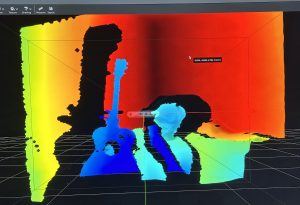
This week, I started working on getting the Intel Realsense camera to work. While we were anticipating on using the Oak-D cameras, we realized that other teams have checked out the cameras already, leaving us with the Realsense camera. There is nothing wrong with the Realsense camera, but we found out that it wasn’t fully compatible with Macs. However, I have an Intel NUC that runs on Ubuntu 24.04, so there is no huge issue. After downloading the necessary libraries, I was able to run the realsense application and turn on the camera. The image below displays a heightmap of me sitting on a chair holding a guitar:

The next step after this is to actually get a good depthmap for different shapes and see if I can convert them into actual measurements.

Tedd’s Status Report – 9/27

This week, we made sure to get the design presentation down. We broke down the design presentation into different parts, and for the presentation, I took the use-case requirements and the testing and verification portion. We also took feedback from other groups from our proposal presentation, and realized that we need to add more numbers and be more thorough in our explanation. This week I also looked into the Intel Realsense, but realized that it is not fully compatible with Macs. So I will be waiting for the Oak-d Pro to be lent to us as it is fully compatible with Macs.

Tedd’s Status Report – 9/20

This week, I looked at the various computer vision libraries that were compatible with our project. I am not sure which depth camera we will be using, so I am assuming that we will be using the Intel Realsense camera. Right now, we are tasked to work on the design of our product, which means that we will need to look over all our design choices for the gantry and the actuators. I looked into which computer vision libraries may be useful for our project, which will include the height map as well. Right now I think we are right on schedule.