Corin’s Status Report for 11/1

Accomplishments

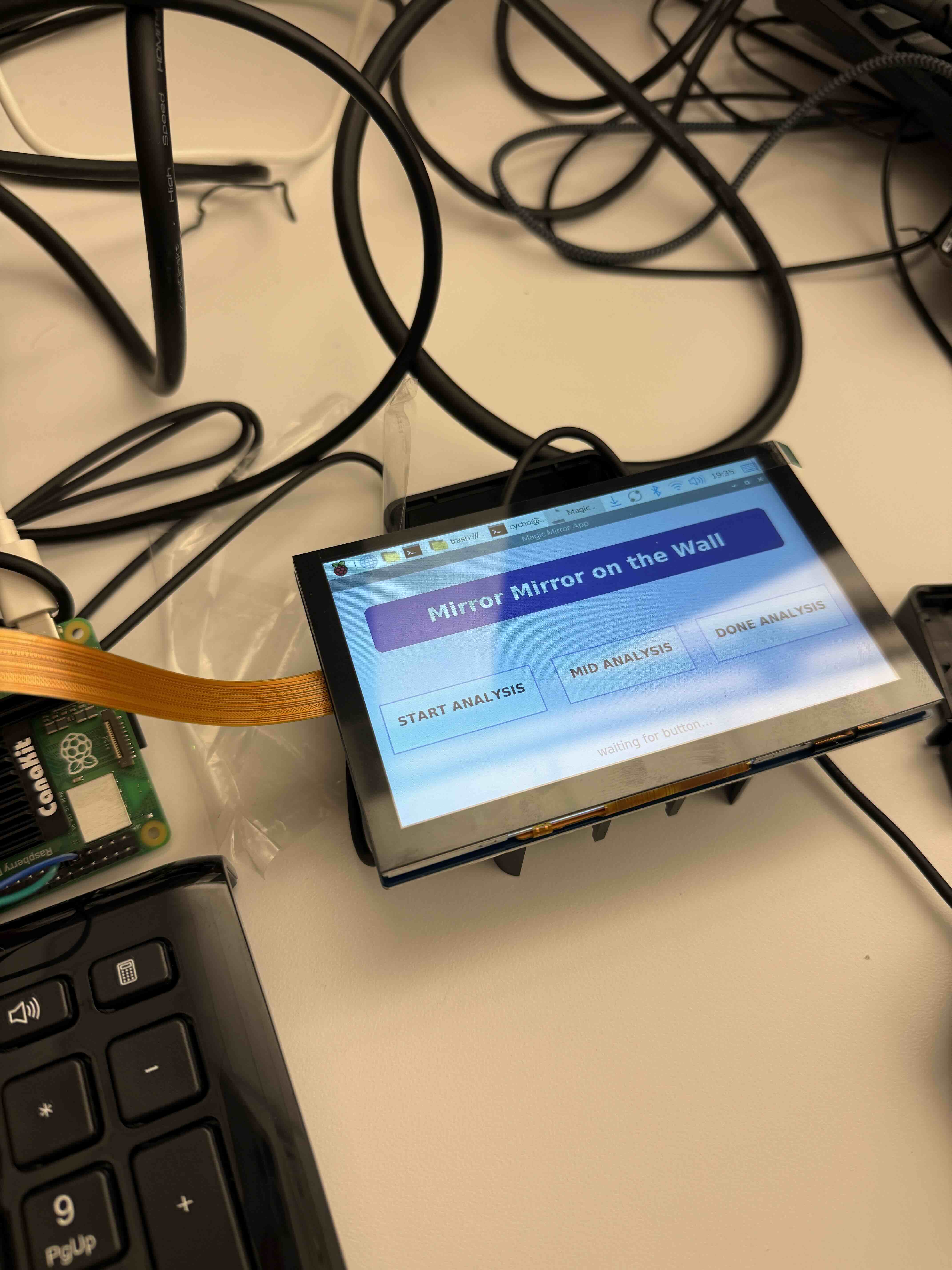
This week, all of our parts arrived on Thursday.  I connected the screen display to the RPI, so that we can see the mockup app on the display. I also connected two buttons(since we cannot touch the screen behind the mirror film), one to start the analysis and one to view the results of the analysis.  I continued working on the mock app, and included a view trend page that includes a chart based on a mock json file of the results of the analysis. I also checked that the screen was bright enough to be seen through our mirror film and that the user can also see themselves pretty well if we have a dark surface behind the mirror film. Siena and I wanted to work on combining the camera with our mirror app/button, such that when the button is pressed, the camera takes a picture and the user is notified that their analysis has begun. However, we had some problems working with the new camera, so we will have to continue working on it next week.

Schedule

I am mostly on schedule. Next week, I will need to work with both Isaiah and Siena to integrate the basics of the whole system for the demo. The goal is to at least have button –> camera snap —> model start —> model out —> results shown on the app.

Deliverables

The demo is next week, so our group wants to connect at least the functional parts together. We want a camera input, buttons to control the most basic start/view results, and an app to show our users our analysis.

Although the physical mirror is unavailable, we want the skeleton to be put together.


Team Status Report for 11/1

  • What are the most significant risks that could jeopardize the success of the project? How are these risks being managed? What contingency plans are ready?

This week all of our parts arrived! We have progress in most of our subcomponents, but because our parts arrived on Thursday, we didn’t have too much time to integrate all of our subcomponents. As we transfer our parts one by one, we are expecting a lot of hurdles in putting everything together.  Siena was working with another camera before our actual camera arrived, and there was already a problem with the new camera that we didn’t encounter in our old camera. This is preventing us from connecting it to the rest of the hardware (buttons and the screen with the mock app).

We also need to start combining all of our mock setups with the actual data input/output from our camera and the ML model. During this process,  we will need a lot of communication/trial and error, since we expect various compatibility issues with our mock data formats and actual outputs from the camera and ML model.

Isaiah is done training the models for the majority of our classes. Since most of our subcomponents are done, we aim to mitigate the risks that comes with integration by working together next week to connect everything  – the camera inputs to the model and the model outputs to the display (app).

  • Were any changes made to the existing design of the system (requirements, block diagram, system spec, etc)? Why was this change necessary, what costs does the change incur, and how will these costs be mitigated going forward?

No changes were made to our existing design requirements. We just received all of our parts, and after checking them out and testing on a few components, we think it’ll be sufficient with our existing design.

  • Provide an updated schedule if changes have occurred.

The schedule didn’t change except that the hardware buildup/testing is going for a week longer (until the mid-demo) because our parts arrived later than expected. everything else will remain the same.

link to schedule: https://docs.google.com/spreadsheets/d/1g4gA2RO7tzUqziKFuRLqA6cGWfeL0QYdg5ozW9hug74/edit?usp=sharing

Siena’s Status Report for 11/1

Accomplishments

Mid-week, we finally received our parts and could begin working on our project. However, I had a lot of problem setting up the new camera. I tried following the guidance on the website, watching youtube tutorials, reading through documentation, and more. However, nothing seemed to work. I spent most of the week debugging, but couldn’t get it working. I’m planning on asking the TAs on Monday.

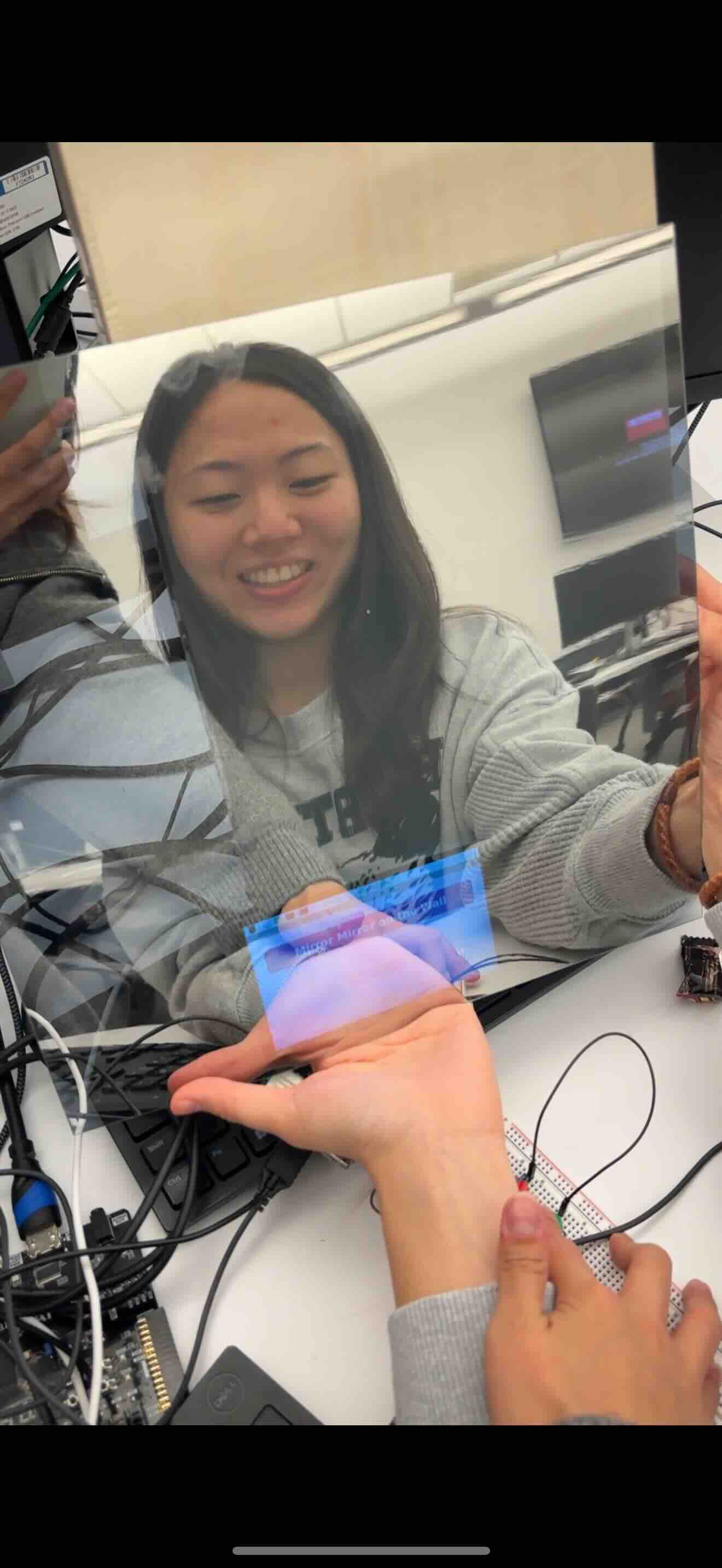
Because I couldn’t make much progress with the camera, I helped Corin with bringing up the LCD. I mostly worked on the connection while Corin was working on our system app. Whilst working, we took a short video showing how the LCD would show through the two-way mirror. The “two-way” of the mirror worked well, but we are a little concerned with the “mirror” functionality as the color is a little bit distorted. 


Schedule

We are currently on schedule. 

Next Week

I hope to get the camera working early next week. Afterwards, I want to work on the actual integration with the ML model that Isaiah has been working on. I expect to be able to have some kind of analysis result by the end of next week.

Additionally, I hope to talk to one of the advisors to move forward in the user study approval process.

Team Status Report for 10/25

  • What are the most significant risks that could jeopardize the success of the project? How are these risks being managed? What contingency plans are ready?

Our most significant risk for hardware persists from last week: our parts are still not here. However, through some snooping, we were able to find a few replacement parts available on campus (for example, a Camera Module 3 and a button). We have started working with them this week, but how we bring up the parts we ordered and some APIs may differ. This is now our greatest concern in terms of our hardware progress. To mitigate this challenge, we have been looking into the differences between our temporary replacement parts and our desired ones and finding their counterpart functions and more scalable interactions between the software. 

The most significant risk in software persists as well, the accuracy of the models. Similarly, the contingency plans involve gathering more data as explained in the design report/previous status reports. Additionally, if the sunburn model becomes exceedingly difficult to train effectively, this could cause the problem to get off schedule. The contingency plan mainly involves going back to gathering more data, but if that doesn’t solve the problem, then re-reviewing existing solutions and directly implementing them would follow.

  • Were any changes made to the existing design of the system (requirements, block diagram, system spec, etc)? Why was this change necessary, what costs does the change incur, and how will these costs be mitigated going forward?

No changes were made to our existing design in terms of hardware. 

We have been sticking to our plan this week!

  • Provide an updated schedule if changes have occurred.

No change in schedule!


Siena’s Status Report for 10/25

Accomplishments

Unfortunately, our parts are still not here 🙁 I’ve been trying to find ways around this, and I have started working with a different camera (Camera Module 3). Although the process and the API might be a little different, I was still able to bring up the camera. Through this, our team was able to discuss ways how we will actually interface with our system’s app. We are still trying out different methodologies to find one that works best for us. 

I also put in orders for now our exterior of our project (wood and two-way mirror glass) and other tools we need to put it together. 

Last but not least, I’ve been communicating with the IRB Review. After explaining our capstone project and the purpose of our user study, they have sent us a checklist to work through with our advisor. I have worked through the checklist and am now waiting for our next week’s meeting where we can get the advisor approval. 

Course-Related Student Project Checklist – 1-4-22 – FINAL

Schedule

After we have altered the schedule last week, I think we are currently on track. 

Deliverables

Next week, I hope we can run our ML model with the inputs from the camera (it’ll be even better if we can work on this with the camera that we ordered, which has higher resolution), have it interface with memory, and collect some results on the analysis. 

Team Status Report for 10/18

What are the most significant risks that could jeopardize the success of the project? How are these risks being managed? What contingency plans are ready?

Our current biggest risk is that the parts that we have ordered did not arrive. We have been stuck in this position for a while, so while the software has been making progress, our hardware aspect has not yet started yet. We checked in with our TA for our orders. In order to mitigate this situation, we have looked through a lot of resources and planned an even more thorough implementation for our hardware. Ideally, we’ll be able to bring up and connect them to the software and work as intended without much challenges in between. Additionally, another biggest risk is with our actual structure of the mirror. To account for our inexperience in this area, we have put in an order for a larger quantity of woodsheets so we have room for error. 

As for software, the biggest risk is still the performance of the remaining two models. The acne detection model is working well on the dataset. Likely, the largest risk is within the sunburn detection model. Increased data gain via scraping detailed in the report is likely the strongest risk management. 

Were any changes made to the existing design of the system (requirements, block diagram, system spec, etc)? Why was this change necessary, what costs does the change incur, and how will these costs be mitigated going forward?

While making concrete plans for our design report, we have decided to add more buttons. This was necessary as our LCD will sit behind and mirror and will not have a touchable screen. These added buttons will help the user navigate our Magic MIrror App. Because buttons are cheap and are easily workable through GPIO, we don’t expect much added challenge. In the case where the user studies feedback details that buttons are hard to use, we may consider installing the LCD in front of the mirror (touchable screen). 

Provide an updated schedule if changes have occurred.

We changed our schedule on the implementation and testing side – our orders are coming in a bit late, and we realized that we need more time to integrate all the software/hardware components. We decided to shorten the user study by a week (we think this is reasonable since getting approved by the IRB will also take time).

link to our schedule 

Part A: written by Isaiah

Our project is designed around analyzing skin, and suggesting products to help improve skin health. There are multiple components to the project that require sensitivity to global considerations for the resulting product to be truly effective and accessible for a wide range of people. Beyond just skin tone, different environmental conditions such as average temperature and humidity of a region can shift. As an extreme case, the level of skin moisture that’s common and healthy in tropical regions might not be the same in mountainous or subarctic climates. Typical tips and tricks used to identify skin conditions that are popular in one climate or for one group of people might not be reliable for another. Our product allows for an algorithmic solution for analysing skin that’s trained and tested on a large variety of skin types, allowing for accurate analysis with a greater trend towards global invariance. Furthermore, in detailing generic products and product combinations, users can make use of the product recommendations, where specific brands might not be available in some regions of the world.

Part B: written by Corin

For any technology that requires personal data collection, many cultures, including the American culture, take privacy and trust very seriously. Privacy is often tied to personal rights, and there’s a cultural implication that personal information should be protected (laws for medical privacy, student records, etc. exemplify that). People generally expect transparency when it comes to how their information is collected, used, and shared. Mirror Mirror on the Wall focuses a lot on this privacy aspect, ensuring that all image processing is done on a raspberry pi locally. We intentionally made this design choice so that our user can trust that his/her data will be kept private and can comfortably use a product that collects sensitive personal data. 

Part C: written by Siena

Mirror Mirror on the Wall’s initiative is primarily focused on analysis of skin care and has no direct ties with environmental factors. However, we have considered environmental impacts in our design to offer sustainable use of resources. Through the use of a Raspberry Pi 5, an energy-efficient embedded system, and making all machine learning inference locally inside the device instead of relying on cloud servers, our system circumvents network-based carbon emissions. Although the physical components of the mirror (LCD, camera, case, etc) must have electronic materials as part of them, our design encourages durability, modularity, and reuse, such that individual components are repairable or replaceable without scrapping the entire system. While the system never has a direct interaction with natural ecosystems or biological systems, its impact on the environment is reduced indirectly through employing sustainable hardware options and power conservation. 


Siena’s Status Report for 10/4

Accomplishments

This week, I worked on building our parts list from our discussion based off of our design review slides from last week. Our group had already ordered a RPi 5 from the inventory, so we ordered additional components like our camera, LCD, LEDs, and more. Aside from parts, I was messing around with the RPi we picked up. Although there wasn’t much that I could do without the rest of our parts, I did extensive research as to how we will integrate the camera and buttons. Here are the main resources for setup, and I have also created an initial code based off of them to take a picture when a button is pressed. It has not been tested yet, but I will do that when everything gets here. 

Parts Status:

Resources for buttons for control: https://gpiozero.readthedocs.io/en/stable/recipes.html#button

Resources for camera setup: https://docs.arducam.com/Raspberry-Pi-Camera/Native-camera/16MP-IMX519/#products-list 

Schedule

For week 6, we are on schedule. We have ordered all the parts that we need in order to proceed with our projects, and I have looked into different ways that I can bring up the camera and button, as well as how they communicate with each other and integrate through the RPi.

Next Week

In the next week, I think our group’s greatest concern is finishing up our design review documents. On a personal level, I wish to be able to bring up the camera and control it with buttons when the parts get here.


Team Status Report for 10/4

  • What are the most significant risks that could jeopardize the success of the project? How are these risks being managed? What contingency plans are ready?

The most significant risks haven’t changed since last week: it is still making sure our user design is intuitive, and our models are accurate.  We developed our physical design a bit more this week, and we discussed what the general flow of the Magic Mirror app should be to ensure ease of use.

In terms of hardware risk, the integration between the new IMX519 camera and the Raspberry Pi 5 introduces potential driver and compatibility challenges. To manage this, we’ve already researched and documented how to bring up the camera using the new picamera2 and libcamera stack. If hardware communication issues arise, our fallback plan is to test using a standard Pi camera first to validate the GPIO and control flow before reintroducing the IMX519. This ensures we can continue development on schedule even if certain hardware components take longer to configure.

  • Were any changes made to the existing design of the system (requirements, block diagram, system spec, etc)? Why was this change necessary, what costs does the change incur, and how will these costs be mitigated going forward

One of the only significant changes was adding more buttons to the system for better system control/user experience. We initially decided on having only one button, but as we planned out the app, we realized that navigating it with only one button would be confusing and inconvenient. We have many open GPIO pins on the RPi, and the buttons are still cheap, so this would mainly just affect our physical structure design.

  • Provide an updated schedule if changes have occurred.

No changes to the schedule as of now.

Corin’s Status Report for 10/4

What did you personally accomplish this week on the project?

This week, our team put in the orders for most of our design parts.

In terms of personal accomplishment, the progress was a bit slower because we took longer to put in our order. Instead of focusing on connecting the physical components, I started looking into constructing the recommender system and the on system app for the user interface. With siena’s list of skin care products and the outputted classification/confidence from Isaiah’s ml work, I started working on the recommender system.

I also looked into creating our on system app to display on the mirror. Both the recommender system and the on system app are in progress, but I hope to be able to have a mock display by next week.

I also thought it would be best to modify our CAD next week when we do get all our components and finalize our physical design.

Finally, we also spent time drafting our design report and working on the diagrams that will be added to our report.

Is your progress on schedule or behind?

My progress is slightly behind because we didn’t receive the parts except the camera and the board. However, because we are using a touch screen instead of the SPI LCD, we don’t need to spend much time on the communication between the RPI and the LCD but need to focus on creating the on-system app. This can be done without the LCD. I wouldn’t say we’re too behind, we just changed our schedule to focus on a different side of the project.

What deliverables do you hope to complete in the next week?

I would like to have code running for the recommendation system and to see if I can create a small mock app for our LCD. 

Corin’s Status Report for 9/27

What did you personally accomplish this week on the project?

This week, I mainly worked with the team to complete our overarching design. In the beginning of the week, all of us decided on using a RPI 5 as our main SBC board and realized that we wouldn’t need additional microcontrollers or accelerators for now. We decided that the RPI camera module 3 and the RPI 5 inch touch screen display would be best compatible with our RPI while satisfying the necessary requirements (size/resolution). Both Siena and I worked on planning out how all the different hardware components will be laid out. I also created a CAD model of our physical design, planning out the dimensions of the actual mirror (12inch * 8inch) and placing the camera, touch screen display, and RPI in positions such that all necessary connections can be made.

Is your progress on schedule or behind?

My progress is on schedule. Last week, I mentioned that I want to focus on the LCD display because I thought we might be using an LCD display connected via GPIO + a communication protocol like i2c. Since our group decided on a touch screen display connected via HDMI (micro HDMI), we don’t need to worry about the pinout or a separate communication protocol. However, we will have to think about launching an app on our RPI that will be displayed on our screen.

What deliverables do you hope to complete in the next week?

For next week, I would like to modify the CAD design to a more detailed level after receiving all of our parts. I would also like to connect the camera and LCD display to the RPI and test the input/output of the images to the processor and processor data to LCD display (although the latter I think might take more than a week to set up the app).