Team Status Report for 12/6

Risks

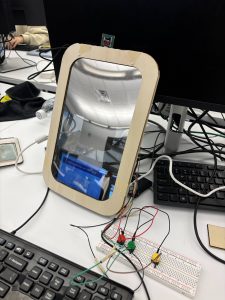
After user testing, the most feedback we’ve gotten was the difficulty with the touchscreen interface. Even when the user pressed a button, our system’s app would not register it properly. To mitigate this, we made our essential buttons/controls larger so that it is easier to press. 

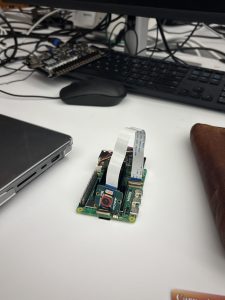
We also had a lot of difficulty integrating the camera (it started throwing bugs after we switched the display). We fixed the problem by switching the camera port (for some reason, the original port threw errors for autofocus). We’re not sure why switching the port fixed the problem, but if we had to build the system again, these minor bugs are potential risks.

We also realized that during demo, where the mirror would sit affects user orientation. To make sure we don’t face difficulties on demo day, we will test it in the room we’ll have our demo in (somewhere in 1200 wing). 

Changes

As we are approaching the end, we did not make any changes in our system expect for sizing of some buttons. 

Schedule

No changes to the schedule! Our project has been finalized 🙂

Siena’s Status Report for 12/6

Accomplishments

Early this week, I used the new LCD (bigger size) and adjusted our system app’s UI so that everything is centered. Then, we conducted user study with 5 people in addition to all 3 of our group members (8 total). 

After each user ran through 5 sessions, we received feedback about our UI as well as how helpful they thought the product was. We made changes accordingly, mostly with the UI (positional feedback and making buttons/scroll bars larger so its easier to press).

Schedule

We are on schedule! Waiting to set up our demo. 

Next Week

Our team will work on the video and the final report. 

Siena’s Status Report for 11/22

Accomplishments

This week, I worked on integrating the face detection model. After Isaiah has laid out the baseline, I fully integrated it fully so that it is compatible with the rest of the code. Our models yield more accurate results. I also worked on integrated the wrinkle model and adding our recommendations based on the top two most severe analysis. 

Finally, we worked on threading. Our 4 ML models now don’t run sequentially, but take advantage of the 4 cores on our RPi. The following is the average result:

oil: 0.3083 s

acne: 0.4713 s

burn: 1.5153 s

wrinkle: 0.3870 s

—————————

total: 1.5167 s

It seems like the bottleneck is our burn model. 

Schedule
Right now, we’re behind in terms of the physical build because we changed our design. We plan on finishing this early next week so we can start our user study the week after Thanksgiving. 

Next Week

I hope we can put together the physical model before we leave for break. 

Siena’s Status Report for 11/15

Accomplishments

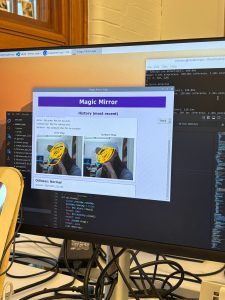
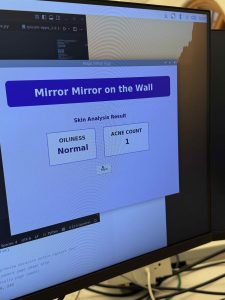
This week, Corin and I worked on further developing our system app. First, we clearly defined what we want to output to the users for each of the four categories we have. This analysis output is now stored, and up to 5 of the most recent results are showed on our new “View History” page. 

Corin and I also added LEDs to our interim setup. After testing it, we found that it gave more accurate results like expected. 

Last but not least, I was involved in discussions about altering our physical setup after the feedback our team got after the demo. 

Schedule

Mostly on track, a little bit behind because we may need to do another iterations of our physical design.

Next Week

I hope our team can finish our iteration after feedback and make a refined physical model. I also want to work on actually adding the recommendation system. 

Team Status Report for 11/8

Risks and Mitigations

This week, we worked on integration and put together a mock mirror for our interim demo. Through this process and by testing the integrated model, we noticed a few challenges. 

  • Reflection – The quality of our “mirror” functionality is low. We plan to address this by adding a black background directly behind the two way mirror (in areas excluding our LCD, of course).
  • Lighting – Lighting heavily impacts our analysis results. We have yet to install the LED lights discussion in our design report, so adding that will help us get more accurate results. 
  • Rounded cornet design – The plywoods we currently have don’t bend well, making it difficult for us to fill the edges of our casing. We plan to look into a different material for this. However, it would also be fine to have 90 degree corners instead of the rounded ones as it will just affect the appearance of the mirror, not the functionality.


Design Changes

After testing the mirror, we decided to add a preview feature before a picture is taken so the user gets more feedback from the system. It reduces confusion on the user’s end as they don’t have to guess about whether they are in frame or not. However, this won’t affect other aspects of our design. 

Schedule

No change to schedule! We are on track 🙂 

Siena’s Status Report for 11/8

Accomplishments

This week, we actually began integration. Our group members worked together most of the time, but I concentrated on connecting the camera inputs to the system’s app, showing the preview of the camera before taking the picture, saving the picture, and passing the picture taken to the ML models that Isaiah has made. There were a few hiccups in the environment setup and actually making it support both the camera and the ML model.  However, all were resolved. 

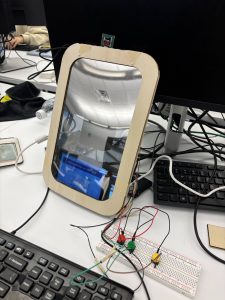
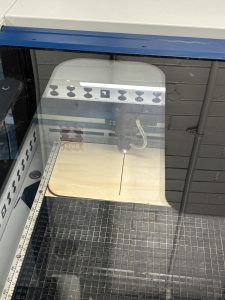
In addition, Corin and I laser cut the plywoods and made a mock setup for our interim demo. The both of us also refined the system app together for a more pleasant user interface. 

Schedule

We are currently on schedule!

Next Week

I hope to now integrate the recommender system, as now we are able to extract and display the outputs from our analysis. 

Siena’s Status Report for 11/1

Accomplishments

Mid-week, we finally received our parts and could begin working on our project. However, I had a lot of problem setting up the new camera. I tried following the guidance on the website, watching youtube tutorials, reading through documentation, and more. However, nothing seemed to work. I spent most of the week debugging, but couldn’t get it working. I’m planning on asking the TAs on Monday.

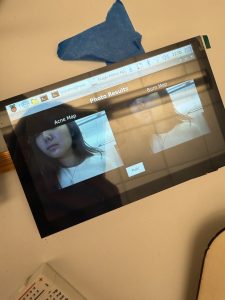
Because I couldn’t make much progress with the camera, I helped Corin with bringing up the LCD. I mostly worked on the connection while Corin was working on our system app. Whilst working, we took a short video showing how the LCD would show through the two-way mirror. The “two-way” of the mirror worked well, but we are a little concerned with the “mirror” functionality as the color is a little bit distorted. 


Schedule

We are currently on schedule. 

Next Week

I hope to get the camera working early next week. Afterwards, I want to work on the actual integration with the ML model that Isaiah has been working on. I expect to be able to have some kind of analysis result by the end of next week.

Additionally, I hope to talk to one of the advisors to move forward in the user study approval process.

Siena’s Status Report for 10/25

Accomplishments

Unfortunately, our parts are still not here 🙁 I’ve been trying to find ways around this, and I have started working with a different camera (Camera Module 3). Although the process and the API might be a little different, I was still able to bring up the camera. Through this, our team was able to discuss ways how we will actually interface with our system’s app. We are still trying out different methodologies to find one that works best for us. 

I also put in orders for now our exterior of our project (wood and two-way mirror glass) and other tools we need to put it together. 

Last but not least, I’ve been communicating with the IRB Review. After explaining our capstone project and the purpose of our user study, they have sent us a checklist to work through with our advisor. I have worked through the checklist and am now waiting for our next week’s meeting where we can get the advisor approval. 

Course-Related Student Project Checklist – 1-4-22 – FINAL

Schedule

After we have altered the schedule last week, I think we are currently on track. 

Deliverables

Next week, I hope we can run our ML model with the inputs from the camera (it’ll be even better if we can work on this with the camera that we ordered, which has higher resolution), have it interface with memory, and collect some results on the analysis. 

Siena’s Status Report for 10/18

Accomplishments
At the start of the week, our team divided the design report into sections. My part was specifically on system architecture, implementation, project management, risk mitigation, and summary (please refer to the corresponding sections of our design report). While we had big ideas in place, I realized that we needed more concrete plans when actually writing the report. I thus refined our hardware architecture/implementation diagrams, defined how our button controls were going to work, and detailed the hardware-software as well as peripheral interface. In addition, by following the CAD model, I added more products to our parts list.

Our parts didn’t arrive yet, but I started working with the RPi camera module for now. I discussed with Isaiah on the methods we want to use to pass the frames to the software side (function call, direct software management, etc).

I also reached out to the IRB office, explaining our plans for our user study and what processes we need to go through in order to get it approved. The email is included below.

Schedule
Unfortunately, we are currently behind schedule. Our parts are not here, and this has been our bottleneck since the last week. We are discussing plans to cut down the time reserved for our user study from 2 weeks to 1. This way, we’ll have another week to actually work on our product.

Deliverables
Hopefully by next week, our parts would be here. My goal would be to have the camera working and feeding in correctly to our Magic Mirror app.

Siena’s Status Report for 10/4

Accomplishments

This week, I worked on building our parts list from our discussion based off of our design review slides from last week. Our group had already ordered a RPi 5 from the inventory, so we ordered additional components like our camera, LCD, LEDs, and more. Aside from parts, I was messing around with the RPi we picked up. Although there wasn’t much that I could do without the rest of our parts, I did extensive research as to how we will integrate the camera and buttons. Here are the main resources for setup, and I have also created an initial code based off of them to take a picture when a button is pressed. It has not been tested yet, but I will do that when everything gets here. 

Parts Status:

Resources for buttons for control: https://gpiozero.readthedocs.io/en/stable/recipes.html#button

Resources for camera setup: https://docs.arducam.com/Raspberry-Pi-Camera/Native-camera/16MP-IMX519/#products-list 

Schedule

For week 6, we are on schedule. We have ordered all the parts that we need in order to proceed with our projects, and I have looked into different ways that I can bring up the camera and button, as well as how they communicate with each other and integrate through the RPi.

Next Week

In the next week, I think our group’s greatest concern is finishing up our design review documents. On a personal level, I wish to be able to bring up the camera and control it with buttons when the parts get here.